How to capture realsense RGB+IRs raw images.
Hi,
I am trying to capture RGB and Left/Right IR images from realsense D415. I need RAW images before any calibration/rectification applied to the images. I was wondering what is the best way to do that through pyrealsense?
Any sample code will be appreciated!
-
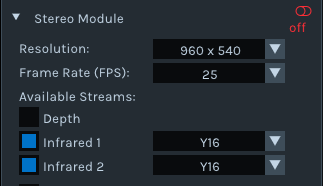
Hi Saeid. In regard to obtaining unrectified left and right infrared, it may be easiest to use the Y16 format, as it is unrectified because it is used for camera calibration. Y16 can use 1280x800 at 15 and 25 FPS, and the Depth stream should not be enabled when streaming Y16 infrared.
The link below provides further information.
The link below provides a Python script for retrieving left and right infrared images that you could adapt.
https://github.com/IntelRealSense/librealsense/issues/3878#issuecomment-569550710
Whilst this link discusses accessing raw RGB frames with Python and OpenCV:
-
Hi MartyG , Thanks for your reply. I tried the python script you pointed out and modified it as follows to capture Y16, 1280x800 at 15 FPS:
import pyrealsense2 as rs

cntx = rs.context()
device = cntx.devices[0]
serial_number = device.get_info(rs.camera_info.serial_number)
config = rs.config()
config.enable_device(serial_number)

config.disable_stream(rs.stream.depth)
config.enable_stream(rs.stream.infrared, 1, 1280,800, rs.format.y16, 15)
config.enable_stream(rs.stream.infrared, 2, 1280,800, rs.format.y16, 15)

pipeline = rs.pipeline()
profile = pipeline.start(config)
Which results in this error:
 profile = pipeline.start(config)
RuntimeError: Couldn't resolve requests
I tried it with FPS 25 too and it results in the same error but it works with the original script's settings.
-
The script looks fine. I assume that you have an import pyrealsense2 as rs instruction on the first line.
Could you confirm whether your camera is on a USB 3 connection please? You can do this by launching the RealSense Viewer program and looking at the number beside the camera name in the options side-panel. If the number is '2.1' then it is a USB 2 connection, and if the number is '3.2' then it is a USB 3 connection, because that mode is not supported on USB 2
I ask this because Infrared 2 (the right infrared channel) is not accessible on a USB 2 connection and requires USB 3. If the camera is not in USB 3 mode then requesting Infrared 2 would cause a Couldn't resolve requests error.
-
Thanks MartyG! This seems to be working now for IRs. What will be the proper format, resolution, and FPS for capturing raw RGB images?
-
Obtaining raw unrectified RGB frames would be more complicated. The link below discusses converting RAW16 color frames to RGB8 using Python.
https://github.com/IntelRealSense/librealsense/issues/7275
Whilst a case in the link below took the alternative approach of using MATLAB.
Please sign in to leave a comment.
Comments
13 comments