D555 IMU topic issue
I have a D555 camera and trying to get it works in Visual SLAM. Unfortunately, the camera pose is jumping around when the camera is sitting still. I recorded the IMU topic for > 2 hours to get the IMU noise parameters. Plugged in the new IMU noise parameter and the pose is still jumping all over the place.
Then I look into the recorded topic '/camera/camera/motion/sample' and found out the orientation is drifted while the camera is sitting still as shown below:
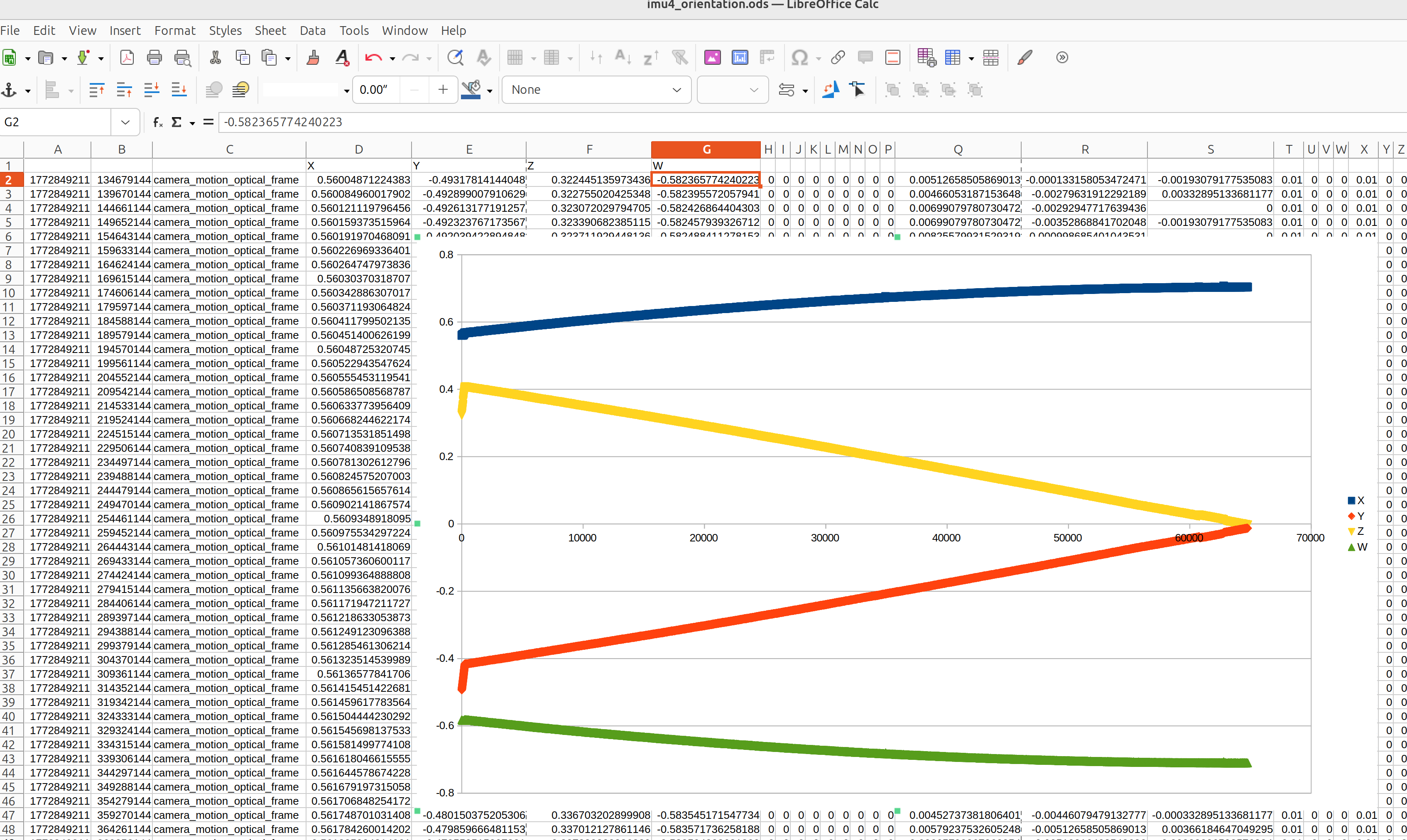
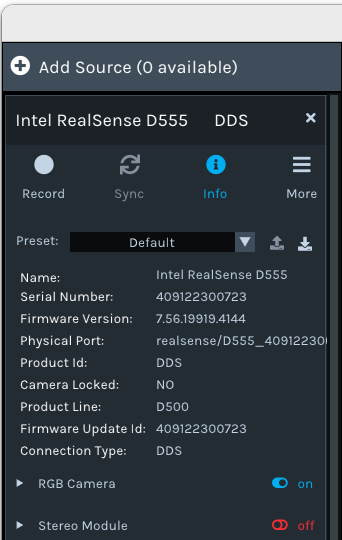
Please let me know if I have a defective hardware or it is a software issue? Below is the camera info:
-
Hi Terri Terri If the camera is stationary on a flat level surface and the values are fluctuating then it could indicate that the IMU needs to have motion correction applied to its raw data (which can be 'noisy') to "fix" the values.
In the RealSense Viewer, a setting is enabled by default in the Motion Module controls called Enable Motion Correction which fixes the raw data to make the values more accurate. This is necessary because the RealSense IMU component does not have built-in hardware calibration and needs to be corrected in software instead.
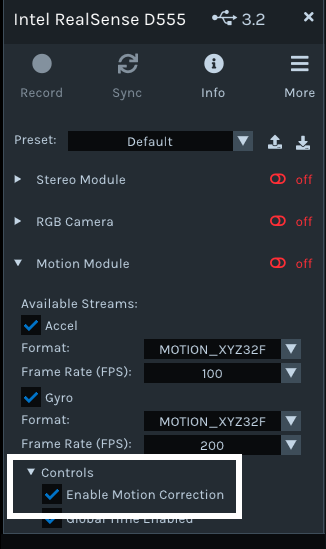
In the RealSense ROS2 wrapper this setting can be applied by setting the parameter enable_motion_correction to true. Setting the parameter unite_imu_method to a value of '1' (Copy mode) can also provide more stable IMU data.
If the IMU is being accessed directly by Visual SLAM without the RealSense ROS2 wrapper installed then it is the noisy raw (uncorrected) values that will be provided.
-
Hello MartyX,
I checked realsense-viewer and there isn't an option for "Enable Motion Correction" as shown below. I am using DDS connection, and I am using Realsense SDK version 2.57.4 and ROS Wrapper 4.57.4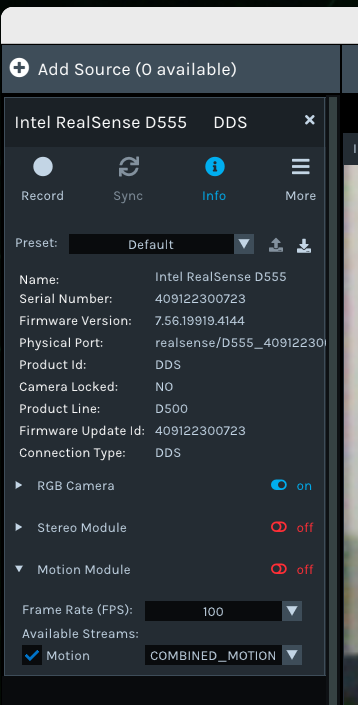
I also looked at the parameter list, and there is no parameter "enable_motion_correction".
Below is the available parameters:
/camera/camera:
align_depth.enable
align_depth.frames_queue_size
angular_velocity_cov
base_frame_id
camera.color.image_raw.enable_pub_plugins
camera.depth.image_rect_raw.enable_pub_plugins
camera_name
clip_distance
color_info_qos
color_qos
colorizer.color_scheme
colorizer.enable
colorizer.frames_queue_size
colorizer.histogram_equalization_enabled
colorizer.max_distance
colorizer.min_distance
colorizer.stream_filter
colorizer.stream_format_filter
colorizer.stream_index_filter
colorizer.visual_presetimu
decimation_filter.enable
decimation_filter.filter_magnitude
decimation_filter.frames_queue_size
decimation_filter.stream_filter
decimation_filter.stream_format_filter
decimation_filter.stream_index_filter
depth_info_qos
depth_module.auto_exposure_roi.bottom
depth_module.auto_exposure_roi.left
depth_module.auto_exposure_roi.right
depth_module.auto_exposure_roi.top
depth_module.depth_format
depth_module.depth_profile
depth_module.emitter_always_on
depth_module.emitter_enabled
depth_module.enable_auto_exposure
depth_module.exposure
depth_module.frames_queue_size
depth_module.gain
depth_module.infra1_format
depth_module.infra2_format
depth_module.infra_profile
depth_module.laser_power
depth_module.thermal_compensation
depth_module.visual_preset
depth_qos
device_type
diagnostics_period
disparity_filter.enable
disparity_to_depth.enable
enable_color
enable_depth
enable_infra1
enable_infra2
enable_motion
enable_rgbd
enable_sync
filter_by_sequence_id.enable
filter_by_sequence_id.frames_queue_size
filter_by_sequence_id.sequence_id
hdr_merge.enable
hdr_merge.frames_queue_size
hold_back_imu_for_frames
hole_filling_filter.enable
hole_filling_filter.frames_queue_size
hole_filling_filter.holes_fill
hole_filling_filter.stream_filter
hole_filling_filter.stream_format_filter
hole_filling_filter.stream_index_filter
infra1_info_qos
infra1_qos
infra2_info_qos
infra2_qos
initial_reset
json_file_path
linear_accel_cov
motion_fps
motion_info_qos
motion_module.frames_queue_size
motion_qos
pointcloud.allow_no_texture_points
pointcloud.enable
pointcloud.filter_magnitude
pointcloud.frames_queue_size
pointcloud.ordered_pc
pointcloud.pointcloud_qos
pointcloud.stream_filter
pointcloud.stream_format_filter
pointcloud.stream_index_filter
publish_tf
qos_overrides./parameter_events.publisher.depth
qos_overrides./parameter_events.publisher.durability
qos_overrides./parameter_events.publisher.history
qos_overrides./parameter_events.publisher.reliability
reconnect_timeout
rgb_camera.auto_exposure_priority
rgb_camera.auto_exposure_roi.bottom
rgb_camera.auto_exposure_roi.left
rgb_camera.auto_exposure_roi.right
rgb_camera.auto_exposure_roi.top
rgb_camera.brightness
rgb_camera.color_format
rgb_camera.color_profile
rgb_camera.contrast
rgb_camera.enable_auto_exposure
rgb_camera.enable_auto_white_balance
rgb_camera.exposure
rgb_camera.frames_queue_size
rgb_camera.gain
rgb_camera.gamma
rgb_camera.hue
rgb_camera.power_line_frequency
rgb_camera.saturation
rgb_camera.sharpness
rgb_camera.white_balance
rosbag_filename
rotation_filter.enable
rotation_filter.frames_queue_size
rotation_filter.rotation
rotation_filter.stream_filter
rotation_filter.stream_format_filter
rotation_filter.stream_index_filter
serial_no
spatial_filter.enable
spatial_filter.filter_magnitude
spatial_filter.filter_smooth_alpha
spatial_filter.filter_smooth_delta
spatial_filter.frames_queue_size
spatial_filter.holes_fill
spatial_filter.stream_filter
spatial_filter.stream_format_filter
spatial_filter.stream_index_filter
start_type_description_service
temporal_filter.enable
temporal_filter.filter_smooth_alpha
temporal_filter.filter_smooth_delta
temporal_filter.frames_queue_size
temporal_filter.holes_fill
temporal_filter.stream_filter
temporal_filter.stream_format_filter
temporal_filter.stream_index_filter
tf_prefix
tf_publish_rate
unite_imu_method
usb_port_id
use_sim_time
wait_for_device_timeout -
Thanks very much for the detailed feedback. It appears that the IMU controls are a bit different in D555's DDS mode. It has enable_motion instead of the separate enable_accel and enable_gyro IMU parameters and as you said, the motion correction control is absent in DDS.
If you do ros2 topic list to list the topics published by the RealSense ROS2 wrapper, which topics related to the IMU are published in DDS mode please? Is only /camera/camera/motion/sample listed?
If you set the unite_imu_method parameter to a value of 1 (it is 0 - disabled - by default in the rs_launch.py launch file), is a /camera/camera/imu topic listed in ros2 topic list?
If /camera/camera/imu is published, does it provide more stable IMU data than /camera/camera/motion/sample ?
-
With the unite_imu_method set to 1, I got the following topic and there are no /camera/camera/imu topic. I can only get IMU data from /camera/camera/motion/sample
/camera/camera/extrinsics/depth_to_infra1
/camera/camera/extrinsics/depth_to_infra2
/camera/camera/extrinsics/depth_to_motion
/camera/camera/infra1/camera_info
/camera/camera/infra1/image_rect_raw
/camera/camera/infra1/metadata
/camera/camera/infra2/camera_info
/camera/camera/infra2/image_rect_raw
/camera/camera/infra2/metadata
/camera/camera/motion/imu_info
/camera/camera/motion/metadata
/camera/camera/motion/sample
/parameter_events
/realsense/D555_409122300723_Infrared_1
/realsense/D555_409122300723_Infrared_2
/realsense/D555_409122300723_Motion
/rosout
/tf_staticI am using the following command:
ros2 run realsense2_camera realsense2_camera_node --ros-args --params-file /workspaces/isaac_ros-dev/terri_scripts/d555_realsense_stereo_imu.yaml
The yaml file is:
camera/camera:
  ros__parameters:
    enable_motion: true
    enable_gyro: true
    enable_accel: true
    gyro_fps: 200
    accel_fps: 200
    enable_color: false
    enable_depth: false
    enable_infra1: true
    enable_infra2: true
    motion_fps: 200
    unite_imu_method: 1

    depth_qos: "SYSTEM_DEFAULT"
    depth_module:
      depth_profile: '640x360x60'
      infra_profile: '640x360x60'
      profile: '640x360x60' # For backwards compatibility
      emitter_enabled: false
      emitter_on_off: false
I look at your previous post and realize that you are using USB mode. So I tried USB mode (with ethernet cable unplug) and the IMU is disabled with the error shown below:
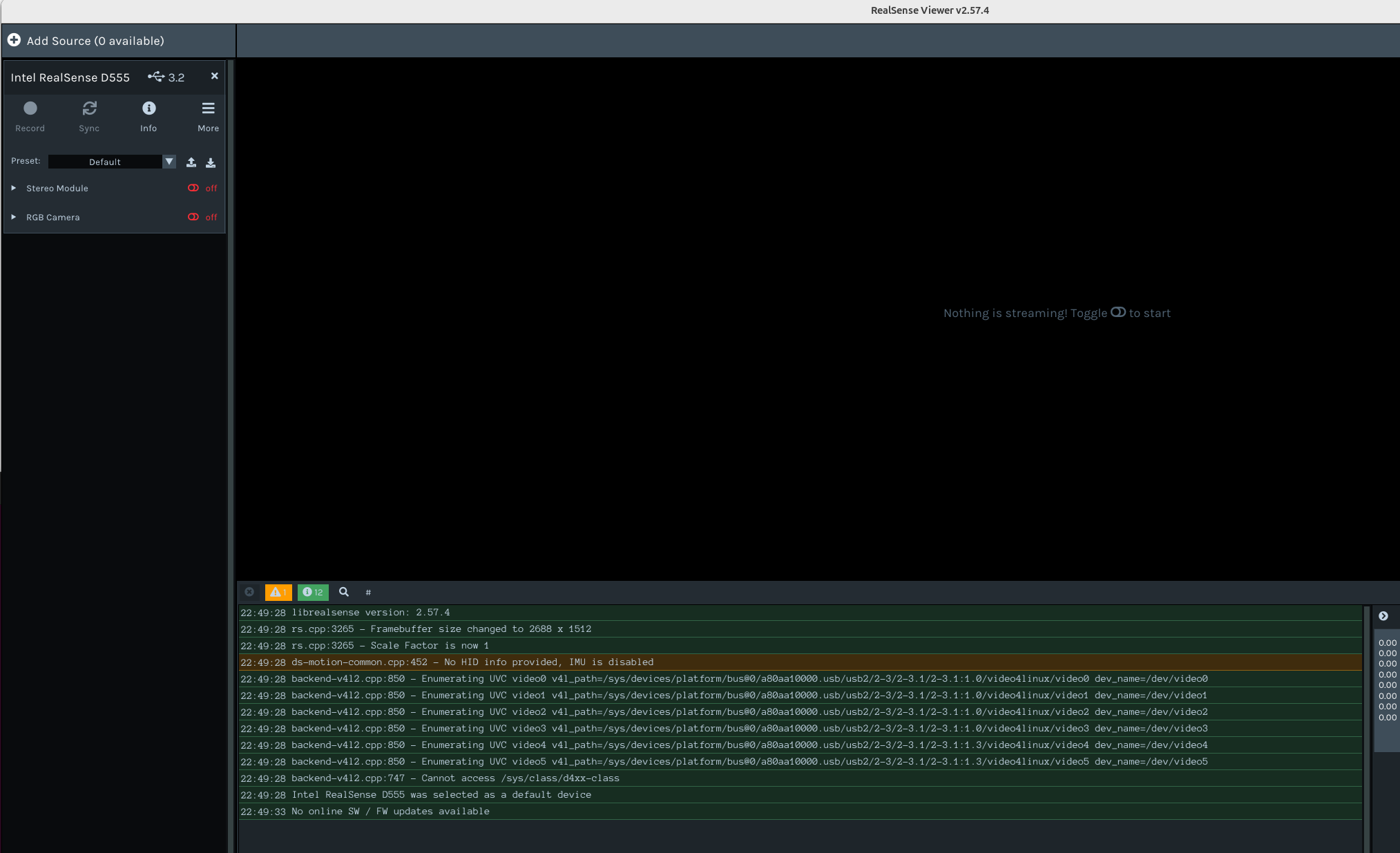
-
Thank you. Does your Jetson Thor use JetPack 6, please? There can be problems using JP6 with RealSense cameras that are equipped with an IMU because JP6 removed a function called hiddraw that our IMU-equipped cameras depended upon. This can result in inability to access IMU data.
A workaround on Jetson that often works and enables the IMU to be accessed on JP6 is to build the RealSense SDK from source code with the libuvc backend installation method.
https://github.com/IntelRealSense/librealsense/blob/master/doc/libuvc_installation.md
The libuvc method provides a pre-made build script called libuvc_installation.sh
https://github.com/IntelRealSense/librealsense/blob/master/scripts/libuvc_installation.sh
-
Hello MartyX,
My Thor has JetPack 7.1.
I tried rebuild and reinstall Realsense SDK 2.57.4 with libuvc and I am still have problems as follows:
- USB mode is showing the right settings in Motion Module including Enable Motion Correction. However, RGB camera is showing only black screen
- DDS mode is still not showing the same setting as before, no option for Enable Motion Correction and RGC camera is showing black screen.
Then I uninstall my current Realsense SDK build and deleted it. I downloaded the latest Realsense SDK from below link.
https://github.com/realsenseai/librealsense/tree/master
With the new download, I got issue installing it and it failed at the step below
./scripts/patch-realsense-ubuntu-L4T.sh
The error is
Failed to connect to nv-tegra.nvidia.com port 443 after 269530 ms: Couldn't connect to server
According to Nividia forums https://forums.developer.nvidia.com/t/cant-connect-to-nv-tegra-nvidia-com-port-443/363538/3 and https://forums.developer.nvidia.com/t/jetson-agx-thor-faq/346561 , we need to download it from their gitlab site now. Is this something you can help to update the script 'patch-realsense-ubuntu-L4T.sh'?
Thanks,
Terri
-
Sometimes installations of the SDK on Jetson can work without applying the L4T patch script. Are you able to achieve a working SDK installation if you skip the patch script installation step, please?
I will also highlight to my RealSense colleagues the issue with using the L4T script with Thor because of the Gitlab address.
Which firmware driver version are you using with your D555, please? The recommended version for use with 2.57.4 is 7.56.19919. you can confirm which firmware is currently installed in your camera by clicking the Info button at the top of the Viewer's options side-panel.
-
Hello Marty,
My D555 firmware is 7.56.19919.4144, it should be the latest one.
I am able to build and install the latest Realsense SDK, v2.57.6, without using the L4T patch. In order to get the RGB camera working, I need to build with option -DCMAKE_CUDA_ARCHITECTURES=native. Below is my build options:
cmake ../ -DCMAKE_CUDA_ARCHITECTURES=native -DBUILD_WITH_DDS=ON -DBUILD_EXAMPLES=true -DCMAKE_BUILD_TYPE=release -DFORCE_RSUSB_BACKEND=false -DBUILD_WITH_CUDA=true -DBUILD_PYTHON_BINDINGS:bool=true -DPYTHON_EXECUTABLE=$(which python3) -DBUILD_GRAPHICAL_EXAMPLES=true -DCMAKE_CUDA_ARCHITECTURES=native && make -j$(($(nproc)-1)) && sudo make install
The USB mode seems to be working now, i need to do more testing.
However, the DDS mode is still NOT showing the option "Enable Motion Correction" and there are no topics for Accel and Gyro. That said the DDS mode IMU is still not working.
-
After highlighting to my RealSense colleagues the L4T patching issue and Nvidia's switch to Gitlab due to deprecating the Tegra server, they are implementing a fallback mechanism to use the new Gitlab address if accessing the usual address fails.
https://github.com/realsenseai/librealsense/pull/14829
If you enable the Motion Module in DDS mode the RealSense Viewer, is the Accel and Gyro data displayed? If it is, are the motion axes relatively stable when the camera is stationary or do they rotate even though the camera is not moving? If they rotate, it could indicate a calibration problem with your IMU. You could also check the Motion Module in USB mode to see whether the accel and gyro data is stable.
In Viewer DDS mode, if you click on the Combined Motion drop down menu, what alternative modes to Combined Motion does it offer you, please?
-
Thanks for working on the L4T patch script fix.
In DDS mode with Motion Module enabled in Realsense Viewer, Linear Acceleration and Angular Velocity data are displayed as shown below. The motion white Norm axis value is jumping between 9.7 and 9.8 when camera is not moving, it is not rotating but it is shifting left/right.
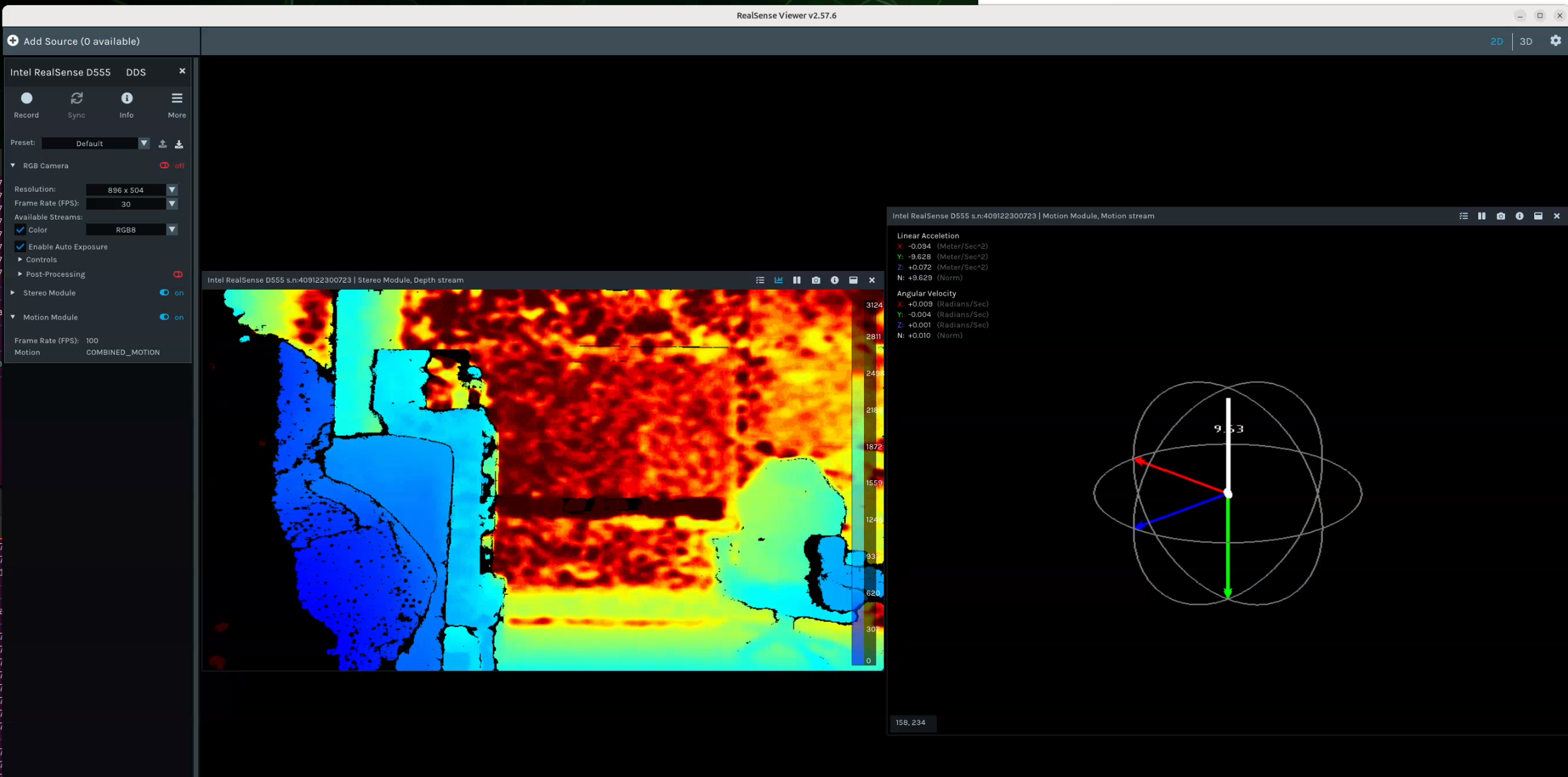
Both Linear Acceleration and Angular Velocity data are combined in ros topic camera/camera/motion/sample when running realsense2_camera node.
In DDS mode, the Combined Motion drop down menu only has one Combined Motion mode.
-
I would also like to update on the imu orientation data i gathered using USB mode and it is about the same noisy as the DDS mode. Below shows the Orientation X, Y and Z data while camera is stationary for about an hour long. I would expect an almost straight line and not a sine wave.
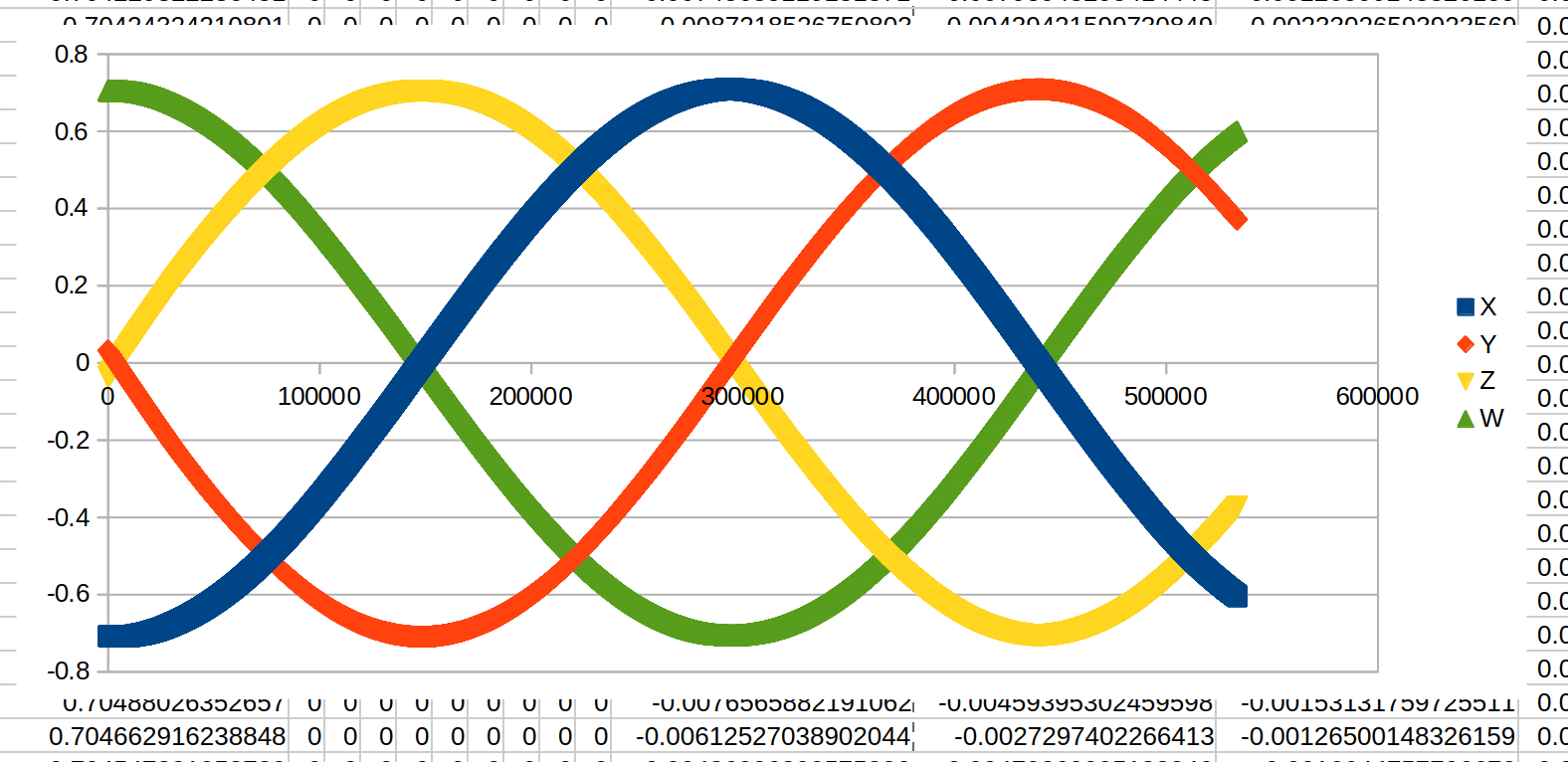
S
-
Thanks very much for the new data.
A Y-axis Accel value of 9.7 to 9.8 usually indicates that the IMU is well calibrated and does not need recalibrating, as the ideal target value for Y Accel is 9.8. So 9.8 is excellent, and 9.7 is a good value.
I was able to replicate the slight rapid side to side axis motion in the Viewer on my own D555, with the Accel X and Z values oscillating rapidly. I performed the same test on a flat surface with other RealSense camera models equipped with an IMU and did not experience the same oscillation, with the axis values being absolutely stationary. So I will discuss this D555-specific fluctuation with my colleagues.
-
My colleagues tested on Jetson Thor and were not able to reproduce the reported IMU oscillation. In their test, they launched the ROS2 wrapper with ros2 launch realsese2_camera rs_launch.py and echoed the IMU topic in DDS mode with the command below:
ros2 topic echo /realsense/D555_xyz_Motion
They provided me with a new engineering firmware that they say is robust and ask if you can update your D555 to this firmware and let us know it it makes a difference.
This firmware has been validated with the native ROS support on Ubuntu 22.04. But there currently exists a compatibility issue with Ubuntu 24.04 (as Thor). So you will have to test it in the RealSense ROS wrapper.
I have uploaded the firmware as a zip file to a Google Drive link that you can download it from.
https://drive.google.com/file/d/1HhHtIxt7_nlXLJzZ52pOhYn8E1YmN-kL/view?usp=drive_link
-
Hello MartyX,
I updated my camera firmware to the one you provided and it is now version 7.56.37776.6014.
You are correct, it doesn't work on my Thor with Ubuntu 24.04 and ROS2 Jazzy. I have issues in both USB mode and DDS mode as shown below:In USB mode:
- Nothing stream in realsense-viewer
- I tried ROS2 wrapper and using command ros2 launch realsense2_camera rs_launch.py enable_gyro:=true enable_accel:=true accel_fps:=200 unite_imu_method:=1. I see below topic list but No IMU data is being published in topic /camera/camera/imu, /camera/camera/accel/sample
sena@sena:~$ ros2 topic list
/camera/camera/accel/imu_info
/camera/camera/accel/metadata
/camera/camera/accel/sample
/camera/camera/color/camera_info
/camera/camera/color/image_raw
/camera/camera/color/metadata
/camera/camera/depth/camera_info
/camera/camera/depth/image_rect_raw
/camera/camera/depth/metadata
/camera/camera/extrinsics/depth_to_accel
/camera/camera/extrinsics/depth_to_color
/camera/camera/extrinsics/depth_to_gyro
/camera/camera/gyro/imu_info
/camera/camera/gyro/metadata
/camera/camera/gyro/sample
/camera/camera/imu
/parameter_events
/rosout
/tf_static
sena@sena:~$ ros2 topic echo /camera/camera/accel/sample --once
[WARN] [1774031278.711190392] [rmw_cyclonedds_cpp]: Failed to parse type hash for topic 'realsense/device-info' with type 'realdds::topics::raw::flexible' from USER_DATA '(null)'.
^Csena@sena:~$ ros2 topic echo /camera/camera/imu --once
[WARN] [1774031304.027951520] [rmw_cyclonedds_cpp]: Failed to parse type hash for topic 'realsense/device-info' with type 'realdds::topics::raw::flexible' from USER_DATA '(null)'.
In DDS mode: the camera stops working after a very short period of time and I am using ROS2 wrapper command. I can see IMU data being published in topic /camera/camera/motion/sample while the camera is working. Please see below output:sena@sena:~$ ros2 launch realsense2_camera rs_launch.py enable_motion:=true motion_fps:=200 unite_imu_method:=1
[INFO] [launch]: All log files can be found below /home/sena/.ros/log/2026-03-20-11-31-21-891251-sena-29245
[INFO] [launch]: Default logging verbosity is set to INFO
[INFO] [launch.user]: 🚀 Launching as Normal ROS Node
[INFO] [realsense2_camera_node-1]: process started with pid [29248]
[realsense2_camera_node-1] 1774031482.038081 [30] recv: malformed packet received from vendor 1.21 length 80 state parse:shortmsg <52545053 02050115 4f981501 5f111bee cdeeb600 06013800 c7030000 c2030000 @80 > (note: maybe partially bswap'd)
[realsense2_camera_node-1] 1774031482.038164 [30] recv: malformed packet received from vendor 1.21 length 80 state parse:shortmsg <52545053 02050115 4f981501 5f111bee cdeeb600 06013800 c7040000 c2040000 @80 > (note: maybe partially bswap'd)
[realsense2_camera_node-1] 1774031482.038171 [30] recv: malformed packet received from vendor 1.21 length 80 state parse:shortmsg <52545053 02050115 4f981501 5f111bee cdeeb600 06013800 c7000200 c2000200 @80 > (note: maybe partially bswap'd)
[realsense2_camera_node-1] [INFO] [1774031482.039831409] [camera.camera]: RealSense ROS v4.57.6
[realsense2_camera_node-1] [INFO] [1774031482.039887826] [camera.camera]: Built with LibRealSense v2.57.6
[realsense2_camera_node-1] [INFO] [1774031482.039896132] [camera.camera]: Running with LibRealSense v2.57.6
[realsense2_camera_node-1] 1774031482.047296 [30] recv: malformed packet received from vendor 1.21 length 80 state parse:shortmsg <52545053 02050115 4f981501 5f111bee cdeeb600 06013800 04210000 c2000100 @80 > (note: maybe partially bswap'd)
[realsense2_camera_node-1] [WARN] [1774031482.057310737] [rmw_cyclonedds_cpp]: Failed to parse type hash for topic 'realsense/device-info' with type 'realdds::topics::raw::flexible' from USER_DATA '(null)'.
[realsense2_camera_node-1] 1774031482.075347 [30] recv: malformed packet received from vendor 1.21 length 80 state parse:shortmsg <52545053 02050115 4f981501 5f111bee cdeeb600 06013800 04230000 c2000100 @80 > (note: maybe partially bswap'd)
[realsense2_camera_node-1] 1774031482.103535 [30] recv: malformed packet received from vendor 1.21 length 80 state parse:shortmsg <52545053 02050115 4f981501 5f111bee cdeeb600 06013800 04250000 c2000100 @80 > (note: maybe partially bswap'd)
[realsense2_camera_node-1] 1774031483.170720 [30] recv: malformed packet received from vendor 1.21 length 80 state parse:shortmsg <52545053 02050115 4f981501 5f111bee cdeeb600 06013800 04270000 c2000100 @80 > (note: maybe partially bswap'd)
[realsense2_camera_node-1] 1774031484.228010 [30] recv: malformed packet received from vendor 1.21 length 80 state parse:shortmsg <52545053 02050115 4f981501 5f111bee cdeeb600 06013800 04290000 c2000100 @80 > (note: maybe partially bswap'd)
[realsense2_camera_node-1] 1774031484.228087 [30] recv: malformed packet received from vendor 1.21 length 80 state parse:shortmsg <52545053 02050115 4f981501 5f111bee cdeeb600 06013800 042b0000 c2000100 @80 > (note: maybe partially bswap'd)
[realsense2_camera_node-1] 1774031484.258137 [30] recv: malformed packet received from vendor 1.21 length 80 state parse:shortmsg <52545053 02050115 4f981501 5f111bee cdeeb600 06013800 042d0000 c2000100 @80 > (note: maybe partially bswap'd)
[realsense2_camera_node-1] 1774031484.258221 [30] recv: malformed packet received from vendor 1.21 length 80 state parse:shortmsg <52545053 02050115 4f981501 5f111bee cdeeb600 06013800 042f0000 c2000100 @80 > (note: maybe partially bswap'd)
[realsense2_camera_node-1] 1774031484.258228 [30] recv: malformed packet received from vendor 1.21 length 80 state parse:shortmsg <52545053 02050115 4f981501 5f111bee cdeeb600 06013800 04310000 c2000100 @80 > (note: maybe partially bswap'd)
[realsense2_camera_node-1] 1774031484.258234 [30] recv: malformed packet received from vendor 1.21 length 80 state parse:shortmsg <52545053 02050115 4f981501 5f111bee cdeeb600 06013800 04330000 c2000100 @80 > (note: maybe partially bswap'd)
[realsense2_camera_node-1] [WARN] [1774031484.264802904] [rmw_cyclonedds_cpp]: Failed to parse type hash for topic 'realsense/D555_409122300723/control' with type 'realdds::topics::raw::flexible' from USER_DATA '(null)'.
[realsense2_camera_node-1] [WARN] [1774031484.265453646] [rmw_cyclonedds_cpp]: Failed to parse type hash for topic 'realsense/D555_409122300723/notification' with type 'realdds::topics::raw::flexible' from USER_DATA '(null)'.
[realsense2_camera_node-1] [WARN] [1774031484.269345081] [rmw_cyclonedds_cpp]: Failed to parse type hash for topic 'realsense/D555_409122300723/metadata' with type 'realdds::topics::raw::flexible' from USER_DATA '(null)'.
[realsense2_camera_node-1] [INFO] [1774031486.103378133] [camera.camera]: Device with serial number 409122300723 was found.
[realsense2_camera_node-1]
[realsense2_camera_node-1] [INFO] [1774031486.103455013] [camera.camera]: Device with physical ID realsense/D555_409122300723 was found.
[realsense2_camera_node-1] [INFO] [1774031486.103464967] [camera.camera]: Device with name Intel RealSense D555 was found.
[realsense2_camera_node-1] [INFO] [1774031486.103630699] [camera.camera]: getParameters...
[realsense2_camera_node-1] [WARN] [1774031486.103828903] [camera.camera]: For the 'unite_imu_method' param update to take effect, re-enable either gyro or accel stream.
[realsense2_camera_node-1] [INFO] [1774031486.103855560] [camera.camera]: JSON file is not provided
[realsense2_camera_node-1] [INFO] [1774031486.103864310] [camera.camera]: Device Name: Intel RealSense D555
[realsense2_camera_node-1] [INFO] [1774031486.103869773] [camera.camera]: Device Serial No: 409122300723
[realsense2_camera_node-1] [INFO] [1774031486.103874829] [camera.camera]: Device physical port: realsense/D555_409122300723
[realsense2_camera_node-1] [INFO] [1774031486.103880097] [camera.camera]: Device FW version: 7.56.37776.6014
[realsense2_camera_node-1] [INFO] [1774031486.103884977] [camera.camera]: Device Product ID: 0xDDS
[realsense2_camera_node-1] [INFO] [1774031486.103890505] [camera.camera]: Sync Mode: Off
[realsense2_camera_node-1] [ERROR] [1774031486.104366228] [camera.camera]: An error has occurred while calling sensor for: rgb_camera.region_of_interest:use rs2_get_option_value to get rect values
[realsense2_camera_node-1] [INFO] [1774031486.104911832] [camera.camera]: Set ROS param rgb_camera.color_profile to default: 896x504x30
[realsense2_camera_node-1] 20/03 11:31:26,104 ERROR [281473069015104] (rs.cpp:280) [rs2_get_option( options:0xffff641cb2a0, option_id:98 ) Not Implemented] use rs2_get_option_value to get rect values
[realsense2_camera_node-1] 20/03 11:31:26,118 ERROR [281473069015104] (rs.cpp:280) [rs2_get_option( options:0xffff641cb2f0, option_id:98 ) Not Implemented] use rs2_get_option_value to get rect values
[realsense2_camera_node-1] [ERROR] [1774031486.118392345] [camera.camera]: An error has occurred while calling sensor for: depth_module.region_of_interest:use rs2_get_option_value to get rect values
[realsense2_camera_node-1] [INFO] [1774031486.118840744] [camera.camera]: Set ROS param depth_module.depth_profile to default: 896x504x30
[realsense2_camera_node-1] [INFO] [1774031486.119075503] [camera.camera]: Set ROS param depth_module.infra_profile to default: 896x504x30
[realsense2_camera_node-1] [INFO] [1774031486.119278634] [camera.camera]: No default profile found. Setting the first available profile as the default one.
[realsense2_camera_node-1] [INFO] [1774031486.140376442] [camera.camera]: Stopping Sensor: RGB Camera
[realsense2_camera_node-1] [INFO] [1774031486.140433914] [camera.camera]: Stopping Sensor: Depth Module
[realsense2_camera_node-1] [INFO] [1774031486.140452146] [camera.camera]: Stopping Sensor: Motion Module
[realsense2_camera_node-1] [INFO] [1774031486.144442025] [camera.camera]: Starting Sensor: RGB Camera
[realsense2_camera_node-1] [INFO] [1774031486.145165897] [camera.camera]: Open profile: stream_type: Color(0), Format: RGB8, Width: 896, Height: 504, FPS: 30
[realsense2_camera_node-1] [INFO] [1774031486.145195749] [camera.camera]: Open profile: stream_type: Color(1), Format: RGB8, Width: 896, Height: 504, FPS: 30
[realsense2_camera_node-1] [WARN] [1774031486.146361835] [rmw_cyclonedds_cpp]: Failed to parse type hash for topic 'rt/realsense/D555_409122300723_CompressedColor' with type 'sensor_msgs::msg::dds_::CompressedImage_' from USER_DATA '(null)'.
[realsense2_camera_node-1] [WARN] [1774031486.147220726] [rmw_cyclonedds_cpp]: Failed to parse type hash for topic 'rt/realsense/D555_409122300723_Color' with type 'sensor_msgs::msg::dds_::Image_' from USER_DATA '(null)'.
[realsense2_camera_node-1] [INFO] [1774031486.147744153] [camera.camera]: Starting Sensor: Depth Module
[realsense2_camera_node-1] [INFO] [1774031486.154275751] [camera.camera]: Open profile: stream_type: Depth(0), Format: Z16, Width: 896, Height: 504, FPS: 30
[realsense2_camera_node-1] [WARN] [1774031486.155129920] [rmw_cyclonedds_cpp]: Failed to parse type hash for topic 'rt/realsense/D555_409122300723_Depth' with type 'sensor_msgs::msg::dds_::Image_' from USER_DATA '(null)'.
[realsense2_camera_node-1] [INFO] [1774031486.155897755] [camera.camera]: Starting Sensor: Motion Module
[realsense2_camera_node-1] [INFO] [1774031486.164292877] [camera.camera]: Open profile: stream_type: Motion(0)Format: COMBINED_MOTION, FPS: 200
[realsense2_camera_node-1] [WARN] [1774031486.166013622] [rmw_cyclonedds_cpp]: Failed to parse type hash for topic 'rt/realsense/D555_409122300723_Motion' with type 'sensor_msgs::msg::dds_::Imu_' from USER_DATA '(null)'.
[realsense2_camera_node-1] [INFO] [1774031486.168989684] [camera.camera]: RealSense Node Is Up!
[realsense2_camera_node-1] [WARN] [1774031486.293005201] [camera.camera]: frame's time domain is HARDWARE_CLOCK. Timestamps may reset periodically.
[realsense2_camera_node-1] 20/03 11:32:09,837 WARNING [281472669638720] (dds-topic-reader.cpp:191) [rt/realsense/D555_409122300723_Depth] 1 sample(s) lost
[realsense2_camera_node-1] 20/03 11:32:16,531 WARNING [281472661184576] (dds-topic-reader.cpp:191) [rt/realsense/D555_409122300723_Motion] 1 sample(s) lost
[realsense2_camera_node-1] 20/03 11:32:16,603 WARNING [281472820764736] (dds-topic-reader.cpp:191) [realsense/D555_409122300723/metadata] 1 sample(s) lost
[realsense2_camera_node-1] 20/03 11:32:16,903 WARNING [281472678092864] (dds-topic-reader.cpp:191) [rt/realsense/D555_409122300723_Color] 1 sample(s) lost
[realsense2_camera_node-1] [ERROR] [1774031547.982338822] [camera.camera]: The device has been disconnected!
[realsense2_camera_node-1] [INFO] [1774031547.982680768] [camera.camera]: Stop Sensor: RGB Camera
[realsense2_camera_node-1] [INFO] [1774031547.988349592] [camera.camera]: Close Sensor.
[realsense2_camera_node-1] 20/03 11:32:27,988 ERROR [281462485999680] (dds-device.cpp:46) throwing: device is offline
[realsense2_camera_node-1] 20/03 11:32:27,988 ERROR [281462485999680] (rs.cpp:280) [rs2_close( sensor:0xffff641cb2a0 ) Invalid Value] device is offline
[realsense2_camera_node-1] [ERROR] [1774031547.988560583] [camera.camera]: Exception: /home/sena/ros2_ws/src/realsense-ros/realsense2_camera/src/ros_sensor.cpp:298:device is offline
[realsense2_camera_node-1] [INFO] [1774031547.988590222] [camera.camera]: Close Sensor - Done.
[realsense2_camera_node-1] [INFO] [1774031547.988605148] [camera.camera]: Stop Sensor: Depth Module
[realsense2_camera_node-1] [INFO] [1774031547.992217475] [camera.camera]: Close Sensor.
[realsense2_camera_node-1] [ERROR] [1774031547.992284596] [camera.camera]: Exception: /home/sena/ros2_ws/src/realsense-ros/realsense2_camera/src/ros_sensor.cpp:298:device is offline
[realsense2_camera_node-1] [INFO] [1774031547.992300198] [camera.camera]: Close Sensor - Done.
[realsense2_camera_node-1] [INFO] [1774031547.992310041] [camera.camera]: Stop Sensor: Motion Module
[realsense2_camera_node-1] 20/03 11:32:27,992 ERROR [281462485999680] (dds-device.cpp:46) throwing: device is offline
[realsense2_camera_node-1] 20/03 11:32:27,992 ERROR [281462485999680] (rs.cpp:280) [rs2_close( sensor:0xffff641cb2f0 ) Invalid Value] device is offline
[realsense2_camera_node-1] [INFO] [1774031547.992664523] [camera.camera]: Close Sensor.
[realsense2_camera_node-1] [ERROR] [1774031547.992706449] [camera.camera]: Exception: /home/sena/ros2_ws/src/realsense-ros/realsense2_camera/src/ros_sensor.cpp:298:device is offline
[realsense2_camera_node-1] [INFO] [1774031547.992717088] [camera.camera]: Close Sensor - Done.
[realsense2_camera_node-1] [INFO] [1774031547.992768736] [camera.camera]: Stop Sensor: RGB Camera
[realsense2_camera_node-1] [ERROR] [1774031547.992794625] [camera.camera]: Exception: /home/sena/ros2_ws/src/realsense-ros/realsense2_camera/src/ros_sensor.cpp:289:stop_streaming() failed. Software device is not streaming!
[realsense2_camera_node-1] [INFO] [1774031547.992803570] [camera.camera]: Close Sensor.
[realsense2_camera_node-1] [ERROR] [1774031547.992823625] [camera.camera]: Exception: /home/sena/ros2_ws/src/realsense-ros/realsense2_camera/src/ros_sensor.cpp:298:close() failed. Software device was not opened!
[realsense2_camera_node-1] [INFO] [1774031547.992831543] [camera.camera]: Close Sensor - Done.
[realsense2_camera_node-1] [INFO] [1774031547.992868682] [camera.camera]: Stop Sensor: Depth Module
[realsense2_camera_node-1] [ERROR] [1774031547.992884895] [camera.camera]: Exception: /home/sena/ros2_ws/src/realsense-ros/realsense2_camera/src/ros_sensor.cpp:289:stop_streaming() failed. Software device is not streaming!
[realsense2_camera_node-1] [INFO] [1774031547.992891820] [camera.camera]: Close Sensor.
[realsense2_camera_node-1] [ERROR] [1774031547.992907959] [camera.camera]: Exception: /home/sena/ros2_ws/src/realsense-ros/realsense2_camera/src/ros_sensor.cpp:298:close() failed. Software device was not opened!
[realsense2_camera_node-1] [INFO] [1774031547.992915182] [camera.camera]: Close Sensor - Done.
[realsense2_camera_node-1] [INFO] [1774031547.992929635] [camera.camera]: Stop Sensor: Motion Module
[realsense2_camera_node-1] [ERROR] [1774031547.992944682] [camera.camera]: Exception: /home/sena/ros2_ws/src/realsense-ros/realsense2_camera/src/ros_sensor.cpp:289:stop_streaming() failed. Software device is not streaming!
[realsense2_camera_node-1] [INFO] [1774031547.992952311] [camera.camera]: Close Sensor.
[realsense2_camera_node-1] 20/03 11:32:27,992 ERROR [281462485999680] (dds-device.cpp:46) throwing: device is offline
[realsense2_camera_node-1] 20/03 11:32:27,992 ERROR [281462485999680] (rs.cpp:280) [rs2_close( sensor:0xffff641cb3c0 ) Invalid Value] device is offline
[realsense2_camera_node-1] 20/03 11:32:27,992 ERROR [281462485999680] (rs.cpp:280) [rs2_stop( sensor:0xffff641cb2a0 ) Wrong Api Call Sequence] stop_streaming() failed. Software device is not streaming!
[realsense2_camera_node-1] 20/03 11:32:27,992 ERROR [281462485999680] (rs.cpp:280) [rs2_close( sensor:0xffff641cb2a0 ) Wrong Api Call Sequence] close() failed. Software device was not opened!
[realsense2_camera_node-1] 20/03 11:32:27,992 ERROR [281462485999680] (rs.cpp:280) [rs2_stop( sensor:0xffff641cb2f0 ) Wrong Api Call Sequence] stop_streaming() failed. Software device is not streaming!
[realsense2_camera_node-1] 20/03 11:32:27,992 ERROR [281462485999680] (rs.cpp:280) [rs2_close( sensor:0xffff641cb2f0 ) Wrong Api Call Sequence] close() failed. Software device was not opened!
[realsense2_camera_node-1] 20/03 11:32:27,992 ERROR [281462485999680] (rs.cpp:280) [rs2_stop( sensor:0xffff641cb3c0 ) Wrong Api Call Sequence] stop_streaming() failed. Software device is not streaming!
[realsense2_camera_node-1] 20/03 11:32:27,992 ERROR [281462485999680] (rs.cpp:280) [rs2_close( sensor:0xffff641cb3c0 ) Wrong Api Call Sequence] close() failed. Software device was not opened!
[realsense2_camera_node-1] [ERROR] [1774031547.992973320] [camera.camera]: Exception: /home/sena/ros2_ws/src/realsense-ros/realsense2_camera/src/ros_sensor.cpp:298:close() failed. Software device was not opened!
[realsense2_camera_node-1] [INFO] [1774031547.992997182] [camera.camera]: Close Sensor - Done.
sena@sena:~$ ros2 topic list
/camera/camera/color/camera_info
/camera/camera/color/image_raw
/camera/camera/color/metadata
/camera/camera/color1/camera_info
/camera/camera/color1/image_raw
/camera/camera/color1/metadata
/camera/camera/depth/camera_info
/camera/camera/depth/image_rect_raw
/camera/camera/depth/metadata
/camera/camera/extrinsics/depth_to_color
/camera/camera/extrinsics/depth_to_color1
/camera/camera/extrinsics/depth_to_depth
/camera/camera/extrinsics/depth_to_motion
/camera/camera/motion/imu_info
/camera/camera/motion/metadata
/camera/camera/motion/sample
/parameter_events
/rosout
/tf_staticI have also modified sync.sh per suggestion in https://github.com/realsenseai/librealsense/pull/14829. Then I tried ./scripts/patch-realsense-ubuntu-L4T.sh again and i got the following error:
ERROR: modpost: "__mutex_init" [drivers/media/usb/uvc/uvcvideo.ko] undefined!
make[2]: *** [scripts/Makefile.modpost:145: drivers/media/usb/uvc/Module.symvers] Error 1
make[1]: *** [/home/sena/librealsense/Tegra/kernel/kernel-noble-src/Makefile:1877: modpost] Error 2
make: *** [Makefile:240: __sub-make] Error 2 -
My colleagues respond that it is expected that the engineering firmware does not work with native ROS on Thor which is installed with JetPack 7.1. Support for Ubuntu 24.04 and ROS2 Jazzy is on the firmware team's work list. The firmware team suggests using 24.04 and Humble, though it is not a straightforward method to implement.
My colleagues will also perform further tests using the information that you kindly provided above.
-
My colleagues have fed back to me their conclusions from further testing of your issue.
They tested on a Jetson Thor with ethernet MTU value 9000 on a source code build of the librealsense SDK's master branch compiled using the CMake build command below:
 cmake ../ -DBUILD_WITH_DDS=ON -DFORCE_RSUSB_BACKEND=ON
Thor MTU: 9000
They believe that in USB mode, building the SDK from source code and including the build flag flag -DFORCE_RSUSB_BACKEND=ON should resolve the IMU issues, and you said earlier in this discussion that using this flag in USB mode did seem to be working for you.
There was still the problem in DDS mode to address. My colleagues were not able to replicate it during their testing in either the Viewer or ROS2 wrapper though, unfortunately.
They launched the ROS2 wrapper with the launch command below:
ros2 launch realsense2_camera rs_launch.py enable_motion:=true motion_fps:=200 unite_imu_method:=1
They then echoed the motion topic and viewed the log file:
ros2 topic echo /camera/camera/motion/sample
They did not see rapid x & z accel value oscillations in the log, or observe them in the Viewer.
Please sign in to leave a comment.
Comments
21 comments