435 Error Over Time at 90fps
With a diagnostic tool running, I've allowed the 435 cameras to run overnight.
At the 4hr mark, the errors were nominal.
Over time, were seeing the Critical Frame Drops start to add up dramatically.
(in the video, you'd see the Critical Frames Dropping multiple frames every second. With the rate of error gradually increasing)
Is this to be expected?
What factors might be responsible for Critical Frame Drops?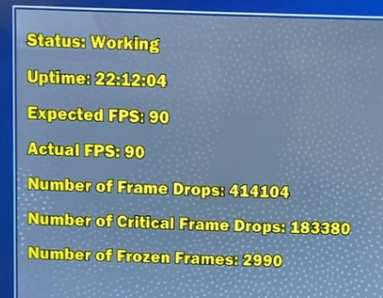
-
Hi Steve Steve RealSense cameras can operate indefinitely so long as they remain within recommended temperature limits. Officially that limit is 35 degrees C. In real world conditions, I would expect the camera to be able to operate normally at up to 42 degrees before problems with the image may start occurring above that temperature.
At 60 degrees and above, a safety mechanism in the camera firmware driver will shut off the camera's laser. The camera can continue operating with the laser off but depth image quality will reduce and the camera may not be able to see in dark environments whilst the laser is inactive.
-
Whilst the camera can operate indefinitely whilst within temperature limits, errors and frame drops may occur if there is a non-camera problem, such as a glitch in the USB system (USB port or USB cable), or an issue with the computer hardware or its operating system. Where such non-camera issues are occurring, it is possible for the camera to start normally and then manifest problems after hours have passed.
-
We've continued to see issues.
So, we've done a test with two cameras and the RealSense Viewer.
We leave the viewer and cameras active.
I don't see any issues after the first 24hrs.
But by 72hrs...there is definitely something happening.
The Hardware FPS for the Depth and RGB cameras will become erratic.
with FPS jumping well above and below definition.
We defined the camera to run 90fps, but we'll see the FPS exceed 150 and drop into the 40s.
(this probably explains the errors in the vector data we are seeing--primarily speed)
This is version v2.56.5 -
RealSense cameras have been tested for long-run use and can be active indefinitely so long as their internal temperature remains below recommended limits. The 36.9 degrees that you reported the camera to be at should be fine.
If a problem occurs after 3 days of running and the camera is within recommended temperature limits then it is more likely to be related to a glitch on the computer hardware, its operating system software or the USB system (the port or the cable) than a problem with the camera hardware.
However, if the FPS is going from 90 to 150 and then down to the 40s, that sounds as though the camera exposure values might be going into ranges that cause that acceleration and lag, The link below has more information about this.
https://github.com/IntelRealSense/librealsense/issues/1957#issuecomment-400715579
If the camera is being used in an indoor location with constant artificial lighting that does not change during the day or night then you could try disabling auto-exposure and using a fixed manual exposure value so that the auto-exposure is not able to change the exposure value.
If the lights of the location that the camera is used in are turned off during the night then auto-exposure should be enabled though.
Please sign in to leave a comment.
Comments
7 comments