D455 can't be recognized
HI,
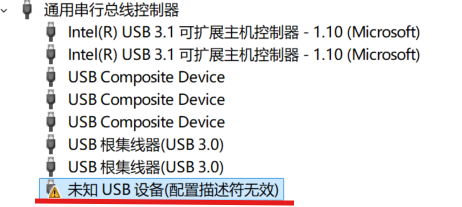
The device can't be recognized after firmware updated.
When I connect device, a pop-up window appears in the system(WIN 11), said i need to update D400 series firmware, so i click update.
But after the update completed, the D455 can'be recognized, PID & VID can't be read either.
What should I do? or how to reset device to its factory firmware?
-
Hello, it sounds as though you were using the RealSense Viewer tool, which has such a firmware pop-up message. Is that correct please?
If you were using the Viewer, do you know which version of the viewer it was please? When using the firmware update recommendation button, it will update the firmware to the version that is recommended for that particular Viewer version.
However, the D455 model of RealSense camera requires a minimum firmware version of 5.13.0.50. If a firmware older than 5.13.0.50 is installed because an old Viewer version was being used (2.38.0 for example) then the camera will become inoperable.
If this is what has happened then there is no reset fix that can be applied by RealSense users and I would recommend creating a new post on this Help Center support forum explaining what has happened so that a member of the Intel RealSense Help Center support team can respond and assist you (I am not a member of that team).
If the camera is outside of the 1-year sales warranty period then the only fix that users can perform themselves is to purchase a Vision Processor D4 V3 circuit board for around $50, take the D455 apart and swap its existing D4 V3 board for the new one. This in itself has a risk because there are two versions of the D4 V3 board, and if you are sold the older version that has a firmware older than 5.13.0.50 pre-installed on it instead of the second version with a newer firmware then your problem will not be solved.
-
If you were using the 2.53.1 Viewer then its firmware updater mechanism should have installed firmware 5.14.0.0, which is newer than the minimum 5.13.0.50 and so should not have caused the D455 to become inoperable. So another possibility is that there has been a failed firmware update, where the the process got to around the halfway point and then did not complete successfully. So you have not done anything wrong.
If the camera is not detectable at all then I would again recommend creating a new post on this forum for the attention of the Help Center team. You could repeat the same opening message as this case, but add the information that you were updating the firmware to 5.14.0.0 in Viewer version 2.53.1. I also suggest giving the new case the title 'Help Center team: D455 can't be recognized' to emphasize that the case is for the Help Center team's attention. Thanks!


Please sign in to leave a comment.
Comments
7 comments