How to get the same timestamp data from two cameras
| Camera Model | D435i |
| Firmware Version | 05.12.08.200 |
| Operating System & Version | Win 10 |
| Language | Python3.7 |
| SDK Version | 2.39.0 |
Hi
I have two D435i cameras. I'm currently working on a project about getting data from two cameras at the same time.
I use config.enable_record_to_file() to record data, and then read the timestamp through frame.get_timestamp(). I found that the timestamps of the two cameras are always not exactly the same. I have read whitepaper. I seem to need to do hardware synchronize and software synchronize. I want to confirm the following things:
1. I need to buy one more D435i camera and use sync cables to connect them together. Then use device.set_option(rs.option.inter_cam_sync_mode, 2) to set one as master and two as slave. Is my understanding correct?
2. If I do not record the bag file, but use pipeline_1.wait_for_frames(),pipeline_2.wait_for_frames() in the while loop in real time, is the data read by the two cameras at the same time?
Tyousei
-
Hi Shenlingwushi123 Thank you very much for your questions about hardware sync.
1. You can connect two cameras together with a sync cable created from the electronics diagram in the multiple camera white-paper document, or you can wirelessly sync the cameras by using a signal generator to generate a trigger pulse. Doing so is more difficult than using sync cabling due to the need for the frequency of the transmitted pulse to be very precise thoygh.
Yes, you are correct, the Inter Cam Sync Mode should be set to a value of '1' for the Master camera and '2' for the Slave camera that will follow the timing of the Master camera.
Since the multiple camera white-paper was published, a new feature called External Synchronization (genlock) has been released that makes setting up triggering of multiple cameras easier.
https://dev.intelrealsense.com/docs/external-synchronization-of-intel-realsense-depth-cameras
2. If you are using two separate pipelines (one for each of the two cameras) then I would expect each pipeline to handle its data independently of the other pipeline. The rs-multicam example program's accompanying documentation states that "Each rs::pipeline produces a synchronized collection of frames for all streams configured for its allocated device. These are contained in rs2::frameset object".
https://github.com/IntelRealSense/librealsense/tree/master/examples/multicam
If you believe that you may need to perform software synchronization, there is a detailed discussion about the subject here:
-
Hi MartyG
Thank you for your detailed reply.
I don’t know much about hardware, so I would like to ask some more specific questions about the above question 1.
1. About this picture.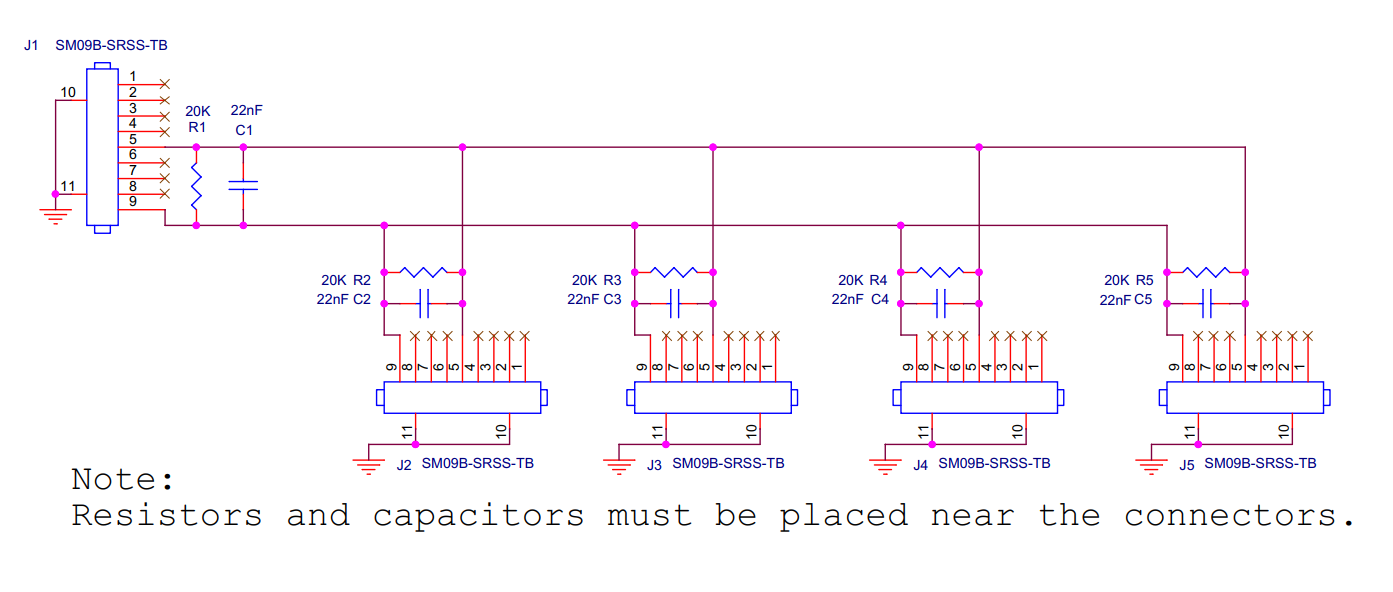 My situation is to use three cameras (one as master and the other as slave), and the connection distance will not be greater than 3 meters. So how many ASSHSSH28K152 and SHR-09V-S-B do I need to buy in total?
2. After I connect the camera according to the above figure, can I just set device.set_option(rs.option.inter_cam_sync_mode, 2) in the code part? No need to set up some other things?
3. How can I confirm that my connection is correct? For example, read the same time stamp on frame.get_timestamp() of two cameras?Looking forward to your reply.
-
1. I will make enquiries to Intel about this for you.
2. I should emphasize that I have not used hardware sync myself, but it is my understanding that setting INTER_CAM_SYNC_MODE for each device is the only requirement in terms of SDK programming. The discussion in the link below is an excellent hardware sync reference:
https://github.com/IntelRealSense/librealsense/issues/2637
3. The standard way to test if hardware sync is working correctly is to observe the timestamps over time. If the timestamps drift apart over time then sync is working. If they constantly stay the same then sync is not working. This is described in the section of Intel's multiple camera sync white-paper that is linked to below, in the paragraph headed Now to the somewhat counter intuitive aspect of time stamps
The multiple camera white-paper also discusses a method of validating sync using high-speed LED panels.
It was recently determined that the panels used in the paper's test application are likely the ones supplied by a company called Image Engineering as they are the best visual match for the ones in the paper, including the distinctive large 'Q' icon.
https://www.image-engineering.de/products/equipment/measurement-devices/900-led-panel
-
Hi again Shenlingwushi123 I received information from Intel about question 1 regarding the quantities of sync cable components required.
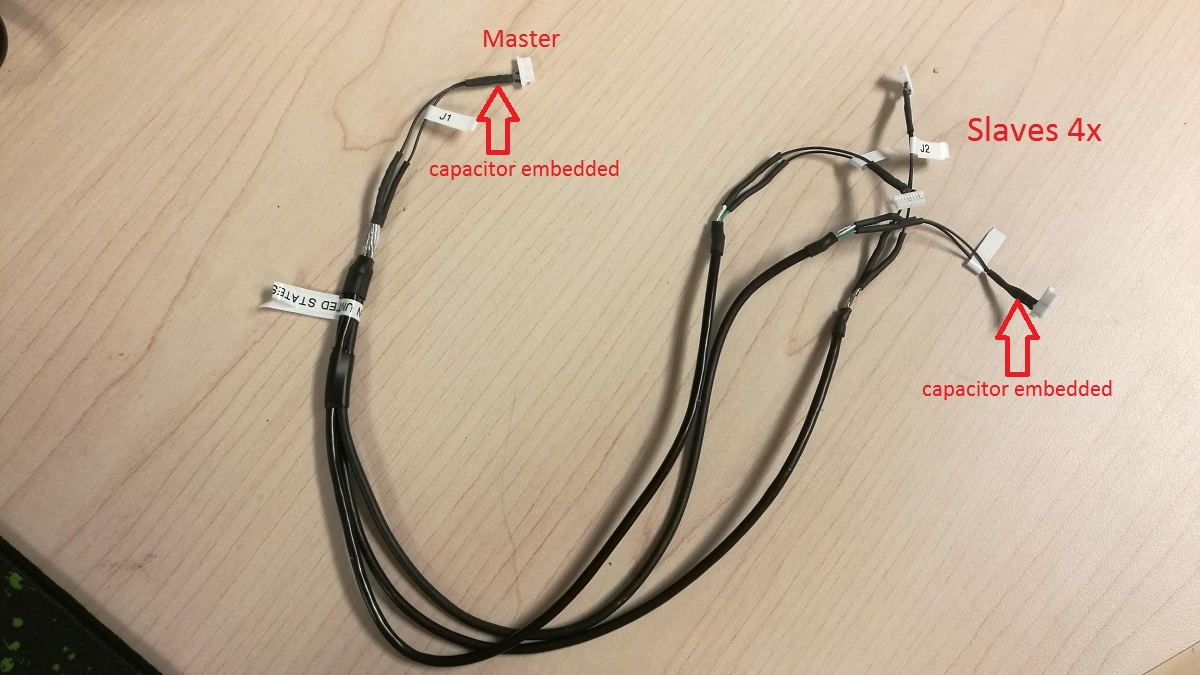
The cable assembly ASSHSSH28K152 is only good for 1x master vs 1x slave.
A reference image (below) was provided for 1x master vs 4x slave connection.
Each end needs 1x SHR-09V-S-B and 2x SSH-003T-P0.2-H, and some 28AWG wires. So you need to build the cable like the one in the reference image.
-
Thank you for your detailed reply. Through your reply, I have successfully connected the camera (one master and two slaves).
I want to ask three questions:
(1) I used set_option(rs.option.exposure, 312) to set the exposure time to 312µs, and then took a picture of the LED panel (flashing time interval is 5ms), and I found that 7 lights were on. Shouldn't there be only one light on?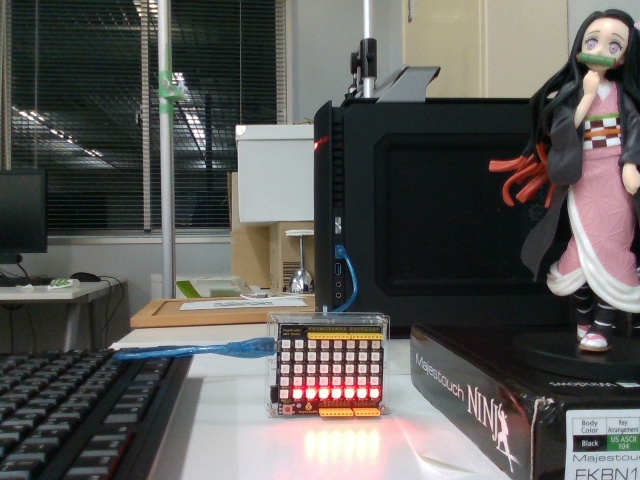
(2) Before HW sync, the difference in shutter time between the two slave cameras is 25ms (for example), then after HW sync, will this value be less than 25ms or become 0ms?
(3) I want to verify whether my connection is successful. Regarding the Now to the somewhat counter intuitive aspect of time stamps. part of the white paper, it seems that it can be used to detect the success of HW sync. In this sentence "you can actually validate that your sync is working by looking at the drift in the difference of the time stamps.", the time stamp I need to compare is the depth_frame.get_timestamp() from the two slave cameras?
Looking forward to your reply. -
1. The multiple camera white paper's high-speed LED panel example states that the camera exposure time shoud be set to < 3 ms rather than 312, otherwise the panel will just be a blur.
2. I considered this question very carefully. I believe that the discussion in the link below provides an excellent reference source for answering it.
https://github.com/IntelRealSense/librealsense/issues/3504
3. Given how slow the drift-apart of timestamps occurs, you could use the RealSense Viewer to compare the timestamps of each camera, unless your project requires the check to be done with code.
https://github.com/IntelRealSense/librealsense/issues/3565#issuecomment-475536818
The case in the link below - which was referenced earlier in this discussion - is an example of using depth_frame.get_timestamp() to check drift. My research could not find another example of this method being used though.
https://github.com/IntelRealSense/librealsense/issues/2637

-
When I use genlock mode (set the master to 1 and the remaining two slave cameras to 4), I found that the two slave cameras did not receive the frame, which should indicate that my circuit is not connected properly. So I used an oscilloscope to test the signal from the master camera like this.
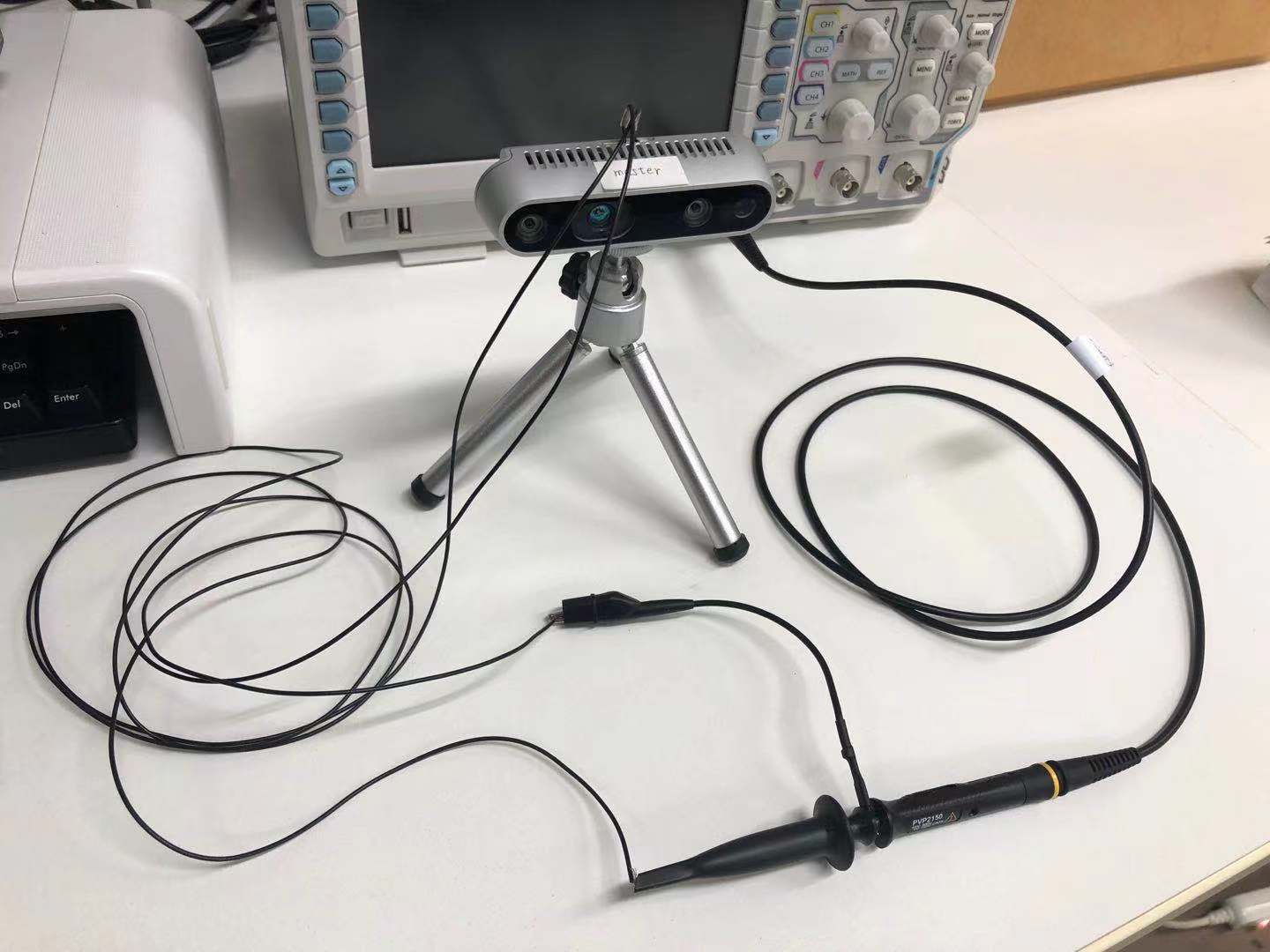
I found that there was only noise on the oscilloscope and no clock signal. There should be no problem with the line I use. When I use Intel RealSense Viewer to set the inter cam sync mode of the master camera to 1, and turn on the stereo module, should the clock signal be detected? Do you think I have any steps left? -
As well as setting the Master camera to '1' in the RealSense Viewer, have you also used the Add Source button to add the two Slave cameras to the Viewer too (so that you have three cameras listed in the Viewer's side-panel) and set their individual Inter Cam Sync Mode options, please?
When a camera is set to Slave, it will start listening for a trigger pulse. If it does not detect the pulse within a certain time period then it captures the frame unsynced.
Given that you are only testing the system at this point, I would recommend setting the Inter Cam Sync Mode of both of the Slave cameras to '2' in the Viewer to designate them both as Slaves. If you need to sync the color camera too, use '3' instead of '2' so that Full Slave mode is set.
The numbering system is described in further detail in Appendix A of the genlock white-paper.
-
I recall a past case where a RealSense user was getting only noise from a pin instead of a clear sync signal because they were measuring Pin 1 instead of Pin 5 (the sync pin).
https://community.intel.com/t5/Items-with-no-label/D435-VSYNC-Pin/td-p/576281
-
Thank you for your patient answers and links. I have carefully read all the documents you recommended to me, which is very helpful to me.
I may not describe my problem clearly. I connected the circuit according to the white paper, and added three cameras to the Intel RealSense Viewer, set the Inter Cam Sync Mode of the master camera to 1, the other two slave cameras to 2, and other parameters (AE and exposure value, etc.) ).
Then, in order to verify whether the circuit is connected correctly, I tried the method you recommend me: (1) Use an LED panel. I found that the two slaves did not take pictures at the same time, and the master camera took pictures behind the slave camera. (2) Check whether drift has changed within 10 minutes for 1ms. I found that drift has been maintained at around 33.3ms, and there is no millisecond-level change.
Therefore, I suspect that there is a problem with my circuit connection. First, I want to check if the master camera is sending out a clock signal, so I used an oscilloscope. But I only get noise instead of regular clock signals. Second, when I use Genlock mode, I set the Inter Cam Sync Mode of the two slave cameras to 4 (burst count = 1) and the fps is set to 90. And the Inter Cam Sync Mode of the master camera is set to 1 and the fps is set to 30. I found that the two slave cameras prompt "No frames received". If there is no problem with the settings I described, does this indicate a problem with my circuit connection? -
Hardware sync causes the timestamps of the Slave cameras to try to follow the timing of the Master camera. The slave cameras are still responsible for generating their own streams though - it does not come from the Master camera. So if the Slave cameras are experiencing No Frames Received errors then that would indicate an issue with the particular camera rather than the sync cable circuit. If the Slave cameras are not detecting a recognisable sync pulse then they should be streaming independently (unsynced).
Are you able to stream the two Slave cameras withut the No Frames Received error if you set their Inter Cam Sync Mode to '0' (no sync) please? If you still get No Frames Received when they are unsynced, test them at 60 FPS and 30 FPS til you can get a stream. If you cannot get a stream when unsynched at 90 FPS but you can at a lower FPS, this would suggest that the error is unrelated to sync.
-
I just tried the method you mentioned.
When I set the Inter Cam Sync Mode of the slave camera to 0 (unsynced) and run at fps of 90, they all work normally. This should indicate that there is no problem with my camera.
When I set their Inter Cam Sync Mode to 4, they prompt No Frames Received, and after a while (a few minutes), they did not stream independently.
I don't know what went wrong. -
If the Master is set to 1 and the Slaves to 2 and the slaves are not syncing their tinestamp, that would seem to point us back in the direction of a possible issue with the sending of the sync signal through the circuit, as you suggested earlier. Rather than checking the cable signal, could you try attaching your oscilloscope to Pin 5 of the Master camera (the sync pin) and see whether you get a signal or just noise during streaming when its Inter Cam Sync Mode is set to '1' please?
Please sign in to leave a comment.
Comments
15 comments