Using intel realsense d435i with raspberry pi4 for V-slam
Hi, I want to use intel realsense d435i for performing Vslam on a UAV for the task of navigating a forest. I found out that ROS is also needed to do the same. After looking around on the internet I learnt ROS doesn't support Rasbian, so installed Ubuntu server on the Pi (Pi4 4GB). After installing ROS I followed these documents:
librealsense - https://github.com/IntelRealSense/librealsense/blob/master/doc/distribution_linux.md
SLAM -https://github.com/IntelRealSense/realsense-ros/wiki/SLAM-with-D435
But while following the steps mentioned above I get an error saying "Unable to locate package"
`sudo apt-get install librealsense2-dkms` -> this was one of them
After further investigation I found out that the packages are not available for ARM devices. I am quite new to all this. If there is any straightforward guide for the above then please let me know.
Also I would like to know your views on the possibily to perform SLAM using Pi4 and D435i. I am open to any suggestions that you have to offer.
Thanks in advance.
-
A popular librealsense installation guide for Pi 4 is the Acrobotic one.
https://github.com/acrobotic/Ai_Demos_RPi/wiki/Raspberry-Pi-4-and-Intel-RealSense-D435
There is also the option of using a pre-made librealsense SD card image for Pi 4 that is provided by Intel. The image does not have additional wrappers such as Python or ROS included in it but is a good reference installation.
The link below will direct you to a recent discussion on navigation and obstacle avoidance for a rover. Please read downward from the point in the discussion that I have linked to for resource suggestions.
https://github.com/IntelRealSense/realsense-ros/issues/1366#issuecomment-687646853
-
I've been trying to get SLAM to work on the D435i aswell for raspbian, you can get ros on rasbian by using ROSberry aswell btw. Here is a link for when I tried to do it:https://support.intelrealsense.com/hc/en-us/community/posts/360049164854-D435i-SLAM-on-Raspbian-buster-raspberry-pi-4.
-
Used the pre-made image, I get the correct output in real-sense viewer when I connect a screen to the Pi. But when connecting on my windows laptop using the IP address as mentioned in the above tutorial, I get this output:
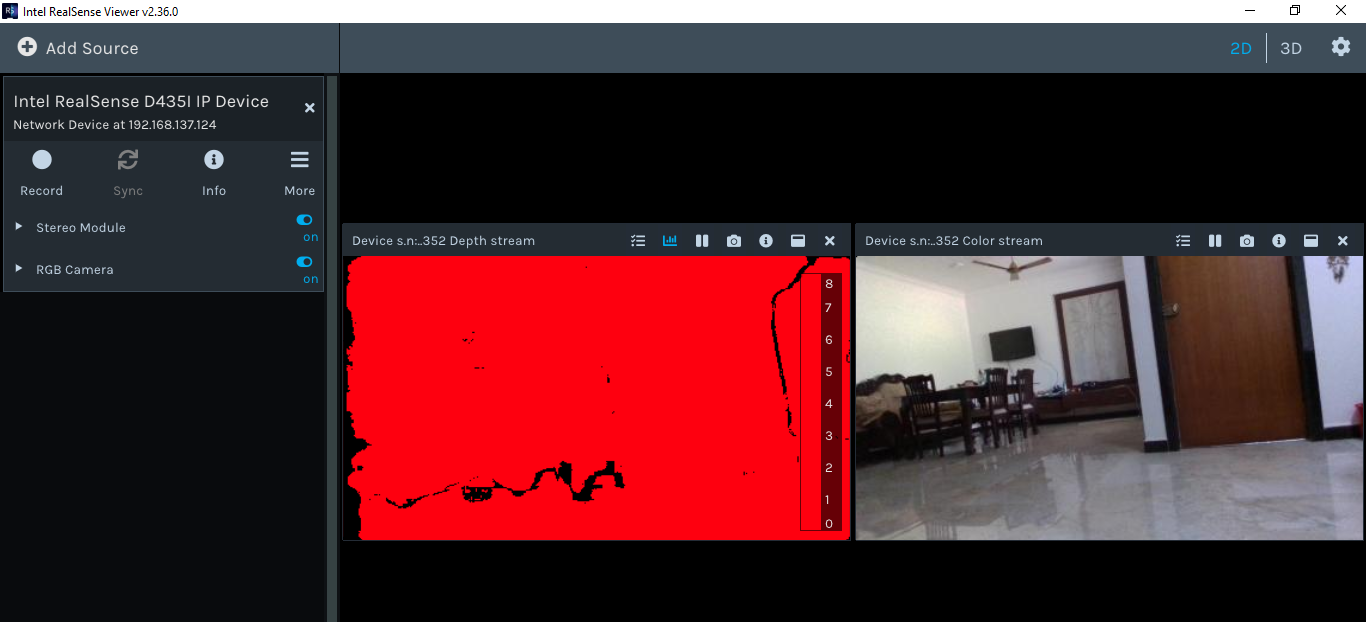
Also the depth reading was incorrect (example: 258149.531 meters)
I also tried doing this over VNC server, but got this error:

But when connecting an external screen I get the correct output with Blue to Red colors and correct depth readings.
I'm suspecting that it's some Ethernet issue that stereo module shows red.
-
Hi Akshay Ulavan When the camera is in IP Camera mode through rs-server, it currently has some limitations compared to use when accessing it directly on a computer, such as only having a limited number of resolutions and FPS speeds for each stream type.
Please check the list at the link below to see whether you are using a mode that has limitations in IP Camera mode (for example, 1280x720 depth can only stream at 6 FPS, and for 30 FPS the largest resolution available is 640x480).
-
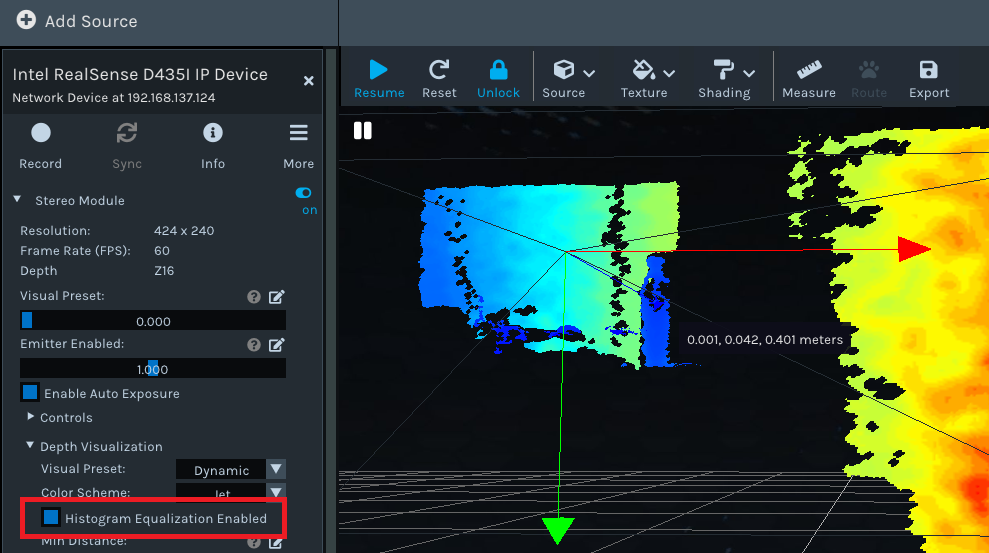
MartyG Histogram Equilization was disabled in the realsense viewer that was the reason for red colour in the stereo module. After enabling I got the Blue to Red colors. Although the depth readings are still the same in the 2D view, the 3D view seems to show correct depth readings. The mode I'm using is in the below snapshot:
I followed this conversion https://github.com/IntelRealSense/realsense-ros/issues/1366#issuecomment-687646853 and learnt about object avoidance in ardupilot using realsense camera. I noticed that they used a board called UP2. It seems to have the x86 architecture rather than ARM. Do you think that board would be a better choice for doing SLAM with ROS than RPi 4?
-
A Dhesi2 I followed your discussions, it seems like we are trying to achieve the same thing i.e. https://github.com/IntelRealSense/realsense-ros/wiki/SLAM-with-D435i
Can you please summarize the steps you followed to get librealsense and ROS on the Pi along with the guide you followed? This would be of great help as I am quite new to this stuff.
-
Akshay Ulavan Thanks very much for the update about the solution to your red depth problem that you found.
The Up2 (Up Squared) board is an excellent pairing for 400 Series cameras. Up boards have a long history with RealSense and being paired with RealSense cameras in bundles..
With Raspberry Pi, you may find it easier to implement a SLAM solution if you use Ubuntu 18.04 as the OS instead of Raspbian. 400 Series cameras can work with any Intel or Arm processor, so the fact that the Pi has an Arm processor is not an impediment
-
Akshay Ulavan
I followed the instructions from the acrobotics video guide (https://www.youtube.com/watch?v=LBIBUntnxp8). I copied and pasted the instructions from his written guide (https://github.com/acrobotic/Ai_Demos_RPi/wiki/Raspberry-Pi-4-and-Intel-RealSense-D435) so i didn't have to type everything. Then I followed the instructions on http://wiki.ros.org/ROSberryPi/Installing%20ROS%20Melodic%20on%20the%20Raspberry%20Pi (In section 3.1 I got the desktop version not the ROS-comm version). Then to get realsense2_camera, robot_localization, imu_filter_madgwick and rtabmap_ros I used section 4.2 of the ROSberry guide. The command i used was:
rosinstall_generator ros_desktop realsense2_camera robot_localization imu_filter_madgwick rtabmap_ros --rosdistro melodic --deps --wet-only --tar > melodic-custom_ros.rosinstall
Then get the realsense ros wrapper by using step 2 of the following instructions
https://github.com/IntelRealSense/realsense-ros#step-2-install-intel-realsense-ros-from-sources
This is where I have got up to I tried following the instructions in
https://eleccelerator.com/wiki/index.php?title=Raspbian_Buster_ROS_RealSense#Installing_RTAB-Map
to get RTABMAP but i'm still unsuccesful in getting SLAM to work , i'm basically right at the end however.. This is a long process so even though it sounds obvious copying and pasting commands into the terminal window saves lots of time. MartyG do you have any advice on where to go from here.
-
A Dhesi2 If you are using RealSense ROS wrapper 2.2.15 or newer then the IMU topics are disabled by default. So you could try adding this line to the end of your roslaunch statement:
enable_gyro:=true enable_accel:=true
-
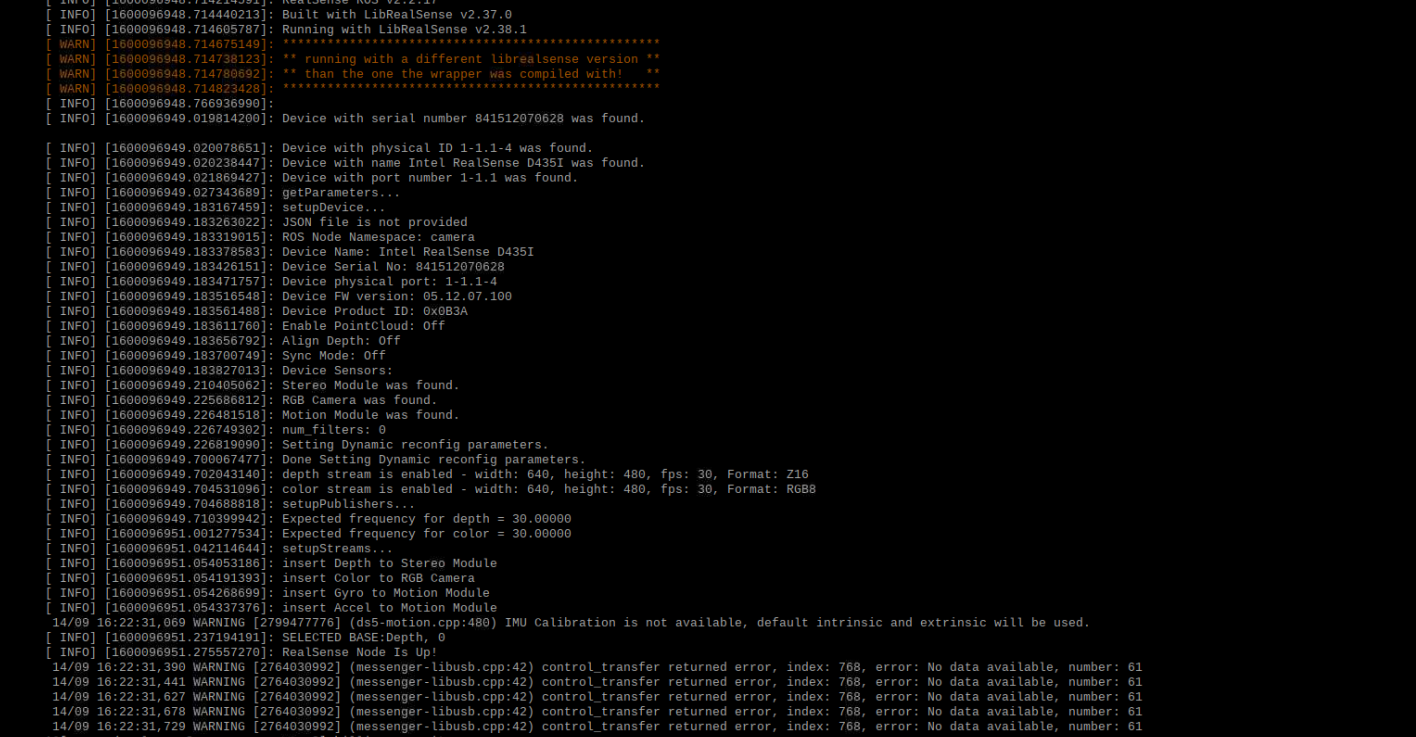
Hi A Dhesi2 The log for roslaunch realsense2_camera rs_camera.launch states that the IMU is not calibrated. You can calibrate the IMU with a Python tool, as described by the link below:
https://dev.intelrealsense.com/docs/imu-calibration-tool-for-intel-realsense-depth-camera
In regard to the control_transfer returned warnings at the bottom of the log: these can be ignored if they are only appearing at the start of launch or appearing about once a minute instead of generating continuously. The topics may still be able to be correctly published in RViz even if these messages appear.
If the control_transfer returned warnings are generated continuously though then this may indicate a serious communication problem with the device.
-
what should i do about the roslaunch realsense2_camera opensource_tracking.launch enable_gyro:=true enable_accel:=true error that i get. Its not captured on the screenshot but the rviz initialisation thing appears but when the first red error appears the rviz initialisation thing then vanishes and it just repeats the same two orange errors.

Also for the control_transfer returned erros about five of them appear in one go then none appear at all it just stays like that indefinitely with no more errors or warnings.
-
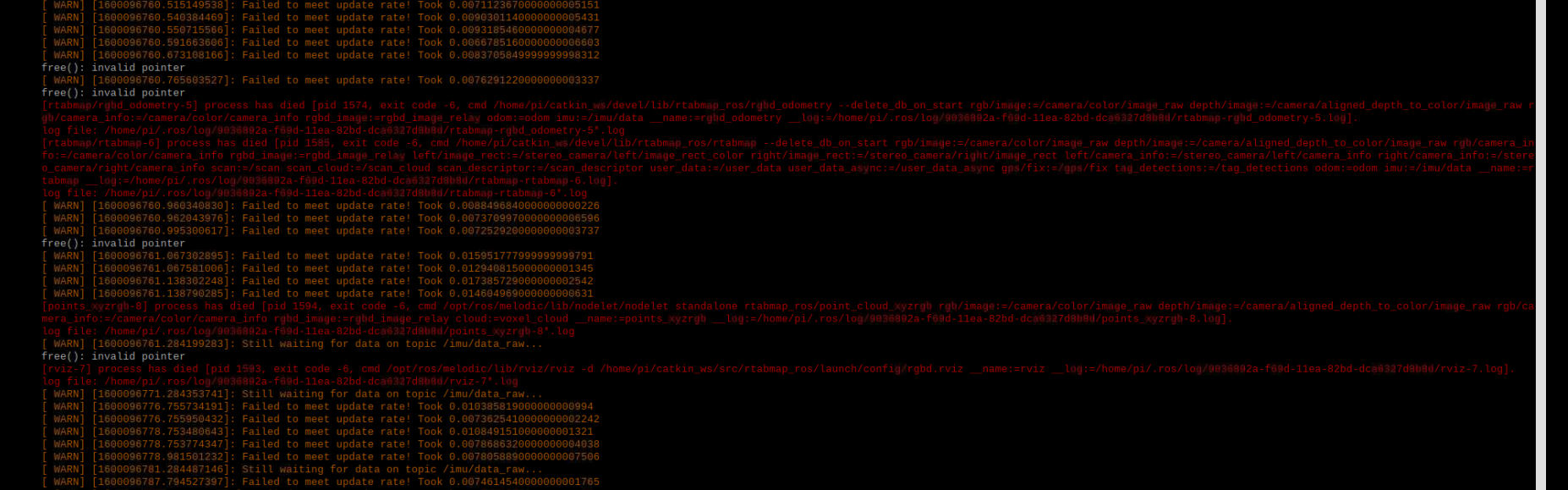
If the control_transfer returned errors have stopped at the first 5 and the process has not 'died' then it sounds as though it is stable. The next logical step is to check if the topics are publishing. You can use rostopic list to list the available topics, and rostopic echo <topic name> to list the messages being published on a particular topic name. If there are no messages being published, it will likely display 'no new messages'.
An example command for checking if a topic is published is:
rostopic echo /camera/rgb/image_rect_color
I located another case where somebody was getting the failed to meet update rate error when trying the D435i SLAM project. It does not contain a clear solution though, as the RealSense user in that case stopped commenting.
-
Thank you A Dhesi2. Since you are trying with Rasbian, I will proceed with using Ubuntu server (https://ubuntu.com/download/raspberry-pi) as per MartyX Grover suggestion. We can always share the solution if one of the two are achieved. I will create another thread for setting up realsense and ros with raspberry Pi4 and Ubuntu. I will be using Ubuntu 18 64bit from the above link.
Please sign in to leave a comment.
Comments
15 comments