Firmwares of Realsense 435i recognizabillity in Windows 10 Pro
Hi Realsensers,
i try lots of Firmwares with my Computer with following specs:
- Win10 Pro (Version 10.0.18363 Build 18363) with update 1909
- Asrock Z97 Extreme6
- I7 4790k not overlocked
- 16gb Ram
- Sapphire Radeon 5700 XT with latest drivers
- Intel.RealSense.SDK-WIN10-2.33.1.1360
Original Realsense USB cable. Same effect on Samsung original Note 9 cable...
I managed to see the Cam in the viewer with the signed Firmware 5_10_3_0. after i set the privacy settings.
Anything above does'nt work.
Any idea what the problem could be?
Best
Damian
-
Hi Damian,
It is not recommended that the firmwares are changed around frequently. This is because the cameras have a maximum limit of 20 downgrades to earlier versions. After that point, downgrading is locked and you can only upgrade to a newer version than the currently installed one in future.
If you currently have firmware version 5.13.0 installed, that is the current recommended latest version, so that is the ideal version for your camera to have for now (a newer 5.14.0 version is on the way but is not available yet).
Could you describe what your problem with the camera is please? Thanks!
-
Hi MartyG,
Thanks for your fast reply !
I have done 8 downgrades just to see wich Firmware are working in my Setup.
thanks for the info with the limitation of downgrades ! nice to know. can i reset that? (Gold Reset)
So the actual working Firmware is the 5.10.3 in my system.
the recomended Firmware when i open the Viewer is 5.12.3 pre release.
On the Firmware page is the latest one 5.12.3.0 -->https://dev.intelrealsense.com/docs/firmware-releases
Can you tell me where can i find the 5.13.0?
Problem:
When i update the cam with the latest recommended Firmware in the viewer, then the cam will not be recognized anymore with the viewer or the other SDK tools/Software like recfusion.
i just can do a rollback to the Firmware i told and then the Cam is working.
really strange.
-
I do not know of any way to reset the downgrade counter. A RealSense user recently said that they thought that their downgrade counter had been reset to zero by a Gold Reset. As far as I know though, the official advice remains that 20 downgrades is the permanent limit.
If you scroll down the firmware releases page a bit, the download link for 5.12.3 (the current recommended version) is at the top of the list.
In most situations though, using the 'update to recommended firmware' option in the RealSense Viewer will work fine. You do not need to download a firmware file when using this option, as the recommended firmware for a particular SDK version is already bundled in the SDK. So with each new SDK version that you install, it will always include the latest recommended firmware for that SDK for the 'update to recommended firmware' option to access.
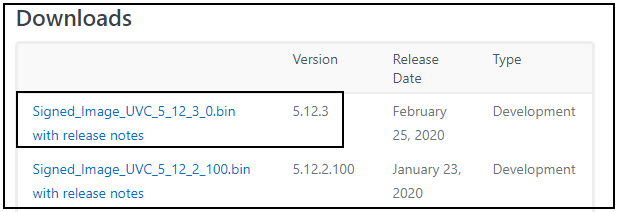
There is currently no firmware version 5.13.0. The next version that is coming is said to be 5.12.4.0 (though firmware names can change in-between announcement and release).
-
Hi MartyG and other 435i useres,
Same problem with a new Cam!
so it have to be my Config.... or another defective Cam ?!
I took some video footage from the upgradeprocess..
https://www.myqnapcloud.com/smartshare/5a8f07acf60b5863733a7c15/video/sharelink?aid=28OSPF
https://www.myqnapcloud.com/smartshare/5a8f07acf60b5863733a7c15/video/sharelink?aid=PofeWq
its my private Nas so please feel free to download the Video and share it with others...
Any ideas how to solve this problem?
Config:
- Win10 Pro (Version 10.0.18363 Build 18363) with update 1909 - nearly fresh Install !
- Asrock Z97 Extreme6
- I7 4790k not overlocked
- 16gb Ram
- Sapphire Radeon 5700 XT with latest drivers
- Intel.RealSense.SDK-WIN10-2.33.1.1360
-
Thanks very much for your patience! The video links did not work, unfortunately.
I had a case in the past week that sounds similar to yours. The user found that the firmwares would only work for them up to a certain point (5.11.11.100 for them) and none newer than that would function. That is still an open and active case at the time of writing this and a member of the RealSense support team is handling it.
https://github.com/IntelRealSense/librealsense/issues/6369
I note that you mention using the DFU firmware tool. Are you referring to this one please?
If so, that tool was superseded in 2019 by a new firmware update tool called rs-fw-update:
-
Hi MartyG,
Thanks again for your reply!
sry for the downtime of the videos..Firmwareupgrade the NAS....
Put it in my Google Drive.
https://drive.google.com/open?id=1mEdERatIgIHxE7rmr9UKUkn_gLXB1el1
Yes its this DFU frimware tool.i will try the the solution with the rs-fw-update..
So the cam comes new and was not recognizeable by the Realsense-Viewer?
Why? i flashed back (DFU) to the 5.10.3 and she was present in the Viewer.
You will see it in the Video. I try a firmwareupdate via the Viewer and the cam never show up again.
Plug it out and back in and no cam.
is it possible that the DFU Tool is changing something in the Firmware, that the viewer not can handle?.
-
Downgrading the firmware version usually should not harm the camera, unless there is a bad / incomplete firmware write that disables the camera and puts it into "recovery mode".
I did a recommended update of my own camera to follow the progress of the log and compared the process to yours. Like with your camera, the process got to 95% and the "Firmware update completed, waiting for device to reconnect" message. The next step to get to 100% (which your process did not reach) was simply to reset the camera, causing it to appear again in the options side-panel.
This implies to me that the firmware update was successfully written to the camera, and that when the camera was unplugged and re-plugged, it should have appeared in the Viewer because doing so is equivalent to doing a reset of the camera.
Sometimes when a problem has occurred with firmware, it has been fixed by doing a downgrade to an earlier version like you did, and then re-upgrading to the current version. But it looks like that was what you were doing in the video - re-upgrading from 5.10.3 to the current version - meaning that you have already tried this method. Is that correct, please?
Does the firmware update process fail if you upgrade by one version from 5.10.3 to 5.10.6 by doing a manual firmware update with a firmware file (not the automated recommended version update) with the Viewer's "Update Firmware" menu option?
-
ok i can say that the cam not goes in to "recovery mode"...
i can see the cam after the upgrade in the DFU Tool (Video 2) but not in the Viewer or other Software.
The cam came new to me with 5.11.10 and was not recognized by the Viewer, Note 9 or RecFusion.
Then i did a downgrade (with DFU) to 5.10.3 and she was recognized by the Viewer and RecFusion but not by my Note 9.
after that i done the Firmwareupgrade from the Viewer recomended. (Video 1)
I Tried that with the cam that i got the first time and now i see it must be my system.
but what can cause this problem?
USB3 chip compatibility? its a Z97 Chipset based USB 3.0 port..
Driver are all up to date...
Do you have an idea? What would you try to fix it?
Thanks in advance MartyG!
-
I did further research and remembered that because the D435i was introduced around a year after D435, it actually had a minimum firmware of 5.10.10.0 or newer. This suggests that if you have 5.10.3 installed then the camera does not even know it is a D435i, as the D435i functions would not be in the firmware yet. At best it might think it is an ordinary D435 and at worst not be detectable by RealSense applications at all.
Another restriction is that Android support for D435i was not introduced til SDK version 2.26.0, which needed a minimum firmware of 5.11.6.250 or newer for the D435i. So if you are trying to use the camera with your Samsung Galaxy Note 9 with a firmware earlier than 5.11.6.250 then it likely would not work with the Android device.
I further would not exclude the possibility that the problem is related to your Windows build version. For some people, RealSense cameras stop working when Windows downloads and installs a new version. I call the phenomenon "worked fine til today" because a camera might work fine one day and not at all the next day if a camera breaking Windows update has installed.
-
You could try installing RealSense's Universal Windows Platform (UWP) driver. You do not actually need it as it is for use with hardware that uses Microsoft's UWP standard, such as the HoloLens VR headset. The UWP driver installation package also installs camera firmware 5.11.6.200 though. So it may make a difference where installing that firmware with a file from the firmware download page did not.
Please sign in to leave a comment.
Comments
12 comments