How to separate the image of open RS2_OPTION_EMITTER_ON_OFF model?
In D435i, I turned on RS2_OPTION_EMITTER_ON_OFF, the output image is a frame with a spot and a frame normal, in the realsence driver, what state quantity is able to distinguish whether the image is speckled in the state of ir open?
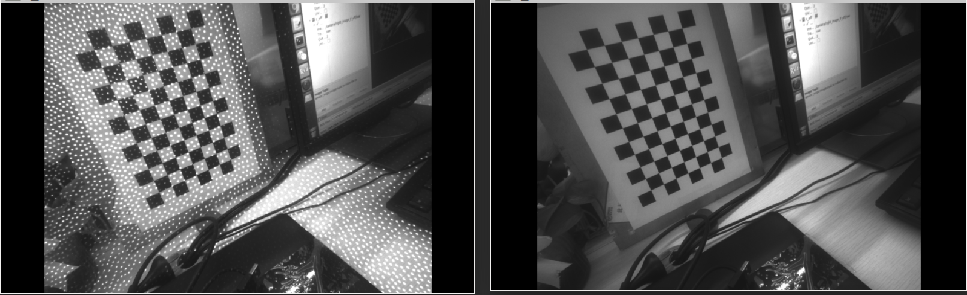
-
It looks as though your question is related to your previous question about alternating the projector on and off each frame, where it was suggested that you use the instruction RS2_OPTION_EMITTER_ON_OFF to do this.
https://support.intelrealsense.com/hc/en-us/community/posts/360036117074-D435i-cycle-switch-ir
If you are asking whether you can check if the IR Emitter is enabled, I guess you could do that by checking if the value of RS2_OPTION_EMITTER_ON_OFF = '1' (on).
Another way to check if the emitter is enabled might be to get the value of RS2_OPTION_EMITTER_ENABLED: (where '0' is disabled and '1' is enabled).
depth_sensor.get_option(RS2_OPTION_EMITTER_ENABLED)
-
If your aim is to detect whether an image has speckles, OpenCV might be the best way to do it. Google for 'opencv detect speckle'. Here is an example:
https://answers.opencv.org/question/54254/some-brainstorming-help-to-detect-speckles/
Please sign in to leave a comment.
Comments
3 comments