D415 Get unrectified streams for custom calibration
Hello everyone,
I'm trying to get the Y16 format streams from left and right imagers for a custom calibration app.
So far I could get the left imager to give me some data, but the right imager only returns a nullptr.
Here is the code I'm working with (thanks ofr your help!):
rs2::context myContext;
rs2::device_list devicesList = myContext.query_devices();

rs2::device myDevice = devicesList[0];
rs400::advanced_mode advancedModeDevice = myDevice.as<rs400::advanced_mode>();
if (!advancedModeDevice.is_enabled())
{
   advancedModeDevice.toggle_advanced_mode(true);
}

rs2::config deviceConfig;
deviceConfig.disable_all_streams();
deviceConfig.enable_stream(RS2_STREAM_INFRARED, 1, 1920, 1080, RS2_FORMAT_Y16, 15);
deviceConfig.enable_stream(RS2_STREAM_INFRARED, 2, 1920, 1080, RS2_FORMAT_Y16, 15);

rs2::pipeline myPipe(myContext);
rs2::pipeline_profile myPipeProfile = myPipe.start(deviceConfig);

rs2::frameset fs = myPipe.wait_for_frames(6000);

// 1. GET RAW IMAGES FROM LEFT IMAGER (IT WORKS!)

rs2::video_frame raw_left_infrared_frame  = fs.get_infrared_frame(1);
if(raw_left_infrared_frame)
{
   const int leftWidth  = raw_left_infrared_frame.get_width();
   const int leftHeight = raw_left_infrared_frame.get_height();
   std::cout << fmt::format("Frame from Left Sensor : w={}, h={}\n", leftWidth, leftHeight);
}

// 2. GET RAW IMAGES FROM RIGHT IMAGER (IT DOES NOT WORK!)

rs2::video_frame raw_right_infrared_frame  = fs.get_infrared_frame(2);
if(raw_right_infrared_frame)
{
   const int rightWidth  = raw_right_infrared_frame.get_width();
   const int rightHeight = raw_right_infrared_frame.get_height();
   std::cout << fmt::format("Frame from right Sensor : w={}, h={}\n", rightWidth, rightHeight);
}
-
Hi MartyG !
I swear I tried looking into every post about raw format and the code samples, but I can't get that simple function to work..
Any idea?
Thanks a lot!
-
If you are able to use the RealSense Viewer tool, please look at the camera name at the top of the options side-panel. If the number beside the name is '2.1' then the camera is being detected as being on a USB 2 connection. If the number is '3.2' then the camera is on a USB 3 connection. Infrared 2 is only available on a USB 3 connection.
-
Hi MartyX Grover, thanks for your answer!
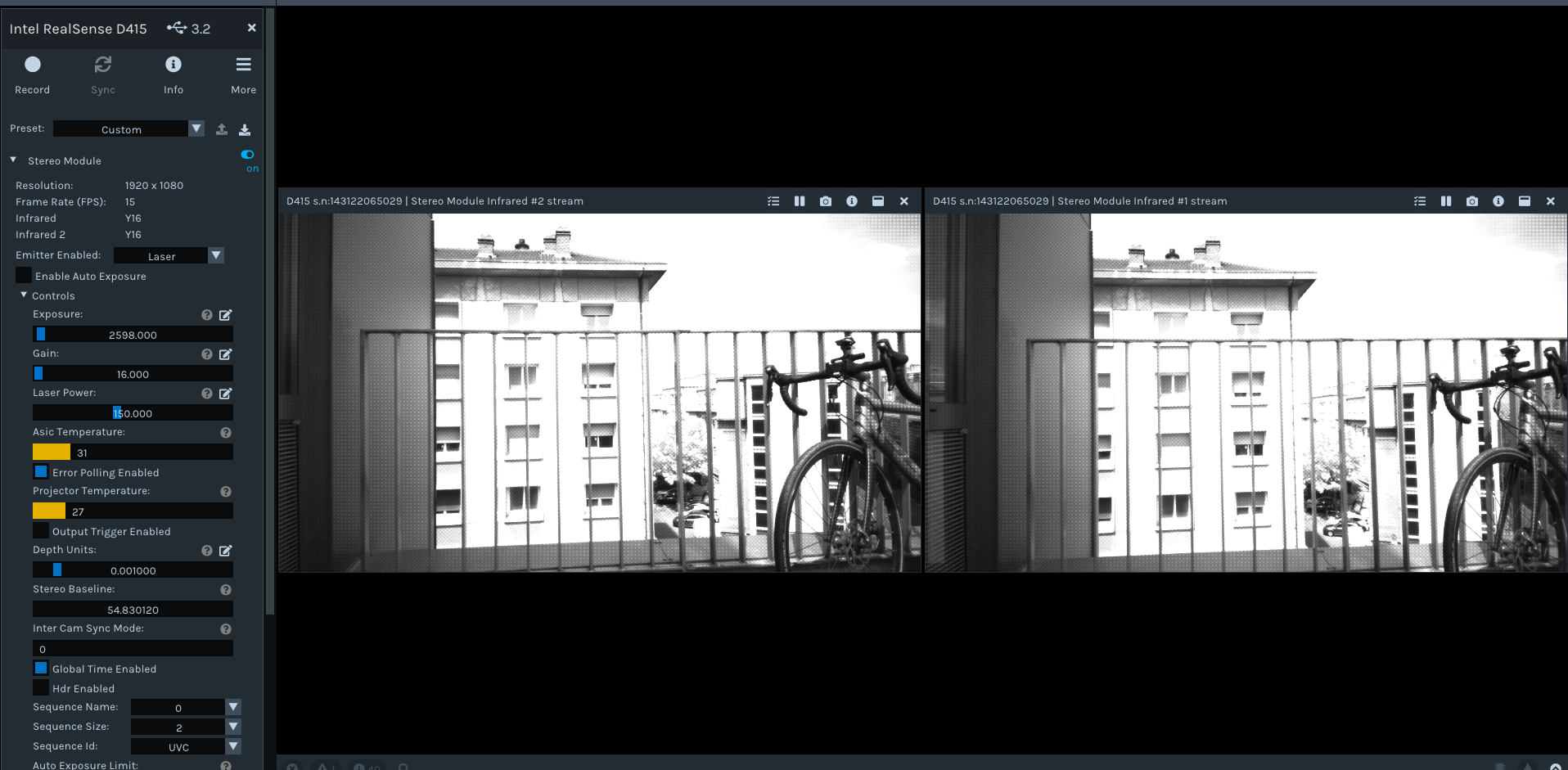
I checked that I was on a 3.2 USB connection, and I could stream both Y16 streams using the viewer, it works just fine:
-
What happens if the code is simplified to remove the If checks, and the '6000' is removed from waitforframes() like in the edited code below.
rs2::context myContext;
rs2::device_list devicesList = myContext.query_devices();

rs2::device myDevice = devicesList[0];
rs400::advanced_mode advancedModeDevice = myDevice.as<rs400::advanced_mode>();
if (!advancedModeDevice.is_enabled())
{
   advancedModeDevice.toggle_advanced_mode(true);
}

rs2::config deviceConfig;

deviceConfig.enable_stream(RS2_STREAM_INFRARED, 1, 1920, 1080, RS2_FORMAT_Y16, 15);
deviceConfig.enable_stream(RS2_STREAM_INFRARED, 2, 1920, 1080, RS2_FORMAT_Y16, 15);

rs2::pipeline myPipe(myContext);
rs2::pipeline_profile myPipeProfile = myPipe.start(deviceConfig);

rs2::frameset fs = myPipe.wait_for_frames();

rs2::video_frame raw_left_infrared_frame  = fs.get_infrared_frame(1);

rs2::video_frame raw_right_infrared_frame  = fs.get_infrared_frame(2);

   const int leftWidth  = raw_left_infrared_frame.get_width();
   const int leftHeight = raw_left_infrared_frame.get_height();


   const int rightWidth  = raw_right_infrared_frame.get_width();
   const int rightHeight = raw_right_infrared_frame.get_height();

   std::cout << fmt::format("Frame from Left Sensor : w={}, h={}\n", leftWidth, leftHeight);
std::cout << fmt::format("Frame from right Sensor : w={}, h={}\n", rightWidth, rightHeight); -
Yes it finally worked \o/
Actually it works well with the "if checks" and the waiting time at 6000, I really don't know what changed except that I tried making it work with the right stream only before...
So thanks for your help!
I guess plugging it / unplugging it and messing around with the streams (with the viewer also) did the trick somehow

Please sign in to leave a comment.
Comments
8 comments