[L515]Is it possible to match alignment of color image and depth image?
I'm currently using the L515 with NVIDIA's Jetson NX.
In the process I do, I need to match the alignment in the color and depth images.
(process)
1, Detect a person in a color image and get the coordinates
2, get the distance from the depth using the obtained coordinates
However, if you add the align function, the position will shift.
The result will look like the image.
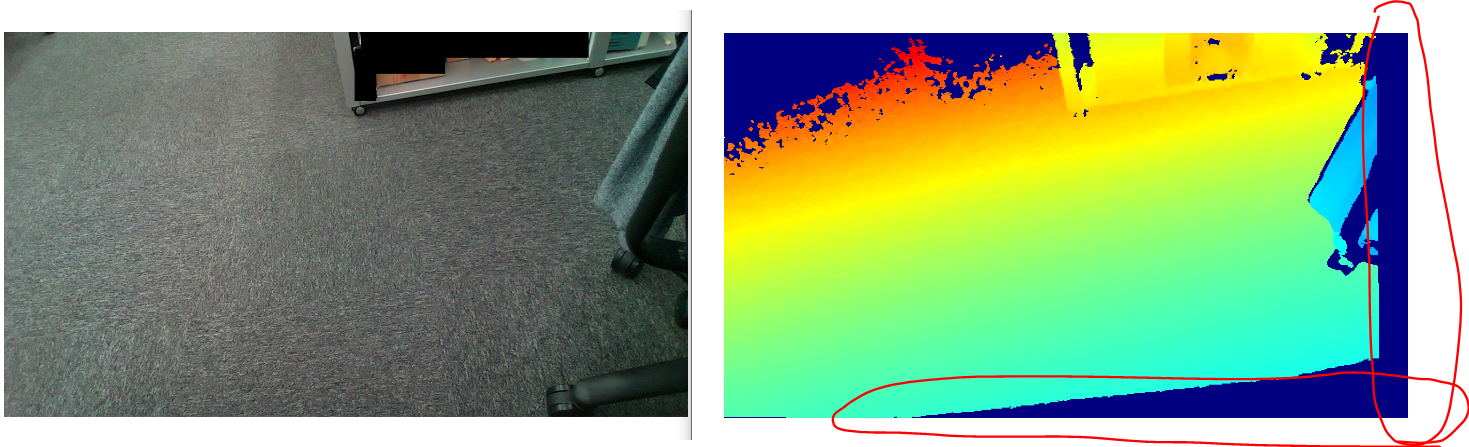 The front is very different.
There is also vertical noise on the right side.
Is it possible to match alignment so that there is no discrepancy between the color image and the depth image?
The code I'm using is below.
import pyrealsense2 as rs
import numpy as np
import cv2

config = rs.config()

config.enable_stream(rs.stream.depth, 1024, 768, rs.format.z16, 30)
config.enable_stream(rs.stream.color, 1280, 720, rs.format.bgr8, 30)

pipeline = rs.pipeline()
profile = pipeline.start(config)

align_to = rs.stream.color
align = rs.align(align_to)
depth_sensor = profile.get_device().first_depth_sensor()
depth_scale = depth_sensor.get_depth_scale()

try:
    while True:
        frames = pipeline.wait_for_frames()

        aligned_frames = align.process(frames)
        color_frame = aligned_frames.get_color_frame()
        depth_frame = aligned_frames.get_depth_frame()

        depth_intrin = depth_frame.profile.as_video_stream_profile().intrinsics
        depth_image = np.asanyarray(depth_frame.get_data())
        color_image = np.asanyarray(color_frame.get_data())

        depth_colormap = cv2.applyColorMap(cv2.convertScaleAbs(depth_image, alpha=0.03), cv2.COLORMAP_JET)

        images = np.hstack((color_image, depth_colormap))
        cv2.namedWindow('RealSense', cv2.WINDOW_NORMAL)
        cv2.imshow('RealSense', images)
        if cv2.waitKey(1) & 0xff == 27:
            cv2.destroyAllWindows()
            break

finally:
    pipeline.stop()
-
Hello N Kanbe l9,
We suggest you use this python code:
import pyrealsense2 as rs
import numpy as np
import cv2
pipeline = rs.pipeline()
config = rs.config()
config.enable_stream(rs.stream.depth, 1280, 768, rs.format.z16, 30)
config.enable_stream(rs.stream.color, 1280, 768, rs.format.bgr8, 30)
profile = pipeline.start(config)
depth_sensor = profile.get_device().first_depth_sensor()
depth_scale = depth_sensor.get_depth_scale()
print("Depth Scale is: " , depth_scale)
clipping_distance_in_meters = 1 #1 meter
clipping_distance = clipping_distance_in_meters / depth_scale
align_to = rs.stream.color
align = rs.align(align_to)
try:
while True:
frames = pipeline.wait_for_frames()
aligned_frames = align.process(frames)
aligned_depth_frame = aligned_frames.get_depth_frame() # aligned_depth_frame is a 640x480 depth image
color_frame = aligned_frames.get_color_frame()
if not aligned_depth_frame or not color_frame:
continue
depth_image = np.asanyarray(aligned_depth_frame.get_data())
color_image = np.asanyarray(color_frame.get_data())
depth_colormap = cv2.applyColorMap(cv2.convertScaleAbs(depth_image, alpha=0.03), cv2.COLORMAP_JET)
images = np.hstack((color_image, depth_colormap))
cv2.namedWindow('Align Example', cv2.WINDOW_AUTOSIZE)
cv2.imshow('Align Example', images)
key = cv2.waitKey(1)
if key & 0xFF == ord('q') or key == 27:
cv2.destroyAllWindows()
break
finally:
pipeline.stop()Regards,
Zulkifli
-
he corregido el codigo ahora funciona:::::
import pyrealsense2 as rs
import numpy as np
import cv2# Configure depth and color streams
pipeline = rs.pipeline()
config = rs.config()# Get device product line for setting a supporting resolution
pipeline_wrapper = rs.pipeline_wrapper(pipeline)
pipeline_profile = config.resolve(pipeline_wrapper)
device = pipeline_profile.get_device()
device_product_line = str(device.get_info(rs.camera_info.product_line))config.enable_stream(rs.stream.depth, 640, 480, rs.format.z16, 30)
config.enable_stream(rs.stream.color, 640, 480, rs.format.bgr8, 30)
# Start streaming
pipeline.start(config)
depth_sensor = device.first_depth_sensor()
depth_scale = depth_sensor.get_depth_scale()
print("Depth Scale is: " , depth_scale)clipping_distance_in_meters = 1 #1 meter
clipping_distance = clipping_distance_in_meters / depth_scalealign_to = rs.stream.color
align = rs.align(align_to)try:
while True:
frames = pipeline.wait_for_frames()aligned_frames = align.process(frames)
aligned_depth_frame = aligned_frames.get_depth_frame() # aligned_depth_frame is a 640x480 depth imagecolor_frame = aligned_frames.get_color_frame()
if not aligned_depth_frame or not color_frame:
continuedepth_image = np.asanyarray(aligned_depth_frame.get_data())
color_image = np.asanyarray(color_frame.get_data())
depth_colormap = cv2.applyColorMap(cv2.convertScaleAbs(depth_image, alpha=0.03), cv2.COLORMAP_JET)images = np.hstack((color_image, depth_colormap))
cv2.namedWindow('Align Example', cv2.WINDOW_AUTOSIZE)
cv2.imshow('Align Example', images)key = cv2.waitKey(1)
if key & 0xFF == ord('q') or key == 27:
cv2.destroyAllWindows()break
finally:
pipeline.stop()
Please sign in to leave a comment.
Comments
4 comments