Intel Realsense D435 Depth sensing reliability and accuracy
Hi,
We are building robotic systems in shelf and bin picking. We are currently using D435 to do object detection and pose estimation. We are frequently facing reliability issue with the depth data as the camera often gives ridiculously inaccurate depth information, for example, the camera places upright, in front of the object 0.4 m away (by tape measurement), but the depth data shows that the object is 0.6 or 1 m away, and sometimes (30% of the time) it just gives 0 m in depth even though the RGB camera detects the object. I have double-checked to make sure both color and depth frames are aligned and I chose the optimal depth resolution that Intel realsense recommends which is 848 x 480 at 30 fps. I read a few posts about related issues, people were saying unplug and plug the camera back in would resolve the issue. It works of course, but we are building commercial robot here and we couldn't afford such issue to happen so frequently. I am really suspicious with the reliability of the realsense D435 camera, and hoping if the support and community can point us to the right direction to solve this issue.
To be more detail, in terms of software API, I used intel sensor control API to directly access the frames, I even did sync both color and depth frames to ensure the frames are received at the same time.
-
Hi Yiherng Would it be possible to provide an RGB and depth image of a typical scene that the camera is observing please? This will help a lot to diagnose accuracy problems that might be being caused by environmental conditions such as lighting, or other elements in the scene that could have negative consequences for the depth image.
-
Thanks for reply MartyG,
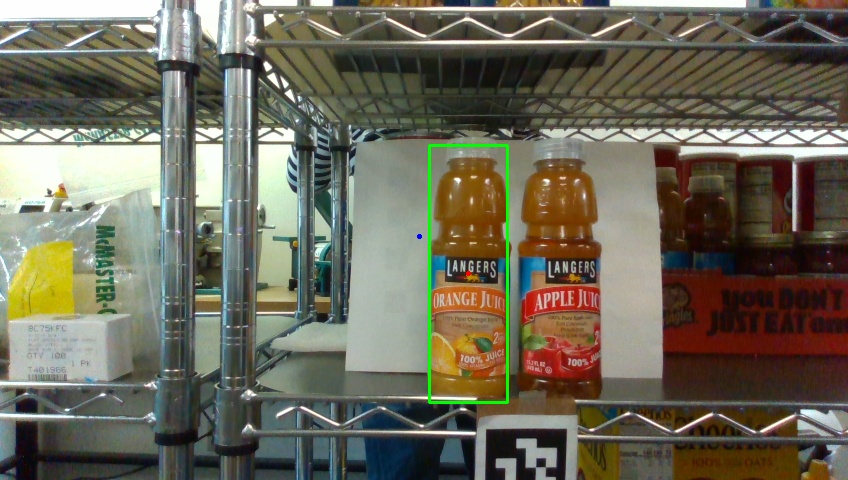
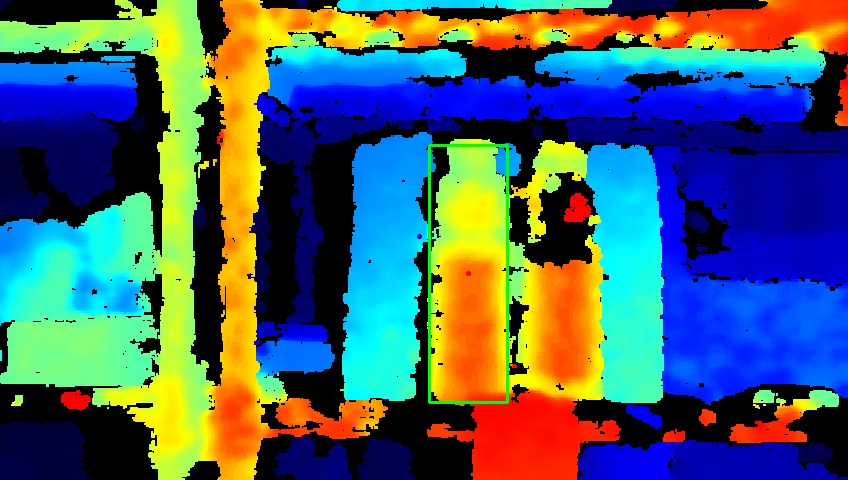
Please see the attached color and depth images captured by the camera.
-
In the above case, the depth of the bounding box is 0.46 m. Here is how I obtain the depth data,
depth = np.asanyarray(depth_image.get_data())depth = depth[target_box[0]:target_box[2], target_box[1]:target_box[3]].astype(float)depth_scale = depth_sensor.as_depth_sensor().get_depth_scale()depth = depth * depth_scaledist = _get_depth_median(depth)I have _get_depth_median() function to get the median of the depth data. The reason of using median instead of the mean is to rule out those outliers.So the issue here is, 40 % of the time the depth calculation is just wrong (0.6 m or 1 m or even 0m), and I need to unplug and replug the camera to get it to work normally again. -
Thanks very much for the useful images.
I would expect the foreground near to the camera to be primarily colored blue. It looks as though the surfaces that may be having their distance mis-read as orange and yellow-green (further away than they actually are) are ones that light can reflect off, such as metal and plastic bottles. Reflections make surfaces more difficult for the camera to read depth detail from.
In this situation, aligning depth to color may help, as it makes it easier to distinguish foreground pixels from background pixels. Intel have examples for such alignment with Python.
align-depth2color.py
depth_under_water
This Jupyter Notebook example is especially relevant, as it uses alignment to deal with reflections.
https://github.com/IntelRealSense/librealsense/blob/jupyter/notebooks/depth_under_water.ipynb
In regard to depth_scale, unless you are changing the value during runtime then you do not need to retrieve the value with a programming instruction in real-time as it is normally unchanging. You can set it to a fixed numeric value of 0.001 (the default depth unit scale of the 400 Series cameras), or try 0.0001 for a potentially improved quality depth image with less missing data when performing close-range sensing like this particular application.
You could also try putting a card background along the bottom of the rack with the triangular sections where the fiducial tag card is, as the camera may interpret the triangles as a repetitive pattern and become confused.
A repetitive pattern is where there are elements in the scene that repeat horizontally or vertically, such as horizontal fence post rows or tree-top rows, or vertical window blinds
-
Now that you mentioned it, it seems really weird to me as well. I use the following method to colorize the depth frame:
colorizer = rs.colorizer()depth_image = framedepth_image = depth_image.as_depth_frame()colorized_depth = np.asanyarray(colorizer.colorize(depth_image).get_data())But when I visualize it on realsense-viewer app, the colors are actually flip.I did use the same method as align-depth2color, as I realized FOV of stereo-vision is actually wider than RGB camera. Aligned-depth2 color is necessary otherwise the reading will always be far off.
-
The image from the RealSense Viewer looks more correct, with the bottles, fiducial tag card and foreground rack bars appearing blue and the detail behind the bottles progressively shifting towards red at the far distance.
It is worth bearing in mind that by default the Viewer applies a range of depth color scheme and post-processing filter settings that are not present in a user-created script unless deliberately programmed in. This is why Viewer images can look different to the output of scripts.
It may be useful to refer to the information in the link below about configuring the color scheme in Python.
https://github.com/IntelRealSense/librealsense/issues/7767#issuecomment-726704671
-
You can automatically reset the camera from a script using the hardware_reset() instruction. It can be set up to trigger when certain logic conditions are met, such as more than 50% of the pixels having zero depth (indicating that something may have gone wrong with the image).
The link below has an example of Python scripting for hardware_reset():
https://github.com/IntelRealSense/librealsense/issues/3329#issuecomment-475293475
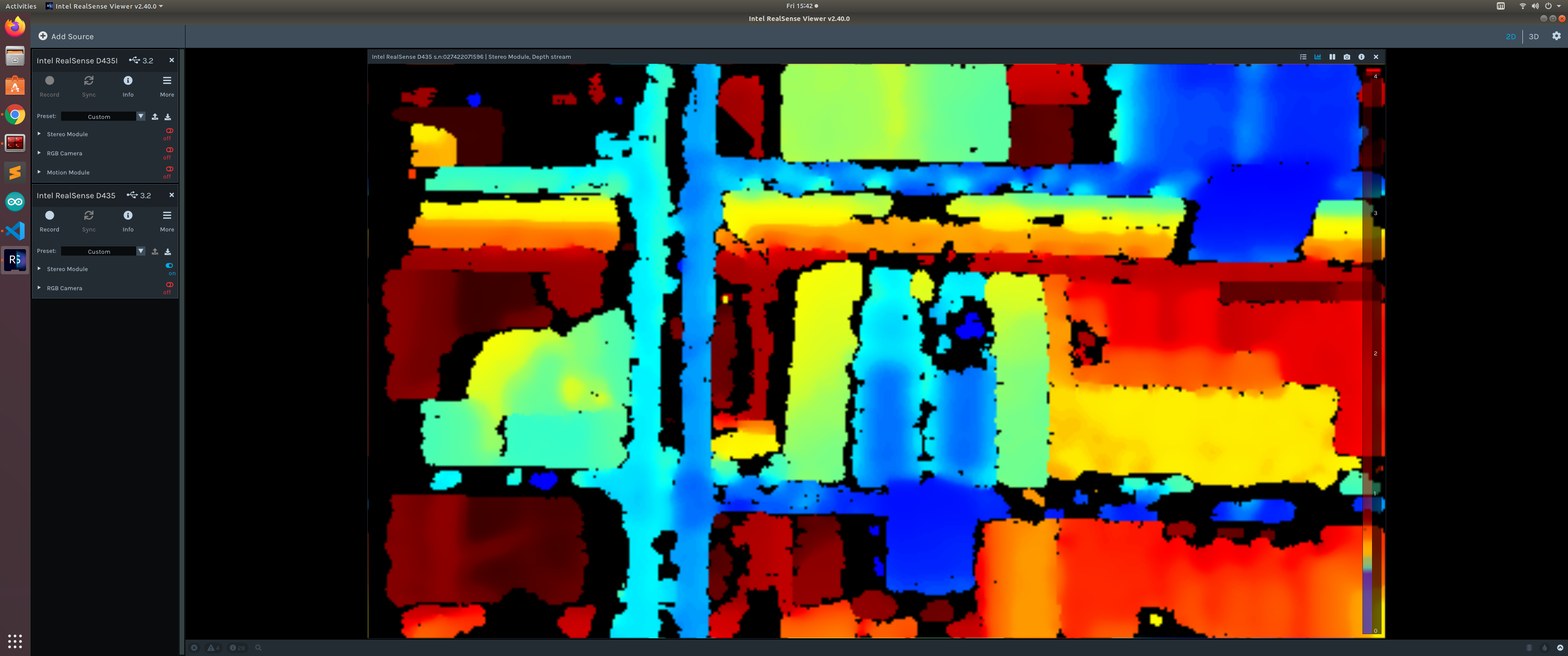
I note in your Viewer image that you have two cameras. If you have a multicam setup then more complex reset code would be needed that can check through all of the attached cameras.
You can also reset manually from the RealSense Viewer by going to the More option near the top of the options side-panel and selecting the Hardware Reset option from its menu. This has a similar reset effect to performing a camera unplug and replug..
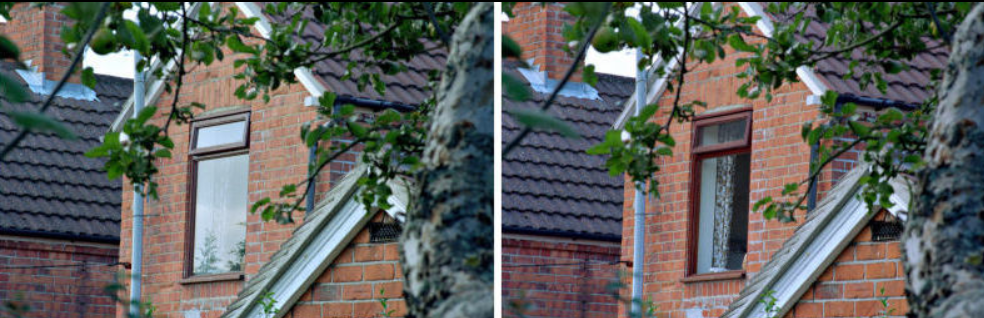
You can significantly reduce the negative effect of glare from reflections by adding a physical optical filter on the outside of the camera, over the top of the camera lenses. The filter is called a linear polarization filter, and Section 4,4 of Intel's white-paper document about optical filters explains it.
A 'without / with' image from the paper illustrating the glare negation that this filter can offer is below.
-
So during the times when the depth readings were 0, I did try hardware_reset() to reset the camera, but the error "Frames did not arrive within 5000" popped up. I think it's because the device was reset yet wasn't ready to be turned on. I guess it needs device_hub to turn it on ?
I also tried to reset the USB port but it also didn't work. Here are the two functions I used to reset and restart the camera.
def reset_device(query_serial_number):ctx = rs.context()device_list = ctx.query_devices()# print (device_list[0])for dev in device_list:if dev.get_info(rs.camera_info.serial_number) == query_serial_number:print("Found device, resetting")dev.hardware_reset()
#################################################################################################
def reset_usb():lsusb = Popen("lsusb | grep -i {}".format("Intel"), shell=True, bufsize=64, stdin=PIPE, stdout=PIPE, close_fds=True).stdout.read().strip().split()decode_lsusb = []bus_number = []device_number = []for idx, x inenumerate(lsusb):# decode_lsusb.append(i.decode("utf-8"))if x.decode("utf-8") == 'Bus':bus_number.append(lsusb[idx+1].decode("utf-8"))if x.decode("utf-8") == "Device":device_number.append(lsusb[idx+1][:-1].decode("utf-8"))if len(device_number) == len(bus_number):for j inrange(len(device_number)):try:print("Opening", "/dev/bus/usb/{}/{}".format(bus_number[j], device_number[j]))f = open("/dev/bus/usb/{}/{}".format(bus_number[j], device_number[j]), 'w', os.O_WRONLY)fcntl.ioctl(f, 21780, 0)except:print("Failed to reset USB device") -
If you have 2 cameras plugged in right now then I would suggest testing hardware_reset() with only one plugged in. The simple version of the hardware_reset code will try to reset the first camera that it finds out of all those attached. So I wonder if two cameras are attached, it might be trying to access the one that is not currently streaming and time-out (hence the 'within 5000' message).
-
Okay I will try that. Thanks for your advice. Device class regardless in python or C++ should contain information particularly to one camera. If the camera has the correct serial number (like I did on my reset_device() function), it should not have problem to reset the device I ask.
If that's not the case, since the robot will have multiple cameras attached, I am wondering if there is a way to reset specific camera in multicam condition.
-
I managed to locate the multicam reset script that I mentioned earlier.
Please sign in to leave a comment.
Comments
15 comments