D435 Custom RGB Sensor
The D435 cameras allow swapping the RGB sensor with an alternative, however I could not find any spec requirements for such an alternative.
What is the communication protocol? What are the dimensions? What is the current RGB sensor in the D435 camera? Is there a limit on the resolution of a replacement sensor?
Thanks in advance.
-
Hi Alal you can find information about the interface that the sensors use by performing a word find operation in the 400 Series' data sheet document (at the link below) for the term mipi csi-2
https://dev.intelrealsense.com/docs/intel-realsense-d400-series-product-family-datasheet
There was a past case about a custom build where a RealSense user speculated that other modules might work because "from my understanding these are just standard MIPI CSI-2 camera modules (OV9821 and OV2740), so any modules with similar spec (MP/s, etc.) should work".
My understanding is that once the default sensor is replaced with a compatible module of your own choice then a Dynamic Calibration of the depth and RGB sensors should be performed.
Below is an example of the MIPI CSI-2 references in the data sheet.

The RGB sensor used in the D435 camera model is OmniVision OV2740
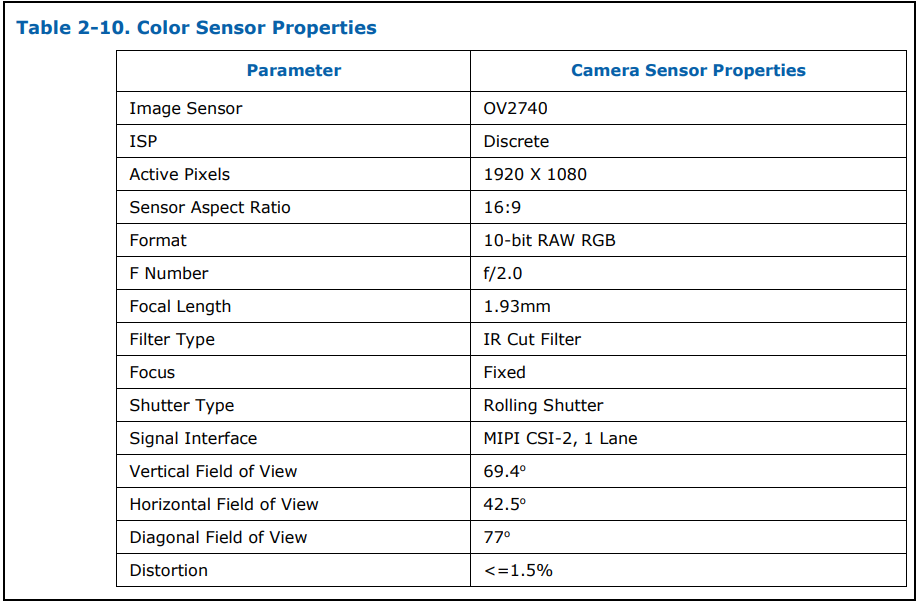
There is not information available regarding your question about resolution limits of a custom RGB sensor. RealSense supports a maximum RGB resolution of 1920x1080
An alternative to replacing the RGB module is to sync the RealSense camera's depth stream to an external non-RealSense high resolution RGB camera, making the RGB camera the 'master' and the RealSense depth camera the 'slave' in the multi-camera arrangement.
Please sign in to leave a comment.
Comments
1 comment