The overexposure issue with realsense d455
Hi there,
I'm using Realsense SDK 2.50.0 along with Realsense ROSv2.3.2. I cannot get good-quality outdoor depth and RGB frames when auto-exposure is on. To avoid sun glare, the camera looks down at 10 degrees. The ROI is set to one-third of the viewport at the bottom and the auto exposure setpoint value is 800. The example below was taken on a cloudy day. You can see empty gaps in vines point clouds that are supposed to be thin twigs. I don't think auto exposure works the way I expected.
Is there any way to get camera dwell time/auto-exposure gain to validate if auto-exposure works properly?
I'm also looking for methods to improve the quality of depth frames of foliages/leaves and sprouts.
Thanks,
Victor
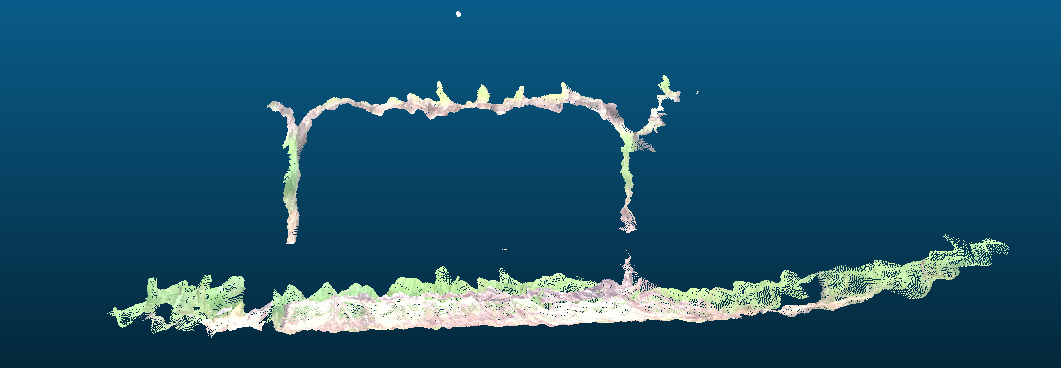
-
Hi Victor As you are using ROS1, you should be able to check the gain value using the dynamic reconfigure interface described at the link below.
https://github.com/IntelRealSense/realsense-ros#set-camera-controls-using-dynamic-reconfigure-params
The command rosrun rqt_reconfigure rqt_reconfigure can be input into the ROS terminal to open the dynamic reconfigure interface once roslaunch has completed.
Whilst you are in that interface, please try un-ticking the auto_exposure_priority option in the rgb_camera section of the side-panel. When auto_exposure is enabled and auto_exposure_priority is disabled, this should force the depth and color streams to try to maintain a constant FPS instead of FPS being allowed to vary.
In the same rgb_camera section, disabling the enable_auto_white_balance option may improve the appearance of green foliage such as leaves and sprouts. If setting a value for the white_balance option manually, increasing it above its default value of '4600' will make the foliage color stronger and warmer, whilst reducing it below 4600 will make it paler and eventually cause a blue tinting effect as the value gets closer to zero.
In the stereo_module side-panel category, increasing laser_power from its default of '150' to its maximum of '360' can increase the amount of detail on the depth image.
Thin objects such as twigs can be difficult to capture on a depth image. You could try selecting a different Visual Preset camera configuration from the dynamic reconfigure interface to see whether it improves results. The Medium Density preset provides a good balance between accuracy and the amount of detail on the image, whilst a depth image using High Accuracy may be sparse in detail, having holes and gaps.
-
Actually I'm doing it by loading from json preset configuration by calling roslaunch. I was turning the visual preset the other day and I found edge mode handles twigs pretty well. As for foliages and sprouts, they are not distinguished in the stereo frames probably because of their repetitive patterns I think? Is there any way to enhance the stereo results of this? I tried the medium density preset the noise level around the foliage obfuscates the actual foliage itself.
-
If the foliage has a light-reflective surface then that can make that surface more difficult for the camera to read depth information from. Attaching a physical optical filter product called a linear polarization filter over the lenses on the outside of the camera can significantly reduce glare from reflections.
As any polarization filter that is linear should work (except for the circular ones in 3D glasses), they can be found at affordable prices on stores such as Amazon by searching the store for the term linear polarizing filter sheet
You could also try setting emitter_enabled to false to disable the camera's projector and the semi-random pattern of dots that it casts over surfaces in the observed scene to see whether doing so reduces noise. The camera uses the dots as a 'texture source' to analyze for depth information, but it can alternatively use ambient light in the scene for the analysis instead of the dots.
-
It seems to be improved a bit after applying the linear polarizing filter on the stereo cameras. As the example below, the depth frame still misses details of tree branches 2m away from the camera.
What I have observed is tunning aux-param-colorcorrection1-12 and param-maxcorethreshb might have an effect on depth stream quality. I can only find the article about drones application that has some description of these parameters at the moment (https://dev.intelrealsense.com/docs/depth-map-improvements-for-stereo-based-depth-cameras-on-drones). I'm wondering if you have any ideas or document about how to use these parameters.
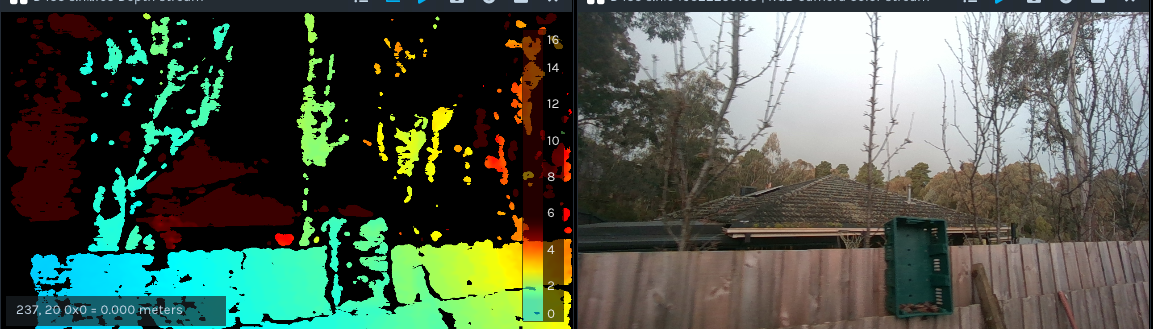
-
Because Advanced Mode parameters like the ones that you described interact with each other in complex ways, they do not have publicly available documentation and instead are controlled with machine-learning algorithms. So there is not a formal reference for how the Advanced Mode options work, though RealSense users are free to experiment with them to see how changes to settings affect an image.
There is however a short description of the Color Correction Matrix at point 3 of the section of Intel's camera tuning guide linked to below.
Please sign in to leave a comment.
Comments
5 comments