Issues with depth frame quality on Intel Realsense D415
Hi,
The captured depth frames from the realsense camera were underexposed as shown.
How to calibrate to achieve better results?
Thank you.
The camera is mounted outside.
Attaching rgb and depth frame
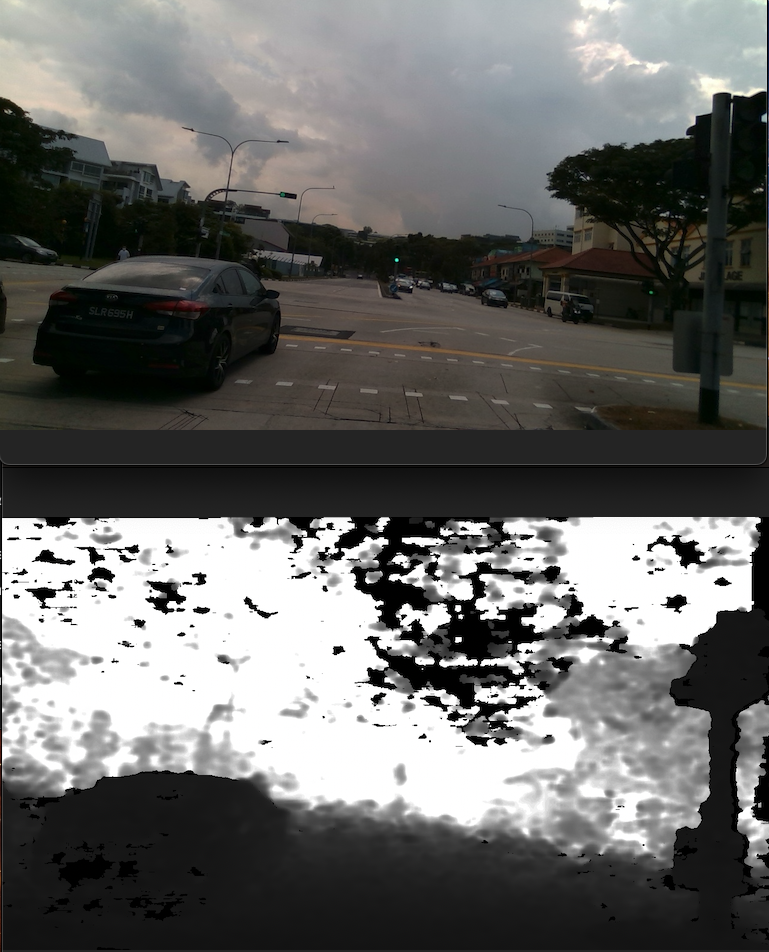
-
Hi Srikar Namburu Are you capturing a single frame, please? If you are and you have auto-exposure enabled then the exposure can take several frames to settle down after the camera pipeline is started. This can result in incorrect exposure on the first couple of frames.
If you are writing your own program script then a simple way to avoid this issue is to use a 'for' instruction to skip the first several frames before commencing capture. Code snippet examples for doing so are shown below.
C++
// Instruct pipeline to start streaming with the requested configuration
pipe.start(cfg);
// Camera warmup - dropping several first frames to let auto-exposure stabilize
rs2::frameset frames;
for(int i = 0; i < 30; i++)
{
// Wait for all configured streams to produce a frame
frames = pipe.wait_for_frames();
}
Python
profile = pipe.start(cfg)
# Skip 5 first frames to give the Auto-Exposure time to adjust
for i in range(5):
pipe.wait_for_frames()
**********
If you are capturing a continuous live stream instead of a single frame and are experiencing exposure problems then please let me know.
-
Hi MartyX Grover Thank you for quick reply.
I am capturing a continuous live stream.
-
If you are encountering scenes where there is problems with exposure because there are simultaneously areas of brightness and areas that are dark in the same view then enabling the SDK's High-Dynamic Range (HDR) exposure control may help to deal with it. Intel have a white-paper guide about the subject at the link below.
https://dev.intelrealsense.com/docs/high-dynamic-range-with-stereoscopic-depth-cameras
Under-exposure and over-exposure is discussed in Section 2.3 of the guide.
Please sign in to leave a comment.
Comments
3 comments