D455-HDR-merge-C-code-example-needed
I have a similar issue as was mentioned in this post:
In my case, I can get the hdr_merge function working fine in the Realsense Viewer on my Windows PC (per the details in the HDR Whitepaper referenced in the previous issue), yet when I try to implement my own C++ code in Visual Studio on my PC, I still get the resultant image flickering between the two settings rather than merging. The solution to the earlier issue pertained to installing SDK on the Jetson Nano; I am still trying to get the flicker issue resolved on the Windows PC. Here is my code. What am I doing wrong?
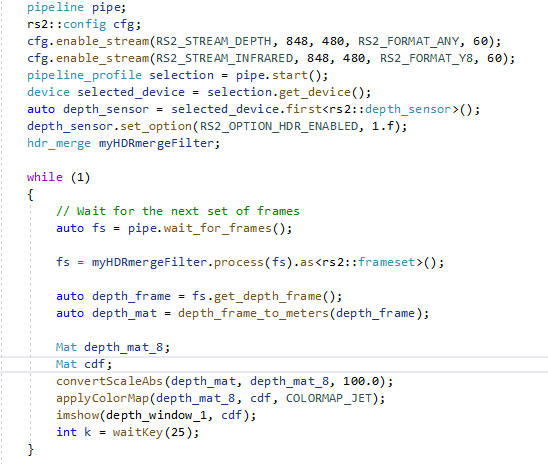
-
I am still having trouble. I tried using the Viewer and HDR on my Jetson Nano and I saw the error messages about metadata, so I installed Realsense using the JetsonHacks Nano "buildLibrealsense.sh" script modified at the cmake command to add "_DFORCE_RUSB_BACKEND=ON". I also added "_DBUILD_GRAPHICAL_EXAMPLES=true" and changed the CUDA option slightly to be "-DBUILD_WITH_CUDA:bool=true". Afterwards on the Nano I no longer get metadata errors but instead I get "resource unavailable" or "lack of available resources" warnings when I try to use the Viewer to enable HDR. Also, the depth image in the viewer flickers along with the infrared image, so HDR still is not performing correctly.
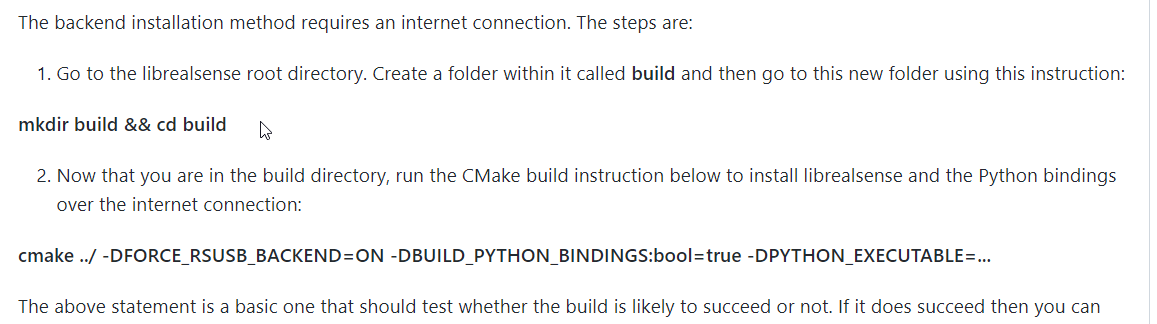
Previous to that I tried the method detailed in issue #6964 (see below) but that did not work either ... I got in error about OpenSSL.:
-
One more thing ... in this posting: https://github.com/IntelRealSense/librealsense/blob/master/doc/installation_jetson.md
it seems to warn about performance loss using the RSUSB backend option (see BOLD text below). I am not using multiple cameras right now as I try to get HDR working, but I need to go back to using 3 cameras on one Nano after I get HDR working. Will that be possible?
3. Choose LibRealSense SDK Backend
Librealsense2 SDK supports two API for communication with RealSense device on Linux platforms:
- Linux native kernel drivers for UVC, USB and HID (Video4Linux and IIO respectively)
- Using
RSUSB- user-space implementation of the UVC and HID data protocols, encapsulated and activated by selecting the SDK's-DFORCE_RSUSB_BACKENDflag (a.k.a.-DFORCE_LIBUVCwith SDK versions prior to v.2.30).
When the second method is selected Librealsense2 communicates with the devices using the standard USB driver, while the higher-level protocols (UVC/HID) stacks are compiled directly into the SDK. Currently the two interfaces are mutually-exclusive, thus the choice taken during the SDK configuration stage (CMakes) predefines the selected backend API.
As a general rule it is recommended to use the native kernel drivers, especially in production environment. The second method augments the native installation and allows for a fully-functional SDK deployment at the expense of certain performance and functional limitations (e.g. multi-cam). The list of requirements for the second method comprise of a basic USB driver and GCC compiler, thus making it attractive for prototyping and demos in new/previously-unsupported environments.
-
Hi Jsaunders There is another case about HDR flickering in the RealSense Viewer on Ubuntu that may be a useful reference.
https://github.com/IntelRealSense/librealsense/issues/10505
During that case, I determined through testing that once the settings in the link below were applied in the Viewer, the infrared only flickered when changing the exposure value manually and stopped flickering as soon as the exposure was no longer being adjusted.
https://github.com/IntelRealSense/librealsense/issues/10505#issuecomment-1126879337
-
Hello MartyX Grover
Thank you for your response. I do see an improvement using your suggestions in the Viewer. The IR image flickering goes away, but the depth stream image still kind of pulses, or flickers to a lesser extent, which was the issue I really was trying to overcome. I was thinking that the HDR Merge feature would sort of average the two sets of exposure/gain and give a more-or-less stable single output in the depth stream display, but as mentioned I am seeing more of a "pulsing" image that I do not get when I have HDR disabled (and am using a single exposure setting). How can I achieve a more stable depth image, or is that just a side effect of the "averaging" of the HDR Megre feature? I notice turning HDR Merge off stabilizes the image (with HDR still enabled) but that seems like the wrong solution.
-
Hello MartyX Grover
I think the pulsing I am seeing is due to some of the other post-processing filters being off, especially the Decimation filter & Threshold filter, so right now I think you have solved my problem on the Viewer. I need to modify my C++ code next to make similar setting changes and verify that I can get similar results outside of the viewer. I will provide an update once I try that.
Thank you.
-
Thanks very much. I look forward to your next report.
You could also test whether setting the Advanced Mode option Second Peak Threshold to zero reduces the depth pulsing, as described at the link below.
https://github.com/IntelRealSense/librealsense/issues/10505#issuecomment-1135641803
-
Hello MartyX Grover
I am very close to having this working as I want. Along the way I have experienced some problems and I have figured out some of them as well. Here is a summary:
1) When using the Viewer, the flickering stops using the methods you suggested.
2) I had several problems implementing the HDR and filter options in my C++ application. Right now I think I have things working fairly well, but here are a few things I learned:
a) When enabling HDR mode, and passing a value for the second parameter, do not use"1.f" as a shortcut for "1.0f" as was shown at the top of the previous posting https://support.intelrealsense.com/hc/en-us/community/posts/360053181133--solved-D455-HDR-merge-C-code-example-needed. That can work OK for some CPP compilers but at least in my case it compiled on the Nano in such a way that my statement "auto fs = pipe.wait_for_frames();" would hang up and time out without a frame getting through. So make sure to use "depth_sensor.set_option(RS2_OPTION_HDR_ENABLED, 1.0f);"
b) If I made a change to my C++ code, recompiled, and re-ran the application without cycling power to the camera, the camera settings were not what I wanted. The camera seemed to remember at least some of the settings from the previous version of the application. So to fix this I now cycle camera power between changes in my code and recompiling/re-starting my application. I suspect there is a way to reset the camera via the API instead of cycling power but I haven't looked for that yet.
c) I am pretty sure that you have to set up the HDR merge BEFORE you try to apply any filters (like spatial, decimation, etc), because the way you get the HDR feature implemented is to read out the frame that way, and I don't think it makes sense to apply the filters until after the frame is read (the filters act in sequence on the frame). So again in the previous post https://support.intelrealsense.com/hc/en-us/community/posts/360053181133--solved-D455-HDR-merge-C-code-example-needed I don't think you can insert the HDR merge between the Decimation and Spatial Filters.
d) I found out how to set the Sequence Name, ID and Size values in my code, like you suggested doing in the Viewer, and that does seem to help minimize flickering of the HDR depth frame raw output (before any filters applied). The filters seem to stabilize the flickering almost completely after that.
e) I struggled with figuring out the exact syntax to make the API commands work. One file that I found which lists all of the main parameters you can set via "set_option" is rs_option.cpp. That helped.
Please sign in to leave a comment.
Comments
9 comments