[D455] Difference Between Cameras
Hi,
I have two D455 cameras,
Camera1: K83122-110 / 146222252818
Camera2: K83122-110 / 146222254368
I let them see the same wall, the same distance from the cameras to the wall.
I have already used hardware reset function on both cameras. Then I turn them on and see the results.
The depth of camera1 is OK, quite as same as the real distance, 1.5m. But the depth of camera2 is about 3.5m. I checked with turn them on individually and simultaniously. The results are the same.
Do you know why? And What should I do to make them the same?
-
Hi Nguyenduyduc14 Please try using the instructions in the link below to reset the camera calibration to factory-new defaults in the RealSense Viewer. This is a different procedure to a hardware reset.
https://github.com/IntelRealSense/librealsense/issues/10182#issuecomment-1019854487
-
Thanks, I got it.
I have one more question.
In IntelRealSenseViewer, we can restore factory but it only changes parameters of calibration.
I see we have hardware reset will reset some setup like laser power, ... setup by number but they don't reset some setup kind of On, Off.
Sometimes, I don't remember what is the default of these setups.
Do we have a way the reset to default all setup in IntelRealSenseViewer?
-
The camera configuration json file 'DefaultPreset_D455.json' at the link below provides a list of D455 default values for a large range of settings, including the '156' default of the Laser Power setting.
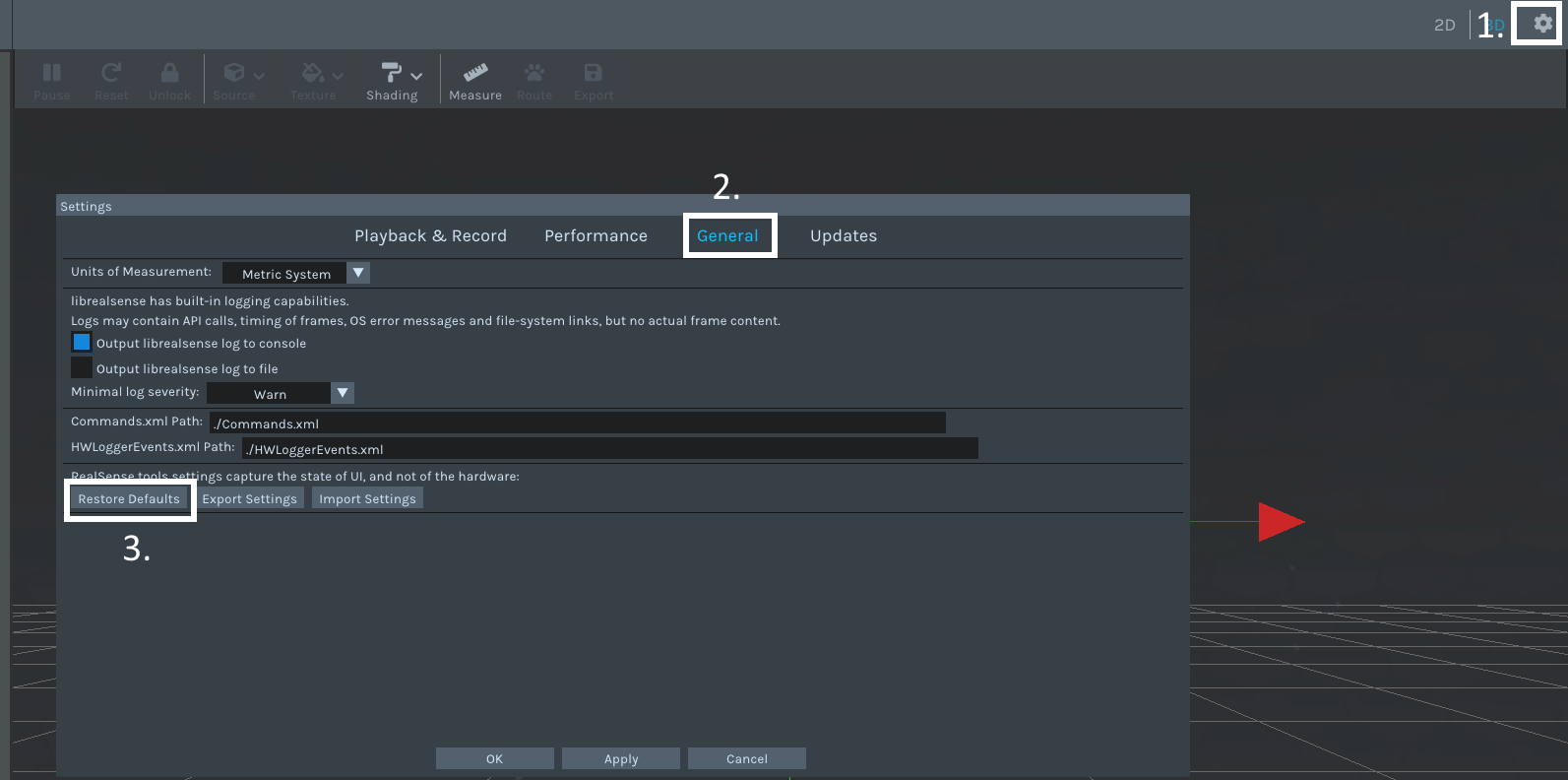
The RealSense Viewer has an option to reset the Viewer program to its defaults (but not the camera, as that is reset by the Hardware Reset option). You can find this by opening the Viewer's Settings panel by clicking on the gear wheel in the top corner of the window and selecting 'Settings' from its drop-down menu, then going to the General tab and clicking the Restore Defaults button.
Please sign in to leave a comment.
Comments
4 comments