Unable download firmware 5.13.0.50
Hello,
I'm trying to download the latest firmware for my D435 (5.13.0.50) but the link on the firmware releases page redirects me to an PDF :
https://dev.intelrealsense.com/docs/firmware-releases
Signed_Image_UVC_5_13_0_50.bin
Where can I download the latest firmware bin?
Best Regards,
François
-
Hi Francois Raymackers I confirmed that this firmware download link leads to a PDF instead of the firmware bin file.
An alternative way to update the firmware would be to launch the RealSense Viewer program, go to the 'More' option near the top of the options side-panel and select the Check For Updates option from its drop-down menu. The Viewer will check for updates and then a pop-up box on the other side of the Viewer window should appear and offer installation of the latest firmware version by clicking on the Install button.
Clicking on Install should automatically launch the firmware update process and run it until update is completed.
I have tested this procedure to confirm that it works.

-
Hi MartyG,
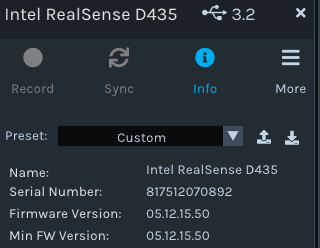
Thanks for your fast reply. I already tried to update with RealSense Viewer but apparently it doesn't find the latest firmware:

-
Do you have the 2.50.0 version of the Viewer installed, please? The option to check for updates will base the firmware version that it installs on the recommended version for a particular SDK / Viewer version that is listed in its release information. So for Viewer 2.49.0 for example, the recommended firmware that it would target is 5.12.15.50, whilst the recommended firmware for 2.50.0 that should be installed by the updater is 5.13.0.50
Please sign in to leave a comment.
Comments
6 comments