D435 will not clear blue bars during rectification in Dynamic Calibrator
Hello! I've searched around but am unable to find any information that has helped the issue we're seeing with a batch of about 25 RealSense D435 cameras.
The issue at hand is during the rectification phase using the Intel Dynamic Calibration tool. What will happen is as the camera is moved through the scene it will clear the blue squares as expected, but instead of sectors remaining cleared the blue squares will reappear. Trying to re-clear those squares results in others reappearing. This cycle will continue until the 180 second timeout is reached, never advancing to the next calibration phase.
We have used the exact same fixture and lighting for hundreds of cameras in the past with no issues.
Here's our setup:
- Calibration target printed to the correct size as per Intel docs.
- Target is affixed flat to a wall with the area around the target free of any objects that may accidentally affect the calibration process.
- The camera is mounted to a fixture that maintains a distance from the lens to the target of ~73cm while allowing the technician to move the camera in the X, Y, and Z axis to complete calibration.
- Dynamic Calibration tool version 2.11.1.0
- RealSense Camera Firmware at 5.12.13.50
- Windows 10 operating system
What we've tried so far (all with no difference):
- Different USB cables (from other new RealSense camera kits)
- Different PC
- Set up an alternate calibration location completely clear of any objects in the camera's FOV aside from the target
- Multiple levels of ambient light
- Factory reset (from RealSense Viewer v2.45)
- Gold Reset (from command line)
Hoping someone can help shed some light on what might be wrong, or some other troubleshooting steps that may be helpful to narrow down the cause. If it were just one camera acting up we just tag them as NCM to return, but being that there is 25 of them so far with the same issue puts us in a different scenario.
Thanks!
-
Hi Ahoffman This issue with re-generating blue areas in the Dynamic Calibration tool has been reported a couple of times recently. In both cases the problem was solved by using a procedure in the link below to reset the camera calibration to its factory-new default calibration configuration in the RealSense Viewer in the Calibration Data interface.
https://github.com/IntelRealSense/librealsense/issues/10182#issuecomment-1019854487
The important part is that the reset calibration is saved to the camera hardware, which the instructions in the above link explain how to do.
-
MartyX Grover thanks for the response! Unfortunately that did not fix the issue. I should mention as well, that these cameras have not successfully completed a calibration sequence since unboxing. The calibration process has had to be stopped each time, so the factory calibration has never been altered. I went back and followed the instructions you shared again just to make absolutely sure, but still no luck. As a note, I am using RealSense Viewer v2.45. Is there any incompatibility with the camera and viewer versions that could render the factory reset ineffective?
-
As the problem is with the Dynamic Calibration tool, it does not sound like an issue related to the RealSense SDK version. The firmware version 5.12.13.50 that you have installed in the camera is correct for SDK 2.45.0, I confirmed.
It may be worth installing SDK 2.50.0 using the automated installer file Intel.RealSense.SDK-WIN10 in the 'Assets' list of the SDK Releases page to eliminate the SDK version as a cause of the problem.
https://github.com/IntelRealSense/librealsense/releases
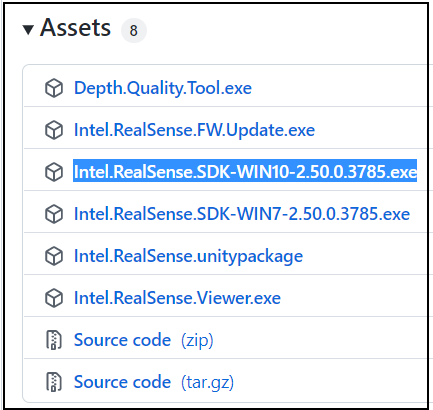
The next action that you could try is a method that completely uninstalls the RGB and Depth drivers from the Windows Device Manager, allowing them to be cleanly re-installed automatically after the camera is unplugged from the USB port and re-inserted.
If you previously installed the RealSense UWP Driver on your computer, this should also clear any problems caused by that driver being installed.
https://support.intelrealsense.com/hc/en-us/community/posts/4419989666323/comments/4431239847443
If that does not resolve your calibration problem and you only need to calibrate depth, not RGB, then you could try using the RealSense SDK's newer calibration tool, On-Chip Calibration. This is built into the RealSense Viewer and does not require the installation of a separate software tool as it is integrated into the firmware driver.
It is accessible by going to the Viewer's More option in the side-panel and selecting the On-Chip Calibration menu option. A user guide for the tool is at the link below.
https://dev.intelrealsense.com/docs/self-calibration-for-depth-cameras
Like with the Dynamic Calibration tool, the On-Chip calibrator can write a calibration to the camera hardware.
-
MartyG sorry for the minor delay. Here's an update.
I first tried the method to uninstall the drivers completely, following the instructions you shared, which did not resolve the issue. Next, I installed RealSense SDK 2.50.0 using the automated installer which also did not resolve the issue. Just to circle back and cover the potential driver issue, I followed the driver uninstall process again after SDK 2.50.0 was installed, and confirmed the issue still persists.
The next thing I'm going to try this morning is the On-Chip Calibration. I will update you with the results of that.
Thanks!
-
Thanks very much Ahoffman for the update. I look forward to hearing the outcome of your On-Chip tests. Good luck!
-
Ok MartyG the On-Chip Calibration succeeded, and I was able to get a 0.00 result for the health check with High Accuracy setting and Emitter Laser on. With the default settings it was -0.06 which is also good. The camera looked good on the Depth Quality tool. Fill rate was 100% and with ground truth enabled the Z-accuracy was around -1.25% which in our normal process would be a PASS.
However, I decided to give the dynamic calibration another shot after this and it still cannot get pass the rectification phase. Our software engineering team is in the middle of a release that will update the SDK version used to 2.50 and allow us to use 5.13 firmware on the cameras. At that point, I believe they are on board with us switching to On-Chip Calibration as our primary method. Until then I will still need to figure out why these cameras failed following our normal process of Dynamic Calibration, especially since it doesn't seem that any methods have been successful in getting the cameras into a state where they would pass that process.
-
In a couple of past cases where the regenerating blue squares issue was reported (linked to below), the outcome was that a solution was not found and the customer successfully used the On-Chip calibration tool instead.
https://github.com/IntelRealSense/librealsense/issues/6741
https://github.com/IntelRealSense/librealsense/issues/10001
In a couple of more recent cases of this issue, the suggestion made earlier in this discussion to completely remove and then re-install the RGB and Depth drivers resolved the problem. I note that this procedure was not successful in your particular case though.
I have experienced time-out with the blue squares myself when attempting to remove squares with the Dynamic Calibration tool. The technique that eventually worked for me was to move the camera in a rhythmic pattern up, down, left, right, up, down, left, right, etc until the squares were all cleared. Even then it took numerous attempts. So there may not necessarily be a problem related to your camera hardware. I would strongly recommend switching to On-Chip calibration if possible for your project.
Please sign in to leave a comment.
Comments
7 comments