[D455] Depth stream stalls for up to 2.4 seconds in Inter Cam Sync Mode 2 at 1280x720@15
Hello RealSense Support,

I am experiencing repeated long stalls in the depth stream of a RealSense
D455 while using Inter Cam Sync Mode 2 (Slave).

Mode 2 is being used according to the documented D400 hardware
synchronization function:

https://dev.realsenseai.com/docs/multiple-depth-cameras-configuration/

The issue is not a single-frame timing deviation. During a 10-minute run,
the depth stream repeatedly stopped for intervals ranging from approximately
200 ms to 2.4 seconds.

System and device configuration
--------------------------------

Camera:
- Model: RealSense D455
- Firmware: 5.17.3.10
- USB connection reported by librealsense: USB 3.2
- Connected directly to the PC without a USB hub
- Emitter disabled

Software:
- OS: Windows 11 Pro, build 26200
- librealsense SDK: 2.58.3.10794
- Capture method: direct sensor callbacks
- rs2::pipeline / pyrealsense2 pipeline is not used
- Depth-to-color alignment and post-processing are not used

Depth stream:
- Format: Z16
- Resolution: 1280x720
- Configured frame rate: 15 FPS
- Inter Cam Sync Mode: 2
- Actual Inter Cam Sync Mode value was read back and confirmed as 2
- Frame queue size: 16
- Global time enabled
- Error polling enabled

Concurrent RGB stream:
- Resolution: 1280x720
- Configured frame rate: 15 FPS

External synchronization signal:
- Frequency: 15 Hz
- Pulse width: approximately 100 us
- Voltage: approximately 1.79 V
- Common ground connected
- The waveform and frequency were verified independently
- The same signal also triggered two independent radar devices throughout
  the test

10-minute test result
---------------------

Test duration:
- Approximately 600 seconds

External trigger pulses:
- 9002 pulses

RGB:
- 9004 frames received
- No comparable long callback gaps were observed

The RGB result is mentioned only to distinguish the depth-specific stall
from a complete device or USB disconnection. I am not using the RGB frame
count as proof that every external trigger was accepted by the depth sensor.

Depth:
- 8745 callback events
- 8745 raw Z16 frames successfully saved
- Estimated missing frames based on frame intervals: 256
- Estimated missing rate: approximately 2.84%
- Long depth callback intervals: 24 events
- Maximum depth callback interval: 2399.77 ms
- Depth callback errors reported by the application: 0
- Raw depth write errors: 0
- Dropped frames in the application writer queue: 0
- Maximum writer queue depth: 0 out of 64
- Median raw-frame file write time: 0.54 ms
- Maximum raw-frame file write time: 4.36 ms

The application received and saved every depth frame delivered by the SDK.
The writer queue never accumulated any frames, so the missing frames do not
appear to be caused by Python processing, disk performance, or application
queue overflow.

Observed metadata behavior
--------------------------

The depth stalls show a repeatable metadata pattern:

1. The host callback interval becomes abnormally long, sometimes up to
   approximately 2.4 seconds.

2. The first depth frame returned after the stall initially advances the
   depth frame counter and sensor timestamp by only one normal frame period
   (approximately 66.7 ms).

3. The following callback arrives after a normal host interval, but its
   sensor/camera timestamp then jumps by approximately the full duration of
   the preceding outage.

4. No corresponding long interruption is observed in the concurrent RGB
   stream.

This appears consistent with a temporary stall in the depth stereo-module,
sensor, or depth-specific transport path, rather than an application-side
writer problem.

Related hardware notification
-----------------------------

In a separate diagnostic test using the same D455, firmware, PC, and USB
connection, librealsense reported the following notification:

"sensor=Stereo Module, severity=error, category=hardware_error,
description=Right MIPI error"

That separate diagnostic run used Inter Cam Sync Mode 4, not Mode 2.
Therefore, I am not assuming that the notification proves the cause of the
current Mode 2 stalls. I am including it because it was generated by the
same camera and may indicate a related right-imager or stereo-module issue.

Questions
---------

1. Is this depth-only multi-second stall expected or known when using the
   D455 in Inter Cam Sync Mode 2?

2. Are there known D455 firmware issues involving the right-imager MIPI path
   or the stereo module when externally synchronized at 1280x720@15 FPS?

3. Is firmware 5.17.3.10 with librealsense 2.58.3.10794 a validated
   combination for this D455 configuration?

4. Is there a different stable firmware/librealsense combination that you
   recommend for Inter Cam Sync Mode 2?

5. Is there any additional firmware or ASIC diagnostic log that can be
   collected through librealsense to identify the exact cause?

6. If the same issue is reproduced with a minimal depth-only application,
   direct USB 3.2 connection, and SDK debug logging, would this indicate a
   defective camera that should be replaced or submitted for RMA?

I can provide the following files:
- 10-minute integrity report
- Depth frame timestamp CSV
- Depth gap event list
- Minimal reproduction program
- librealsense DEBUG log
- Stereo Module notification log
- Oscilloscope capture of the external trigger waveform

A similar depth-only frame-drop report was posted here, although its setup
and synchronization mode are different:

https://support.realsenseai.com/hc/en-us/community/posts/50479655238035-Random-depth-frame-drop-in-Realsense-D435-and-D455

Thank you.-
1. Is this depth-only multi-second stall expected or known when using the D455 in Inter Cam Sync Mode 2? No.
2. Are there known D455 firmware issues involving the right-imager MIPI path or the stereo module when externally synchronized at 1280x720@15 FPS? No. It is worth bearing in mind that that using a high resolution could cause processing strain on the computer that may lead to bottlenecks if the computer does not have a good hardware specification though (CPU, memory capacity, etc).
3. Is firmware 5.17.3.10 with librealsense 2.58.3.10794 a validated combination for this D455 configuration? Yes.
4. Is there a different stable firmware/librealsense combination that you recommend for Inter Cam Sync Mode 2? No, any firmware should be fine.
5. Is there any additional firmware or ASIC diagnostic log that can be collected through librealsense to identify the exact cause? Firmware logging can be enabled in the debug console of the RealSense Viewer but the output would only be meaningful to a RealSense engineer.
6. If the same issue is reproduced with a minimal depth-only application, direct USB 3.2 connection, and SDK debug logging, would this indicate a defective camera that should be replaced or submitted for RMA? Stopping of the stream for periods is not usually a problem that would require an RMA return of the camera.
It sounds as though you are using a program that you have created yourself to perform the sync, as callbacks are mentioned. You could test sync in the RealSense Viewer tool to see if the delays still occur. If they do not then it could indicate that there is an issue somewhere in your program. The Stereo Module > Controls section of the Viewer's options side-panel enables the camera Inter Cam Sync Mode to be set to 2 or 4.
How long is the sync cabling that connects to your camera, please? If it is longer than 3 feet then there would be an increased risk of the camera's frame timer resetting if an electrostatic discharge built up and then was released. For sync cables longer than 3 feet, anti-ESD components can be bult into the cable to minimize the chance of camera frame timer resets occurring.
I would recommend using Mode 4 instead of Mode 2 if possible as it is much easier in Mode 4 to match the trigger pulse frequency to the camera's FPS frequency. In Mode 4, the trigger must be set to approximately half of the camera FPS. So if the camera FPS is 30, set the trigger pulse to 15, and if the camera FPS is 15 then set the trigger frequency Hz to 7.5. The stream still operates at the camera's FPS even though the trigger Hz is halved.
-
Thank you for the detailed response. I repeated the test after power-cycling the system because the previous run was interrupted by a loss of power.
The sync cable is approximately 20 cm long (about 8 inches), so it is much shorter than 3 feet. The sync input is a 15 Hz, 100 us positive pulse at approximately 1.8 V with a common ground. The D455 was connected directly to a PC USB 3.2 port, without a USB hub.
Test configuration:
- Camera: Intel RealSense D455, serial 338122301130
- Firmware: 5.17.3.10
- RealSense Viewer / librealsense: 2.58.3.10794
- Inter Cam Sync Mode: 2
- Stream: Depth Z16 only; RGB and motion streams disabled
- Profile: 1280x720 at 15 FPS
- Emitter: Off
- Viewer post-processing: Off
- External trigger: 15 Hz, 100 us high pulse, approximately 1.8 V
- Connection: direct USB 3.2
- Host: Intel Core i5-14400F, 16 GB RAM, Windows 11 ProThe trigger generator ran for 700.002 seconds and reported 10,504 pulses. Its hardware timer reported zero scheduling lateness and zero overruns. After the Viewer stream was started, the depth display was monitored continuously for 673.0 seconds (11 minutes 13 seconds).
In this long Viewer run, I did not reproduce a multi-second depth stall. The Viewer remained responsive for every 0.5-second sample. The longest unchanged-display run was 2.0 seconds, below the 3-second stall threshold. Viewer CPU usage was low: 1.59% average, 4.10% 95th percentile, and 6.44% maximum across the whole host. Viewer working-set memory remained between 148.1 and 156.5 MB. This does not look like a host CPU or memory bottleneck.
However, a red notification appeared immediately when the depth stream was started. Because the firmware logger filled the Viewer's 1,000-line display buffer during the long run, I restarted the official Viewer and repeated only the stream-start step to preserve the exact message. The Viewer log records:
```text
13:06:50 [Info] - Starting streaming of Depth...
13:06:50 [Info] ...\src\core\notification.cpp:22 - Right MIPI error
13:06:50 [Error] ...\common\notifications.cpp:512 - Right MIPI error
```The depth image nevertheless started and continued updating after this notification. The same red notification was also visible at the beginning of the long run.
I also enabled firmware logging in the Viewer and used "Recover Logs from Flash" after the test. The recovered output is raw hexadecimal data, and I can provide it for review by a RealSense engineer. The Viewer export contains the most recent 1,000 firmware-log lines because that is the Viewer's display limit.
If verification of the external sync signal would be useful, I can also provide an oscilloscope capture measured at the D455 sync input, showing the pulse amplitude, width, frequency, and signal integrity.
Could you please clarify the following?
1. What internal condition produces the `Right MIPI error` at the exact moment the depth stream starts, even though the stream then continues?
2. Is this start-time error considered harmless, or can it be related to the intermittent multi-second depth stalls seen in our application and minimal depth-only tests?
3. Could a RealSense engineer interpret the raw firmware log if I provide it, or provide the matching `HWLoggerEvents.xml` / event dictionary for firmware 5.17.3.10?
4. Since the issue is intermittent and did not occur in this single 11-minute Viewer run, what duration or number of repeated Viewer runs would you recommend before ruling out the camera or firmware path?
5. Regarding Mode 4, when the camera profile is 30 FPS and the external trigger is 15 Hz, should the delivered depth-frame rate be approximately 15 FPS or 30 FPS? In our Mode 4 tests, the delivered depth rate followed the 15 Hz trigger.Files available on request (the community comment form does not expose an attachment control):
- `viewer_startup_right_mipi.log` - clean Viewer startup log containing the exact Right MIPI notification
- `realsense_viewer_and_fw.log` - raw Viewer firmware / flash-log export
- `viewer_monitor.csv` - 0.5-second Viewer display, CPU, memory, and responsiveness samples
- `viewer_stall_events.csv` - detected static-display intervals; the only event is the pre-stream setup interval
- `trigger_serial.log` and `monitor_stdout.log` - trigger configuration, pulse count, and hardware-timer statistics -
Thanks again for the very detailed information.
1. Right MIPI Error is difficult to diagnose as it is typically equivalent to a vague 'Something went wrong' message. When they occur, I would focus on the USB system rather than the camera (i.e an issue with a USB port or the USB cable). Are you using the official 1 meter long USB cable supplied with the D455 or a cable of your own choice, please?You can also check for a potential problem with the USB cable or USB port if the camera's casing is hot to the touch after only a few minutes of streaming.
2. Although a continuously generating log error is inconvenient for performing log analysis, if a stream performs normally despite the continuous error message then it is usually safe to ignore the message.3. RealSense engineers usually do not request firmware logs except on rare occasions when they have reason to suspect that an issue is related to the firmware. New firmware releases are robustly tested before release because of the critical need for them to be stable, in order to avoid cameras being disabled by a firmware update.
4. It becomes less likely that a problem is related to the camera hardware or firmware driver if a stream can continuously run successfully in a single session for at least 24 hours. After that duration, it becomes likely that if a problem subsequently occurs then it is related to the computer hardware, the computer's operating system or a glitch with the computer's USB port or the USB cable.
5. In Mode 4, if the camera FPS is 30 and the trigger frequency is 15 then the frame rate should be 30 (the same FPS that the camera is set to).
RealSense do not provide technical support for Mode 4 unfortunately as it is considered an unvalidated proof-of-concept experiment. The officially supported sync modes, which are considered validated and mature, are modes 1 and 2. Mode 4 and above remain accessible in the SDK even though officially no longer supported though.
-
Thank you for the clarification.
The D455 is using the official 1-meter USB cable supplied with the camera, not a third-party cable. For the Viewer test described above, it was connected directly to a USB 3.x port on the PC, without a USB hub or adapter. The sync cable is approximately 20 cm (8 inches) long.
I also rechecked the saved logs to determine whether the `Right MIPI error` actually coincided with a missing depth frame. In two diagnostic runs where both the SDK notification timestamp and every raw depth-callback timestamp were recorded on the same host-monotonic clock, the notification occurred between two consecutive depth frames:
- With the 30 FPS profile and 15 Hz trigger, it occurred between depth frame 62 and frame 63. The interval was 66.947 ms and the frame-number increment was 1, which is the expected frame interval.
- With the 15 FPS profile and 7.5 Hz trigger, it occurred between depth frame 23 and frame 24. The interval was 133.180 ms and the frame-number increment was 1, again the expected interval.Therefore, those logs show no depth-frame omission at the exact time of the `Right MIPI error`. In the official Viewer Mode 2 test, the same notification appeared at stream startup, but it was not followed by a multi-second stall during the subsequent 11-minute 13-second run.
For the earlier 10-minute Mode 2 application run that had 24 long depth intervals (maximum 2399.769 ms), the saved report contains the frame-interval statistics and an empty callback-error list, but that run did not save a synchronized SDK-notification timeline. Therefore, I cannot confirm that a `Right MIPI error` occurred during any of those stalls. My earlier assumption that the MIPI notification and frame omissions were directly correlated was not supported by the timestamped data.
Based on the available logs, the start-time `Right MIPI error` and the intermittent multi-second depth gaps appear to be separate events. I will also perform the recommended 24-hour Mode 2 Viewer test. Since the supplied USB cable and a direct PC connection are already being used, please let me know whether you recommend testing a different USB port/controller or collecting any specific USB diagnostic information during that run.
-
Thank you. I have now repeated the test using the official RealSense Viewer and analyzed every recorded depth frame offline. This test reproduced the depth gaps in the Viewer itself, so I need to correct my earlier statement that the 11-minute Viewer test had not reproduced the issue.
Test configuration:
- RealSense Viewer / librealsense: 2.58.3.10794
- D455 firmware: 5.17.3.10
- Inter Cam Sync Mode: 2
- Stream: Depth Z16 only; RGB and motion disabled
- Profile: 1280x720 at 15 FPS
- Emitter and Viewer post-processing: Off
- External trigger: 15 Hz, 100 us high pulse
- USB: official 1-meter cable supplied with the D455, connected directly to the PC USB 3.2 port without a hub or adapterThe official Viewer recorded 629.461934 seconds to its native ROS 2 DB3 recording format. Offline analysis of the image and metadata topics produced the following results:
- Depth image frames: 9,343
- Depth metadata frames: 9,343
- Median recorder interval: 66.658300 ms
- Median camera timestamp interval: 66.658936 ms
- Abnormal intervals of at least 100 ms: 18
- Intervals of at least 500 ms: 5
- Intervals of at least 1 second: 1
- Maximum recorder interval: 1,999.815100 ms
- Maximum camera timestamp interval: 1,999.792725 ms
- Estimated missing frames from the interval lengths: 101 out of an estimated 9,444 expected frames (approximately 1.069%)The external-trigger generator ran for 700.002 seconds and reported 10,505 pulses. Its hardware timer reported zero scheduling lateness of 100 us or more, zero lateness of 1 ms or more, and zero overruns.
An important detail is that both `Frame number` and `Frame Counter` remained completely consecutive from 1,650 through 10,992, with no frame-number discontinuities. At each event, the Viewer recording/arrival interval first became abnormally long while the returned camera timestamp advanced by one normal period. On the following frame transition, the camera's Global Timestamp, Frame Timestamp, and Sensor Timestamp jumped by approximately the duration of the preceding outage.
For example, at the largest event the recorded arrival interval between frames 6,680 and 6,681 was 1,999.815 ms, while the camera timestamp advanced by a normal 66.660 ms. The next transition, from frame 6,681 to 6,682, arrived normally but the camera timestamp jumped by 1,999.793 ms. This is the same delayed camera-timestamp pattern observed in our minimal application test.
The previously reported Viewer screen-monitor test only flagged an unchanged display after 3 seconds. The new exact recording analysis shows why that test missed the issue: the maximum outage in this run was approximately 2 seconds, below the screen monitor's threshold. The Viewer remained responsive even though frames were absent.
The only `Right MIPI error` observed was at depth-stream startup, before this recording began. It did not coincide with any of the 18 recorded gap events, so the timestamped data still do not support a direct one-to-one relationship between that notification and the frame omissions.
Because this has now been reproduced using the official Viewer, our callback, pipeline, radar capture, image writer, and application queues were not involved. Does the combination of consecutive frame counters and a jump in the camera-generated timestamps indicate that the D455 did not generate/number intermediate depth frames during these intervals, rather than the Viewer or host simply discarding already-numbered frames?
Does this official Viewer reproduction change your assessment of the issue or the need for a 24-hour Viewer test? I can provide the 17.26 GB DB3 recording, the complete 9,343-frame timestamp CSV, the 18-event gap CSV, and the trigger log if a RealSense engineer would like to review them. Please let me know the preferred transfer method for the large recording.
-
I do not need the recordings to be transferred at present. Thank you for the offer.
The value of a test that is 24 hours or longer in running time is that it provides evidence regarding whether responsibility for a problem is with the camera hardware / firmware driver or an external hardware / software / OS factor. I appreciate that such long-run testing is not practical for all customers though (such as those who have to turn off their computer at the end of office hours).
Does depth stream stalling occur if Inter Cam Sync Mode is set to 0 (no sync). If it does then that would indicate that the stalling periods are not being caused by hardware sync or the sync cabling.
If the stalls still occur when Inter Cam Sync Mode to 0, do they still occur if Global Time is disabled in the Viewer in the 'Stereo Module > Controls' section of the options side-panel before starting the depth stream?
If the stalls still occur if Inter Cam Sync Mode is 0 or Global Time is disabled, the next step that I would recommend is to apply to sign a Non Disclosure Agreement (NDA) with RealSense so that you can receive advanced support from a RealSense engineer on our private Zendesk support channel.
-
Thank you. I completed the requested Mode 0 comparison in the official RealSense Viewer and also performed an additional Mode 2 test with Global Time disabled. Every recorded depth frame was analyzed offline from the Viewer DB3 files.
Common configuration:
- D455 firmware: 5.17.3.10
- RealSense Viewer / librealsense: 2.58.3.10794
- Depth Z16 only; RGB and motion disabled
- 1280x720 at 15 FPS
- Emitter and Viewer post-processing: Off
- Official 1-meter D455 USB cable, connected directly to the same PC USB 3.2 port without a hub or adapterMode 0, Global Time ON, no external trigger:
- Recorded duration: 658.825580 seconds
- Depth frames: 9,878
- Intervals of at least 100 ms: 0
- Maximum recorder interval: 67.997100 ms
- Maximum camera timestamp interval: 66.953125 ms
- Estimated missing frames: 0
- Frame number and Frame Counter were fully consecutive from 151 through 10,028A Right MIPI error was again displayed when the Mode 0 depth stream was started, but the recording contained no abnormal interval. This is further evidence that the start-time Right MIPI notification is not itself equivalent to a dropped frame or stall.
Because Mode 0 was normal, a Mode 0 / Global Time OFF test was not necessary under the sequence you suggested. However, to check whether Global Time contributes specifically to the Mode 2 behavior, I additionally tested Mode 2 with Global Time OFF and the same 15 Hz external synchronization signal.
Mode 2, Global Time OFF, externally synchronized:
- Analyzed stable external-trigger portion: 589.906974 seconds
- Depth frames: 8,811
- Intervals of at least 100 ms: 8
- Maximum recorder interval: 1,066.520500 ms
- Maximum Hardware Clock timestamp interval: 1,066.636000 ms
- Estimated missing frames from interval lengths: 41 out of an estimated 8,852 frames (approximately 0.463%)
- Frame number and Frame Counter remained fully consecutiveThe trigger generator produced 9,012 pulses during its 10-minute run. Its reported period minimum, maximum and average were all 66,372 us, with zero scheduling lateness of 100 us or more, zero lateness of 1 ms or more, and zero overruns.
Therefore, the current official Viewer comparisons are:
- Mode 0 / Global Time ON: no stalls
- Mode 2 / Global Time ON: 18 abnormal intervals, maximum 1,999.815 ms, approximately 1.069% estimated missing
- Mode 2 / Global Time OFF: stalls still reproduced, with 8 abnormal intervals and a maximum of 1,066.521 ms in the stable trigger intervalOnly one run was performed for each Global Time setting, so I am not claiming that disabling Global Time statistically reduces the rate. The important result is that disabling Global Time did not eliminate the Mode 2 stalls, while Mode 0 completed approximately 11 minutes without a single abnormal interval under the same Viewer, camera, USB cable, port and host.
Does this Mode 0 versus Mode 2 result justify proceeding with the NDA / advanced engineering support path, or is there another controlled test that you would like first? I can provide the DB3 files, complete timestamp and event tables, trigger log, or an oscilloscope capture measured at the D455 sync input if useful.
-
I do not have camera sync equipment at my location to perform testing, so you would benefit from NDA discussion with a RealSense engineer who has the equipment necessary for testing sync and has specialist sync expertise.
Before pursuing the NDA support option though, a couple of routes you could explore are:
1. If all of the cameras are connected to the same computer then you could disconnect the sync cables, set Inter Cam Sync Mode to 0 (hardware sync disabled), have Global Time enabled and let Global Time take care of generating a common timestamp for all attached cameras.
2. If the need to trigger with an external signal in Mode 2 is compulsory then you could experiment with the trigger frequency. In Mode 2 the trigger needs to be very precisely configured to the "actual FPS" of the camera, not the round-number setting. For example, if the camera is set to 30 FPS then it is recommended that the trigger is configured to the 'actual FPS' of the camera, such as 30.015 hz.
You could try very small variations of the trigger's hz frequency (for example, increments like .015. .030, .045) to see if stability changes.
If you have more than one D455 camera then an alternative to external triggering is to set one of the cameras to Mode 1 (master) so that it transmits a 50 hz trigger through the sync cable on each frame to the slave camera that is set to Mode 2, so that an external trigger is not required. This would be much easier than trying to precisely tune an external trigger.
-
Thank you for the suggestions. I tested finer external-trigger frequency adjustment in Mode 2 using the official RealSense Viewer.
Test configuration:
- D455 firmware: 5.17.3.10
- RealSense Viewer / librealsense: 2.58.3.10794
- Depth Z16 only, 1280x720 at 15 FPS
- Inter Cam Sync Mode: 2
- Global Time: ON
- Emitter and Viewer post-processing: OFF
- Official 1-meter D455 USB cable, connected directly to the PC USB 3.2 port
- External pulse width: 100 usTo generate an average trigger rate of 14.9875 Hz, two adjacent hardware-timer periods were alternated. The trigger generator produced 9,002 pulses during the 10-minute test, with 4,501 periods of each length.
Offline analysis of the exact external-trigger interval in the Viewer DB3 recording gave the following results:
- Analyzed duration: 600.474 seconds
- Depth frames: 8,996
- Timestamp intervals of at least 100 ms: 6
- Estimated missing-frame equivalents from interval lengths: 7 out of an estimated 9,003 frames (0.0778%)
- Maximum timestamp interval: 200.788 ms
- Frame Number and Frame Counter remained fully consecutive
- The recording/host-arrival gaps showed the same six events, with a maximum of approximately 201 msThis was substantially better than a separate 10-minute test at 14.988 Hz:
- Timestamp intervals of at least 100 ms: 16
- Estimated missing-frame equivalents: 31 (0.345%)
- Maximum timestamp interval: 467.005 msMode 0 with Global Time enabled previously completed approximately 11 minutes with no abnormal intervals. Therefore, the Mode 2 behavior appears highly sensitive to small changes in external-trigger frequency, although the stalls were not completely eliminated at 14.9875 Hz.
Could you please clarify the following?
1. Is there an official method for determining the exact required external-trigger frequency for a D455 configured at 1280x720@15 FPS?
2. Should the target Mode 2 trigger frequency be derived by measuring the camera's free-running frame timestamps in Mode 0, and then matching the trigger generator to that measured average FPS?
3. Is it acceptable to synthesize a fractional average frequency such as 14.9875 Hz by alternating two adjacent hardware-timer periods, or must every external-trigger interval be identical?
4. Based on these results, would you recommend continuing finer frequency tuning around 14.9875 Hz, or proceeding with NDA / advanced engineering support?
Our system requires the same external signal to synchronize one D455 with two radar units. Therefore, Mode 0 with Global Time cannot provide the required radar-to-camera hardware synchronization. We also have only one D455, so using another D455 as a Mode 1 master is not applicable.
Thank you.
-
1. You can find the actual FPS of the camera in the RealSense Viewer by enabling the depth stream and then clicking the metadata overlay icon on the top of the depth stream panel to overlay metadata information, including the Hardware FPS metadata value (the actual camera FPS).
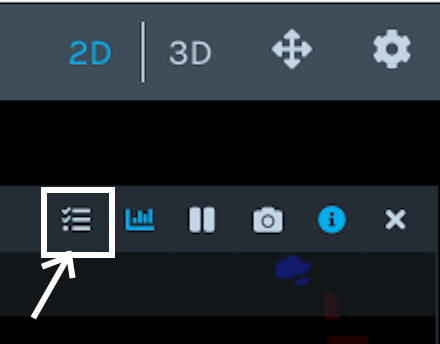
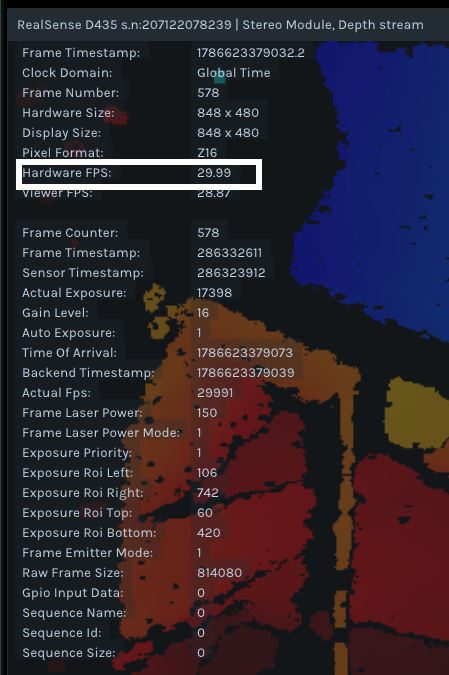
2. Yes, I believe that the actual FPS measured in Mode 0 should be usable.
3. My understanding of using an Actual FPS to configure the trigger frequency is that once you choose a value then that one value should be usable for each streaming session without having to keep changing it.
4. Given that you had very good, stable results with the 14.9875 Hz frequency, it may be worth performing even finer tuning of the frequency to reduce the 7 frame loss in 9003 frames down even further if possible, or accept the very low 7 frame loss, given that perfection (zero loss) may be unattainable.
-
Thank you for the guidance. Following your instructions, I checked the metadata overlay in RealSense Viewer while the camera was operating in Mode 0. The Hardware FPS value was checked at three different times and was displayed as 14.99 FPS each time.
I then configured the external trigger generator to 14.990 Hz and performed a 10-minute depth-only Mode 2 recording using the official RealSense Viewer.
Test configuration:
- D455 firmware: 5.17.3.10
- RealSense Viewer/librealsense: 2.58.3.10794
- Depth Z16, 1280x720 at 15 FPS
- Inter Cam Sync Mode 2
- Global Time enabled
- Configured external-trigger rate: 14.990 Hz
- Configured High pulse width: 100 us
- Nominal input High voltage: approximately 1.8 V
- Arduino Timer1 hardware output using a fixed timer period
- Official D455 USB cable
- Direct connection to the PC USB 3.2 port without a hub or adapterOffline analysis of the exact trigger interval in the Viewer DB3 recording produced the following results:
- Analyzed duration: approximately 600.44 seconds
- Depth frames: 8,891
- Intervals of at least 100 ms: 13
- Estimated missing-frame equivalents: 112 (approximately 1.244%)
- Maximum frame interval: approximately 1,600.881 ms
- Frame Number and Frame Counter remained consecutiveThis result was worse than the previous test using a 14.9875 Hz configured rate. At 14.9875 Hz, there were 6 intervals of at least 100 ms, 7 estimated missing-frame equivalents (0.0778%), and a maximum interval of approximately 200.788 ms.
The 14.990 Hz rate and 100 us pulse width above are the configured values of the trigger generator. Since the Viewer displays Hardware FPS to only two decimal places, it is difficult to determine whether the camera's required frequency and the physical signal arriving at the external sync input are matched precisely enough.
The external trigger currently uses a 100 us High pulse width. The camera clearly recognizes the trigger signal, but I would like to confirm whether 100 us is an officially recommended value for D455 Mode 2 and whether pulse width could affect synchronization stability or frame omissions.
Could you please provide or point me to the official Mode 2 external-sync waveform specifications for the following items?
1. At 1280x720 at 15 FPS, how closely must the external-trigger frequency match the actual Hardware FPS?
2. Should the trigger frequency be slightly above or below the Hardware FPS, or should it be matched as closely as possible?
3. Is there an official method to obtain the actual camera FPS with greater precision than the two-decimal Hardware FPS value displayed by the Viewer?
4. What are the recommended input voltage, minimum and maximum High/Low voltages, and logic thresholds?
5. Is the 100 us High pulse width currently being used an appropriate and recommended value for the D455 Mode 2 external-sync input? What are the officially recommended, minimum, and maximum permitted pulse widths? Could changing the pulse width affect frame omissions or stream stability?
6. Are there specified limits for period jitter, frequency error, and signal rise/fall times?
7. Must every trigger interval be identical, or is it acceptable to alternate two adjacent Timer1 periods to synthesize an average rate such as 14.9875 Hz?If useful, I can provide an oscilloscope capture measured directly at the D455 external sync input relative to the common ground, showing frequency, period, pulse width, High/Low voltage, and rise/fall times. Please let me know if you require any particular measurement conditions or additional parameters.
-
It is not usually necessary to consider the configuration of a Mode 2 trigger in such detail. You choose a trigger frequency value that is as close to the actual camera FPS as possible, and in the majority of cases it works.
A complicating factor is that in this particular case 15 FPS is being used for the camera, whilst the norm for Mode 2 is to use 30 FPS. So there are not precedents in past cases for how the sync is expected to behave at 15 FPS. The sync white-paper suggests using an oscilloscope to measure the real frame and configuring the signal generator to the same frequency.
1 & 2: ideally the trigger hz in Mode 2 should be matched as closely as possible to the actual FPS of the camera. This makes using an external trigger in Mode 2 more difficult than in Mode 4 (which is significantly more flexible in the hz values that will work).
3. Slightly better Actual FPS accuracy than that displayed in the Viewer may be obtained by retrieving the actual FPS metadata with code using the RS2_FRAME_METADATA_ACTUAL_FPS instruction, with each unit being 0.001 FPS. Two decimal points is likely sufficient though.
4. The trigger voltage should ideally be 1.8 V exactly if possible. It has worked in the past with slight variations such as 1.78 V though, but I would recommend trying to achieve 1.8 V whenever possible. The trigger should be 0 V when low and 1.8 V when high.
5. The officially recommended pulse width for Mode 2 in the sync white-paper is 100 us exactly. When using Mode 4, a larger pulse width than 100 can be used for the purposes of increasing the time that the pulse is in the high state. For Mode 2 though, 100 is the most reliable pulse width to use.
6. Aside from the pulse width (the time between fall to rise to fall) being recommended to be 100 us, there are not other specified limits.
7. Ideally each trigger interval will be identical.
Please sign in to leave a comment.
Comments
12 comments