D555 PoE
Hi Realsense Support,
I recently purchased the D555 camera, and overall it has been working quite well. Listing and echoing topics functioned smoothly for the most part; however, I encountered some warnings when using cyclone_dds_rmw during topic echoing, which appear to be due to compatibility issues. On a positive note, the rs_cmdline tools worked perfectly throughout.
Later, I was no longer able to see or receive any topics. I believe the issue may be related to having set ROS_DOMAIN_ID to 20 in the .bashrc file. To troubleshoot, I exported ROS_DOMAIN_ID=0 in a local terminal, but no topics appeared. Interestingly, topics only became visible after running rs_sniffer in a separate terminal. Additionally, the rs_cmdline tools stopped working at this point.
how can I fix such issue?
HW/SW Setup:
- Ubuntu 24
- ROS2 Jazzy
- D555 PoE Connected
-
Hi Usef Desouky If the problem started when you edited the ROS2 bashrc file, could you try resetting the file with the command below, which restores the file from a default template?
cp /etc/skel/.bashrc ~
-
But I need to change the camera domain id to match the ROS_DOMAIN_ID I have set not the opposite
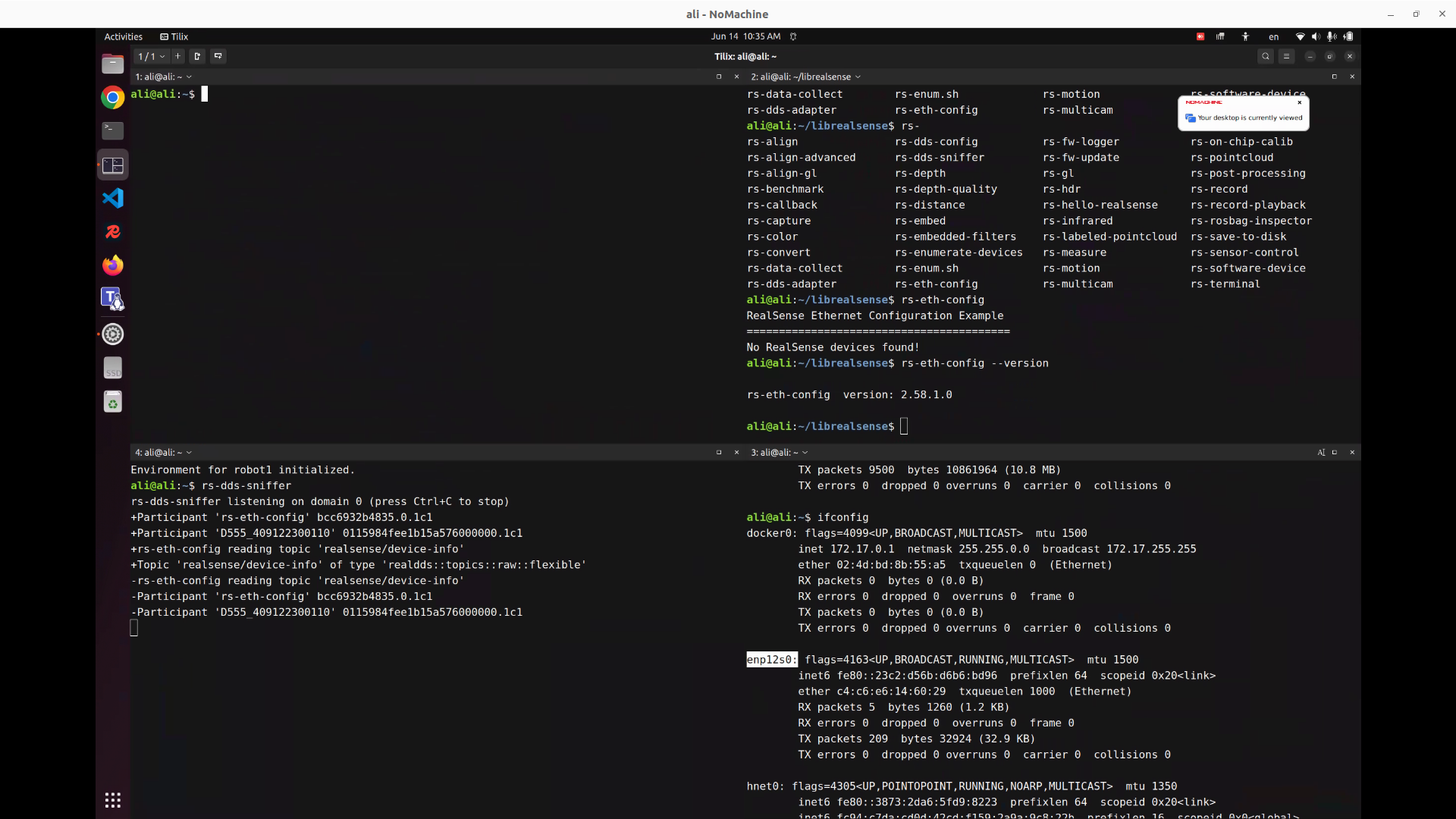
here are some logs of the recent command so you can understand the problem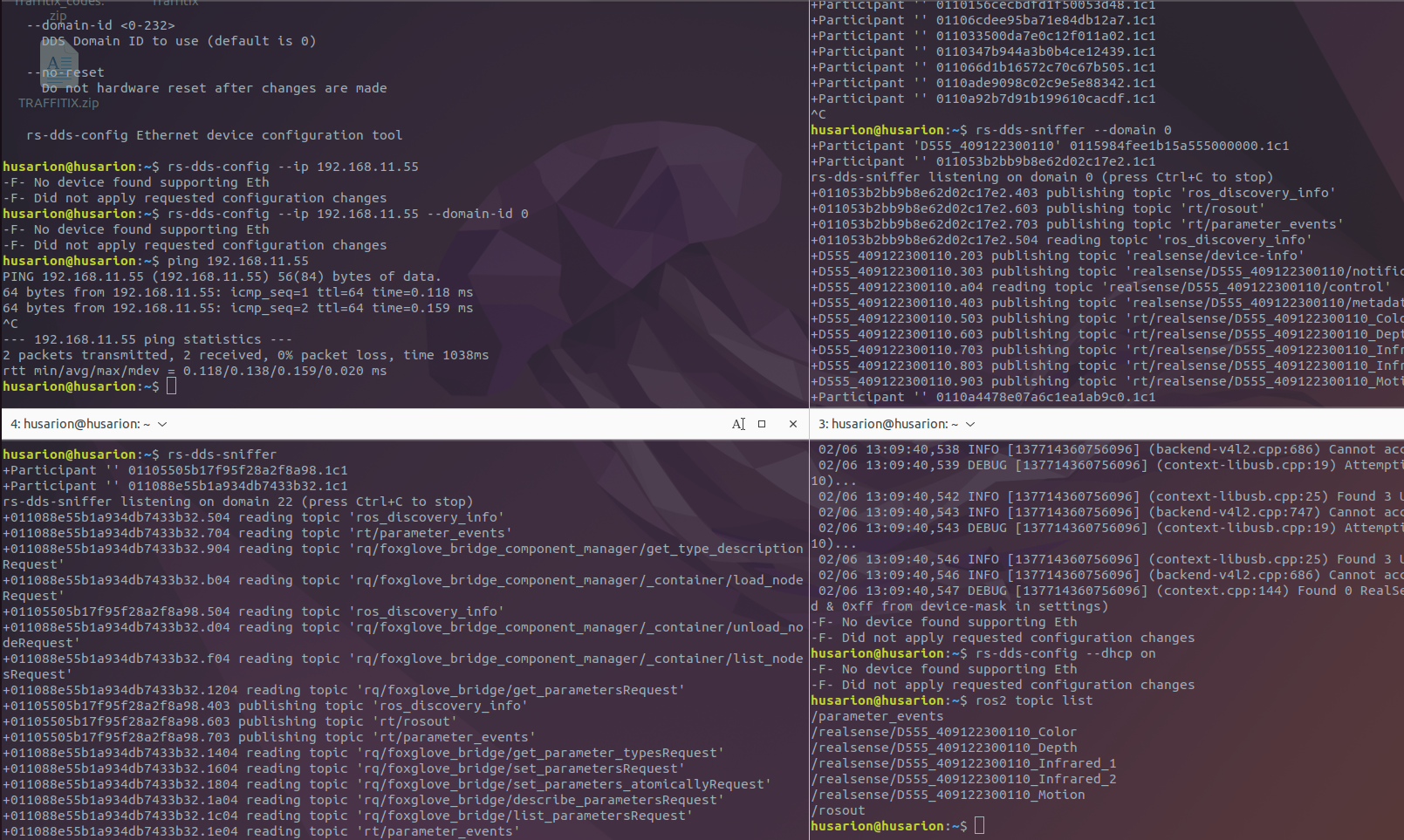
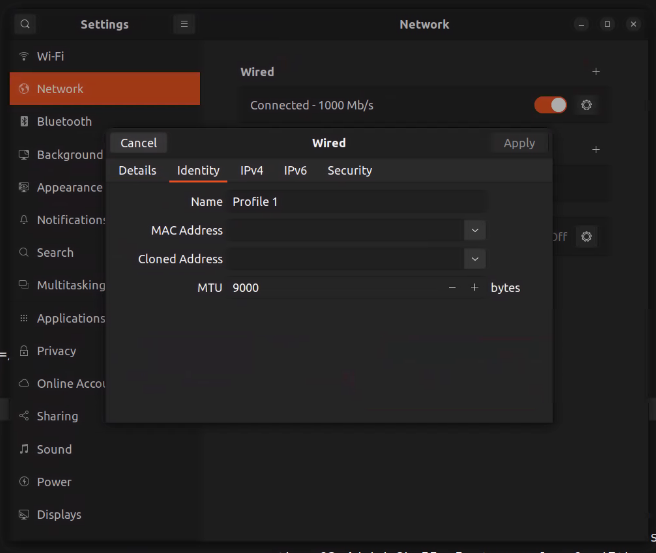
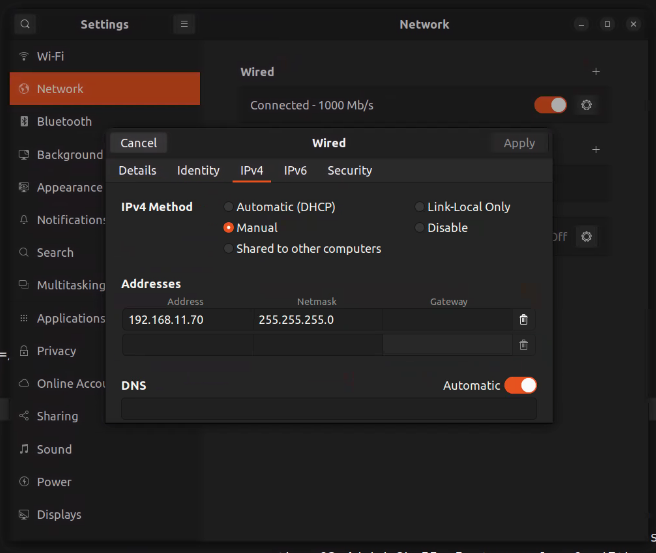
top left: ping camera ip and cant detect camera over ethernetbottom left: rs-dds-sniffer on domain id 22 as the dds domain id in .realsense-config.json set to 22
top right: rs-dds-sniffer on domain id 0
bottom right: locally exported ROS_DOMAIN_ID to 0 and on ros2 topic list I got the topics listed
The issue that the camera is not discoverable and I need to get the topics listed on the ROS_DOMAIN_ID 22
-
My research of ROS_DOMAIN_ID=22 indicates that it is used to isolate nodes so that they will only communicate with other nodes, computers or robots that use ROS_DOMAIN_ID=22. Is this what you are attempting to do with your configuration, please?
Is the RealSense DDS topic list detectable if you manually set the ID to 22 before you list the topics instead of relying on the automated definition in the bashrc file?
export ROS_DOMAIN_ID=22
ros2 topic list
My research indicates that RealSense topics should be listable when the domain is set to 22. However, those successes were in cases where the RealSense ROS2 wrapper had been installed and its node launched with the rs_launch.py launch file before echoing the topics. For example:
export ROS_DOMAIN_ID=22

ros2 launch realsense2_camera rs_launch.py

ros2 topic list
My understanding is that when echoing the short list of RealSense DDS topics, a RealSense node is not yet active until the RealSense ROS2 wrapper has been launched by the user with rs_launch.py. The short RealSense DDS topic list is able to be published without the RealSense ROS2 wrapper being launched because D555 is interoperable with Fast DDS, the middleware powering ROS 2.
-
My research of ROS_DOMAIN_ID=22 indicates that it is used to isolate nodes so that they will only communicate with other nodes, computers or robots that use ROS_DOMAIN_ID=22. Is this what you are attempting to do with your configuration, please?
yes this is what I am attempting as the whole robot system runs on the ROS_DOMAIN_ID 22 and I want the camera topics to be discoverable across the system.
Is the RealSense DDS topic list detectable if you manually set the ID to 22 before you list the topics instead of relying on the automated definition in the bashrc file?
Unfortunately, no
I tried launching with ROS_DOMAIN_ID 0 and ROS_DOMAIN_ID 22 but both had the same result
~$ ros2 launch realsense2_camera rs_launch.py
[INFO] [launch]: All log files can be found below /home/husarion/.ros/log/2026-06-03-15-29-16-907939-husarion-18475
[INFO] [launch]: Default logging verbosity is set to INFO
[INFO] [launch.user]: 🚀 Launching as Normal ROS Node
[INFO] [realsense2_camera_node-1]: process started with pid [18478]
[realsense2_camera_node-1] [INFO] [1780493357.319832862] [camera.camera]: RealSense ROS v4.57.7
[realsense2_camera_node-1] [INFO] [1780493357.319947771] [camera.camera]: Built with LibRealSense v2.57.7
[realsense2_camera_node-1] [INFO] [1780493357.319973196] [camera.camera]: Running with LibRealSense v2.57.7
[realsense2_camera_node-1] [WARN] [1780493357.330568983] [camera.camera]: No RealSense devices were found!
[realsense2_camera_node-1] [WARN] [1780493363.335267136] [camera.camera]: No RealSense devices were found
I think we need to schedule meeting to solve this issue, kindly send me your contact details -
This RealSense support channel can only provide advice via web comments, unfortunately.
Are you able to uninstall and reinstall ROS2 Jazzy to see whether the earlier configuration problems produced when the ROS_DOMAIN_ID was set in the bashrc file disappear?
Have you previously tried accessing the topics with ROS2's default FastDDS to confirm whether or not the problem is related to use of cyclone_dds_rmw as you encountered some warnings?
-
We do not have a ready-made official Docker image for ROS2. Some RealSense ROS2 users have shared their Docker contents. However, they are often designed for Nvidia Jetson, though the link below has one for PCs (amd64).
-
Your D555 configuration settings appear to be correct.
Some RealSense ROS users who switched to CycloneDDS have also increased the DDS buffer size to achieve improved performance.
https://docs.ros.org/en/foxy/How-To-Guides/DDS-tuning.html#cyclone-dds-tuning
https://github.com/realsenseai/librealsense/issues/14928#issuecomment-4249129238
-
Official support for ROS2 Jazzy and Ubuntu 24.04 in the ROS wrapper is included in the latest 2.58.2 beta SDK released yesterday. So it may be worth trying that SDK to see whether your situation improves.
https://github.com/realsenseai/librealsense/releases/tag/v2.58.2
The Jazzy compatibility is provided via CycloneDDS, so it may be more compatible with your setup than previous SDK releases.
The use of ROS_DOMAIN_ID=22 introduces uncertainty though, as this isolated domain is not usually used with RealSense cameras.
As a next step, I would recommend installing 2.58.2 and then seeing if you are able to echo the short list of DDS native topics that do not require the wrapper by inputting ros2 topic list
-
We continued investigating the D555 PoE issue and have narrowed it down significantly.
This does not appear to be a ROS 2 or ROS_DOMAIN_ID issue.
Current Findings
The camera is consistently detected as a DDS participant using
rs-dds-sniffer:Participant 'D555_409122300110'We also observe DDS traffic directly from the camera IP (
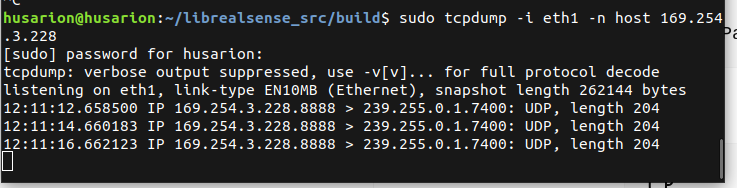
169.254.3.228) usingtcpdump, confirming that the camera is powered, reachable over Ethernet, and actively transmitting DDS traffic.
Regarding the SDK issue, we also tested with librealsense SDK v2.58.2 built from source. The behavior remained unchanged.However, the camera is still not discoverable by RealSense tools:
-
rs-enumerate-devices→ No device detected -
rs-eth-config→ No RealSense devices found -
RealSense Viewer → "Add Source (0 available)"
The camera is visible on the network and DDS communication is active, but it cannot be discovered by any RealSense tools (
rs-enumerate-devices,rs-eth-config, or RealSense Viewer).Could this indicate a hardware defect, or would you recommend additional diagnostics ?
Attached
-
DDS participant discovery (
rs-dds-sniffer) -
DDS traffic captured from camera IP using
tcpdump -
RealSense Viewer showing "Add Source (0 available)"
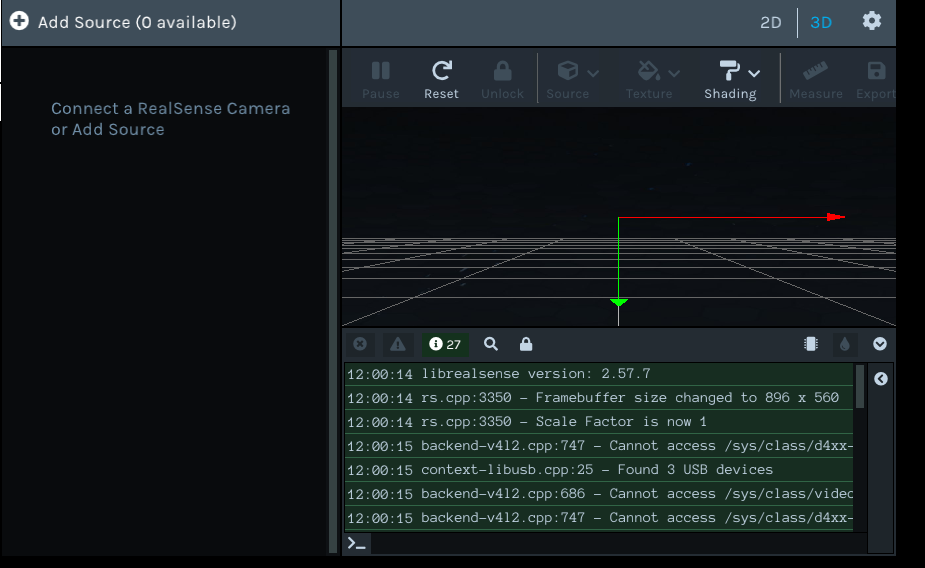

Thank you.
-
-
Hi mohamed mohamed When you built the SDK from source, can you confirm please if you included the CMake flag -DBUILD_WITH_DDS=ON in the CMake build instruction in order to enable DDS support in the SDK?
-
Thank you for the suggestion.
Initially, I built librealsense v2.58.2 from source without explicitly enabling DDS support.
After your recommendation, I rebuilt it with DDS enabled using:
cmake .. \
  -DCMAKE_BUILD_TYPE=Release \
  -DBUILD_WITH_DDS=ON \
  -DBUILD_EXAMPLES=ON
I also tested another build with:
-DFORCE_RSUSB_BACKEND=ONand another one without it.
After rebuilding, the behavior remains unchanged:
./Release/rs-eth-configNo RealSense devices found!./Release/rs-enumerate-devicesNo device detected. Is it plugged in?However, DDS discovery is still working:
./Release/rs-dds-sniffer | grep D555Participant 'D555_409122300110'Additionally, I verified that the tools are using the newly built librealsense v2.58.2 library and not the system-installed version:
ldd ./Release/rs-eth-config | grep realsenseOutput:
librealsense2.so.2.58 => /home/husarion/librealsense_src/build/Release/librealsense2.so.2.58 -
mohamed mohamed Do you have a USB cable plugged into the camera? If you do then it should be unplugged, as only the ethernet cable should be attached to the camera when using it in DDS mode.
Is the camera connected to a 30 W PoE switch or 30 W PoE injector?
-
No USB cable is connected to the camera. The camera is operating in Ethernet DDS mode only.
The camera is connected through a TSW101 PoE switch.
DDS discovery is working and the camera appears as:
Participant 'D555_409122300110'But rs-eth-configandrs-enumerate-devicesstill cannot detect the device. -
mohamed mohamed Does the camera become discoverable if you enable DHCP dynamic discovery of the device with the command below?
rs-dds-config --dhcp on
-
I tested the DHCP suggestion using both the locally built librealsense v2.58.2 tools and the system-installed tools, with the same result.
rs-dds-config --dhcp oncould not be applied because the camera is still not detected as an Ethernet RealSense device:-F- No device found supporting EthHowever, DDS discovery still detects the camera successfully as:
Participant 'D555_409122300110'So the D555 is visible on DDS, but it is not discoverable by the Ethernet configuration or device enumeration tools.
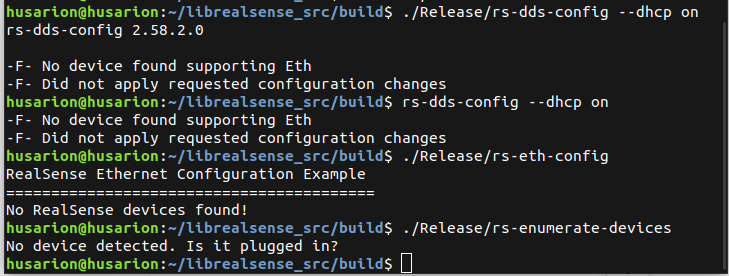
-
Wafaa Mohamed Do you know which D555 firmware driver version is currently installed in your camera, please? The recommended firmware for SDK 2.58.2 is 7.58.38448.10612 which can be downloaded from the D555 Early Access firmware page.
https://dev.realsenseai.com/docs/firmware-early-access-release-d500/
Recent firmware versions, including this one, have improved camera discovery.
-
Actually, we cannot determine the currently installed firmware version because the camera is not discoverable by the RealSense tools.
However, DDS discovery still detects the camera participant (
D555_409122300110).Is there an alternative method to retrieve the firmware version or update the firmware in this state?
Could this behavior indicate a firmware/configuration issue or a hardware defect? -
If you have not been able to update the firmware since the camera was purchased then it likely still has the default factory-installed firmware on it, which is currently 7.56.19918.835, designed for use with SDK 2.56.4.
It is recommended that D555 firmware updates are performed with a USB cable instead of the ethernet cable. You mentioned earlier that no USB cable was connected to the camera. Do you have a USB Type-C cable that you can attempt a firmware update with, please?
If you have a USB cable then rs-fw-update and rs-enumerate-devices should also respond when the camera is on a USB connection.
As the camera can be discovered in DDS mode to return D555_409122300110, it is likely that the camera hardware is okay.
-
I note that the camera was working well when this support discussion began 23 days ago and then you begun experiencing problems with it after that.
If you are using the camera on a USB cable with only USB plugged in and no ethernet cable attached, and the camera is still not being discovered by RealSense tools, then it does increase the chance that the camera has a fault. If you purchased it recently then you have the option of contacting the retailer that you purchased it from to enquire about the possibility of an RMA return of the camera under warranty for a replacement.
Please sign in to leave a comment.
Comments
23 comments