Calibration of D401
Hi,
We are integrating the D401+Vision Processor Board in a custom-made housing. I have questions on how to calibrate it. So far we have used the self-calibration instructions as described in "Intel® RealSense™ Self-Calibration for D400 Series Depth Cameras": on-chip calibration, tare calibration and focal length calibration, with printed targets such as "GaussianBlur30x100x100back-8.5x11.pdf".
I noticed that after self-calibration, looking at the point cloud of the flat target, it's not truly flat, but slightly curved: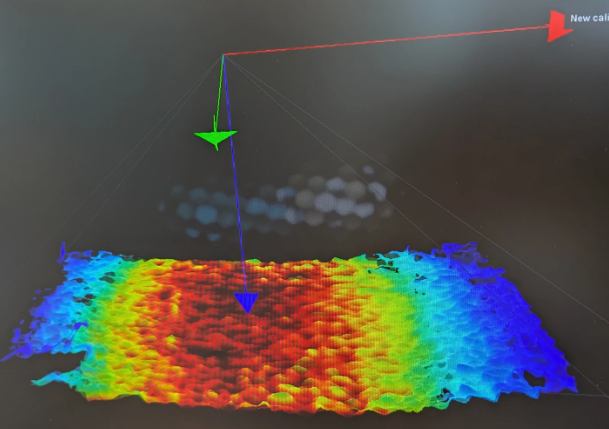
My hunch is that the extrinsics of the left and right camera are not calibrated, is this true?
Do we need to adopt the "OEM calibration" workflow with the $1500 OEM calibration target?
Browsing the online documentation, I saw a "D400 Dynamic Calibration Tool" with another printable target. Is this still supported? The link to download this software seems dead.
-
Hi Sabin-Tiberius Strat RealSense cameras are calibrated in the factory and so ae usually well-calibrated when taken out of the box by the customer. They may develop miscalibration and need a recalibration though if they receive a physical shock such as a hard knock or a drop on the floor, or experience severe vibration.
The OEM calibration target board is aimed at customers such as engineering departments and manufacturing facilities and will not be needed by most RealSense users.
RealSense was spun off from Intel on July 11 2025 to become a separate company. Whilst most assets transferred to the new company (RealSense, Inc), the Intel Dynamic Calibration tool went offline last year. The calibration tools now available are the self-calibration toolset such as On-Chip, Tare and Focal Length calibration.
Does your custom housing have a clear window in front of the camera? If so, have you tested the camera outside of the housing to check whether the material being used for the window might be slightly distorting the image? Page 160 of the 400 Series datasheet document provides guidance about choosing a 'cover material' to act as the front glass. For example, it recommends that the thickness of the glass be around 0.55 mm and not exceed 1 mm.
https://dev.realsenseai.com/docs/intel-realsense-d400-series-product-family-datasheet
If the custom housing is being used underwater then the calibration needs to take place underwater (for example, with a waterproofed calibration image immersed in the water) and not in the air.
-
Hi Marty,
Thanks for your reply. We're not buying a factory-calibrated camera, but something closer to this
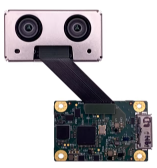
we are then integrating the whole thing into our own housing. Depending on our housing and assembling tolerances, the frame holding the 2 cameras could get a little warped => the need to calibrate.
My question now is whether we need to spend $1500 on the OEM calibration target or if we could still achieve intrinsics AND extrinsics calibration via the self-calibration workflow.
-
The metal casing of the RealSense depth module acts as a stiffener for the sensors, so they should not easily become miscalibrated when the module is being handled during assembly and fit into the custom housing. It is a good idea though to perform a calibration once the D401 module and D4 V4 have been connected together.
When an image bends inwards, that is known as a concave or pincushion distortion (an outward bend is a convex or 'barrel' distortion). In a past case of pincushion distortion, a focal length calibration resolved it, though you have already performed one of those.
Use of the $1500 USD OEM board should not be necessary to correct this issue.
I note that your pointcloud is very "wavy". This phenomenon can occur when the camera is close to a surface and reduce in intensity when the camera is moved further away. That method would not be practical for a D401 though, which is designed to be used at close range.
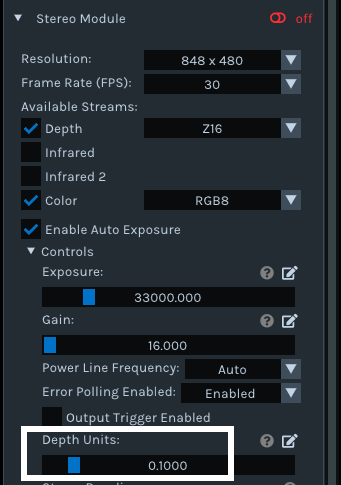
Does the image improve if you change the RealSense Viewer's Depth Units setting in Stereo Module > Controls from the default of 0.01 to 0.1
-
I tried changing the depth units but it just scales the whole point cloud, keeping the overall shape.
Here are some more details of my setup: I have a self-calibration target attached to a flat surface ~20cm away. I adjust the camera holder so it looks head-on => in theory I should see a uniform depth map. Here's what I observe in practice (distance measurements made by hovering the mouse over the depth map):
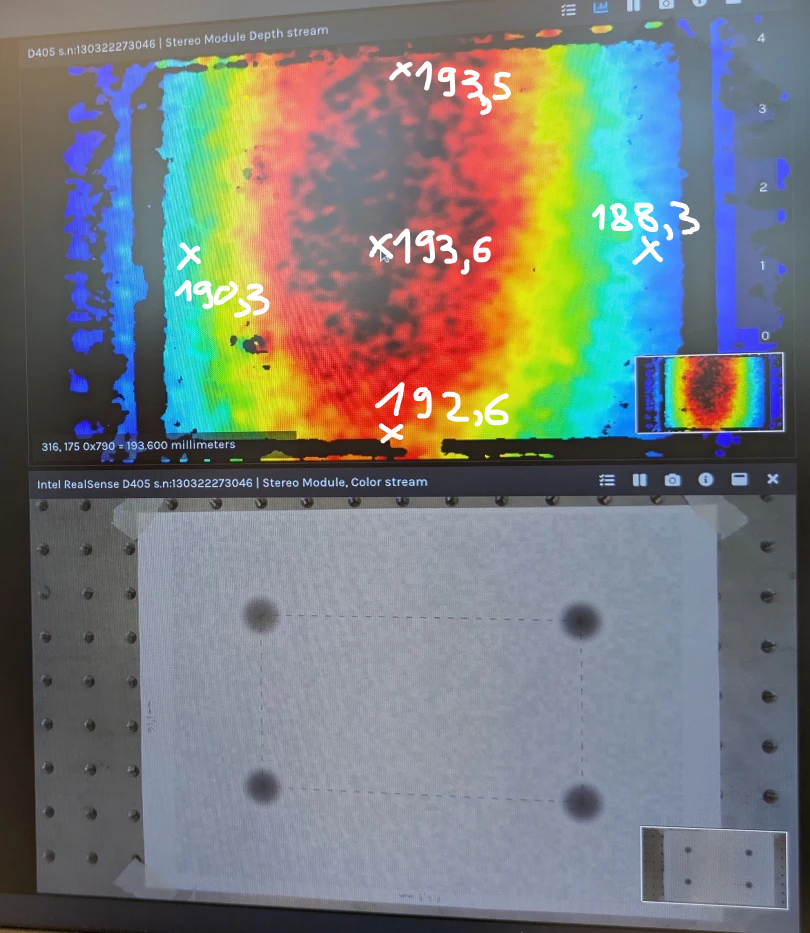
Between the FOV center and the edges there's about 4-5mm difference, even though it should have been the same depth. If I play with the Calibration data in the RealSense viewer and modify the extrinsics rotation matrices, I can make the point cloud a bit flatter, but to me it looks like I need to do a proper extrinsic calibration.
-
Yes, I would expect a flat surface at the same distance from the camera to show as uniformly blue instead of that blue to red color range.
On-Chip calibration improves depth quality only. It is Tare calibration that improves depth measurement accuracy.
When you performed the Tare calibration, did you click the Get button on the Tare interface to generate a custom ground truth value for your particular camera and its distance from the target to replace the default '1200' value before starting the Tare calibration process running?
-
I checked RealSense's website download link for the Dynamic Calibration tool and the Windows version is now hosted on our RealSense Inc system instead of Intel's and is downloadable.
If you visit the link below and scroll to the bottom of the user agreement and accept the terms, the download of CalibrationTool-2.13.1.0-Setup.zip should begin in your browser.
https://dev.realsenseai.com/firmware-download/?file=42115
Extracting the zip will give you an .exe setup program file to run to launch the installation of the Windows version of the Dynamic Calibration tool.
This free public version of Dynamic Calibration is the one that calibrates the camera extrinsics.
-
There was an Ubuntu version but the user guide (which has Ubuntu instructions on page 14 onwards) has not been updated since 2021 and so only has installation instructions for Ubuntu 16.04 and 18.04 and Intel server addresses for Debian packages that may not work any more.
Alternatively, there was also a local Debian package download command for an earlier version of the tool but it was released before D401 / D405 was introduced.
sudo dpkg -i librscalibrationtool_2.11.0.0_amd64.deb
-
Thanks very much for the update. If neither the Dynamic Calibration tool or the self-calibration toolset make a difference then the issue may not be directly related to the camera's calibration (it is possible that the point cloud's slight flattening by manually changing the rotation extrinsics was a beneficial side-effect of changing those values).
In the Viewer, does the image and accuracy improve if you change the Visual Preset to Default ? This preset can provide a better point cloud.
Also, have you tested the D401 with a range of different surfaces? Because D401 and D405 does not have an IR laser emitter component, it can have difficulty obtaining depth information from smooth plain surfaces with low detail or no detail due to the lack of a projected IR dot pattern. Increasing the level of lighting illumination in the area the camera is in can help to compensate for this though.
-
Hi Sabin-Tiberius Strat Do you require further assistance with this case, please? Thanks!
Please sign in to leave a comment.
Comments
16 comments