Random depth frame drop in Realsense D435 and D455
Hi,
Setup:
We are using 1 realsense D455/D435 camera for calculating the plane angle of object which is placed on pallet on turn table which rotates continuously. The realsense camera is connected to a Nvidia Jetson Xavier NX device which is running Ubuntu 20 with ROS 1 Noetic.
Problem:
We are facing random depth frame drop from the D455/D435. Sometimes 5 frames gets dropped
continuously or one or two random frames drops per 50 frames as shown in the attached image. The dropped depth frame is highlighted in red.
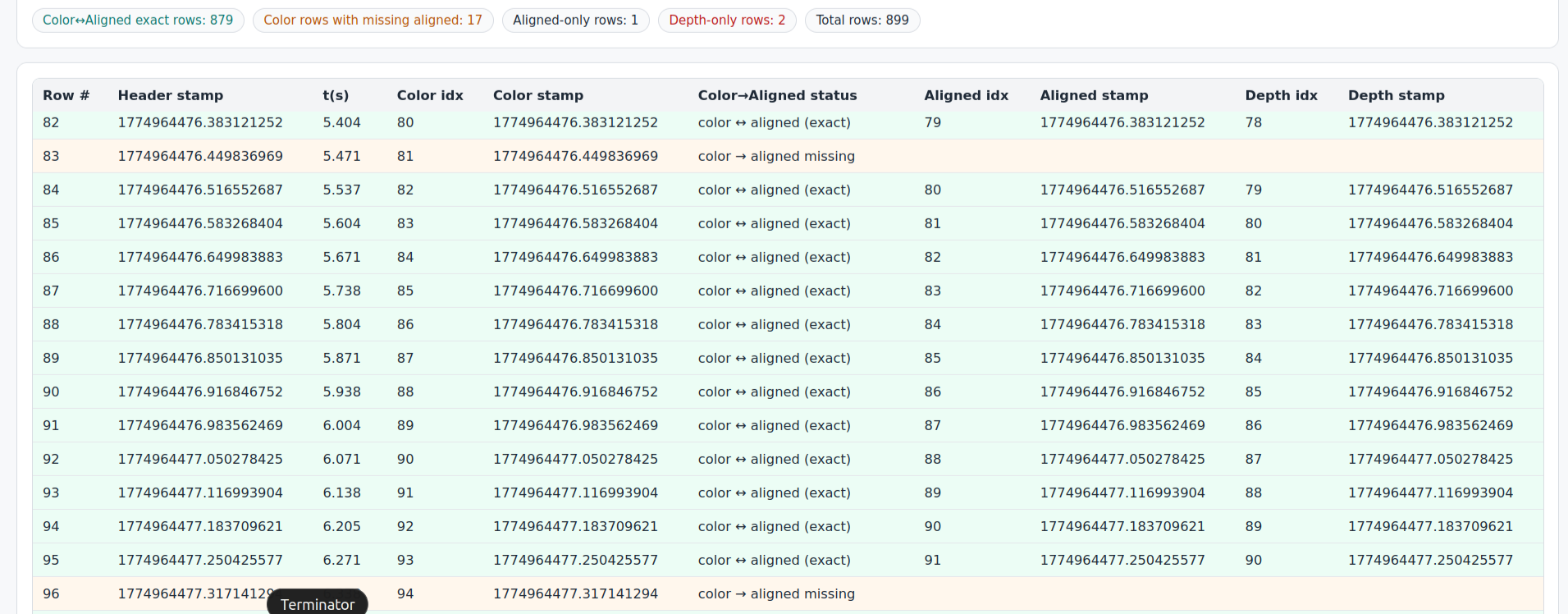
When the depth frame gets dropped RGB frame for the same timestamp is getting published properly. Only the depth and aligned depth frame is getting dropped randomly.
Because of this dropping of depth frame, we are facing issues with real-time image to depth association and other tracking issues which are critical for production.
Is there any way to ensure that the depth frame don't get dropped in run-time. There is no issue with RGB stream
Detailed specs:
Resolution: 1280x720
FPS: 15
Exposure: Manual for both colour and depth stream
Align depth: enabled
Gyro , accelerometer: disabled
RealSense ROS: v2.3.2
LibRealSense version: v2.50.0
Config json: Default preset
USB device: USB 3 type port
USB hub: Custom microchip USB hub, apart from realsense camera other 4 High resolution 13MP cameras are connected
Host device: Nvidia Xavier NX running Jetpack 5 with Ubuntu 20 (ROS1 Noetic)
-
Hi Manoj Guha Are the four high resolution cameras active at the same time as the RealSense D455, please? A USB hub has a maximum amount of data bandwidth (often 5 Gigabits per second / gbps). When using multiple cameras simultaneously, one of the cameras may be negatively affected if the total bandwidth consumed by all attached cameras exceeds the hub's maximum permitted bandwidth.
A solution for this is to use a hub with a higher bandwidth allowance such as 10 Gbps or to link together more than one hub and spread the cameras across them instead of having all cameras on one hub. If your computer has a spare USB3 port then you could also try connecting the single D455 directly to the computer and having the four high-res cameras on the hub so that the D455 is using the computer's USB bandwidth allowance instead of the hub's.
It is also worth bearing in mind that each attached device consumes a portion of the computer's resources, so a good computer hardware specification is important for simultaneous multicam to help avoid performance drops.
-
MartyX Grover There was only one Realsense D435 connected in the case where the image table has been mentioned. No other USB 3 device was active or connected.
-
Thank you for the clarification about the number of active cameras.
Which method did you use to install the 2.50.0 librealsense SDK on your Jetson NX, please? If it is installed from Jetson-specific packages at the link below or is built from source code with CMake with the -DBUILD_WITH_CUDA=ON flag included in the CMake build instruction then the SDK's support for CUDA will be enabled. This provides assistance for alignment operations by offloading its processing from the Jetson's CPU onto its Nvidia graphics GPU, greatly reducing demand on the CPU that may lead to reduced performance.
https://github.com/realsenseai/librealsense/blob/master/doc/installation_jetson.md
-
MartyX Grover
We built the realsense package with CUDA suport now and even after that we are still seeing random colour and depth frame drops.
Instead of using Nvidia Jetson device we will try to run in my Ubuntu 20 laptop and see the behaviour. -
Hi Manoj Guha Do you require further assistance with this case, please? Thanks!
Please sign in to leave a comment.
Comments
6 comments