(messenger-libusb.cpp:42) control_transfer returned error, index: 768, error: Resource temporarily unavailable, number: 11
Hello,
I have the realsense SDK 2.50.0 installed in 32-bit rasbian buster stable release on a pi4 and also on ubuntu server 20.04 for raspberry pi. I get the above warning as soon as I activate the D455 in the viewer.
If I track error logs from uvcvideo via "dmesg | grep uvcvideo" I get [ 7512.800925] uvcvideo: Unknown video format 00000050-0000-0010-8000-00aa00389b71.
The viewer is working but example code in ROS2 is not bringing up images in rviz. There are also about 4 dropped frames/s in the viewer. Not sure if that is normal. Stream is running through USB 3.2
Are these warnings the reason? Any ideas of how to fix them? Thank you
-
Hi James Miller
Are the control_transfer returned warnings appearing a small number of times and then stopping or are they generating continuously? If they are continuous then this can indicate that there is a serious problem regarding communication with the device. It is still sometimes possible for the camera data to be viewed normally whilst the warnings are appearing though.
As a starting point in investigating your case, would it be possible for you to use a system monitoring tool such as htop in Ubuntu Server whilst the Viewer or the ROS2 wrapper are streaming in order to check whether CPU % usage is very high or whether the memory capacity appears to be being consumed rapidly (a 'memory leak').
-
Thanks for the fast reply MartyX Grover. The warnings only come up at the start, 5-7 times. htop is showing on average 2 cores have 30% remaining capacity at any given time, while the other 2 are nearly maxed.
Would it be safe to assume the warnings are not related to why I am not getting pointcloud messages to rviz?
-
As your CPU is apparently under high processing demand, the Resource temporarily unavailable type of control_transfer returned warning may suggest that the Pi's processor is having difficulty keeping up with processing the incoming frames.
Generating a pointcloud in the RealSense ROS wrapper (and also performing alignment) can impose additional CPU processing burdens that may cause problems with publishing topics that do not occur when the pointcloud filter is not enabled.
As you are using the ROS2 wrapper, may I confirm please that you have tried using the command below to launch the camera and open RViz2:
ros2 launch realsense2_camera demo_pointcloud_launch.py
-
Is the pointcloud able to be generated if you define a custom stream configuration with a low specification of 640x480 and 15 FPS for both depth and color like the ROS2 launch instruction below?
ros2 launch realsense2_camera demo_pointcloud_launch.py depth_width:=640 depth_height:=480 depth_fps:=15.0 color_width:=640 color_height:=480 color_fps:=15.0
-
just switched to the ubuntu server 20.04 image for this question as I don't have ROS2 runing on the raspbian buster image yet: When I lauch the script as above I still get no pointcloud in rviz. htop shows all cores maxed out. index: 768 resource temporarily unavailable error comes up regularly.
HOWEVER, depth_fps=5.0 and color_fps=5.0 DOES work! But the pointcloud color recedes to just a white image. (see below)
Any tips to get it to run better?
Any reason to worry about the "Stereo is NOT SUPPORTED" info message?

-
The Stereo is NOT SUPPORTED message is likely a temporary glitch related to the processing struggles rather than a serious problem.
Let's try generating a ROS2 pointcloud using a different launch-file to see how its performance compares to demo_pointcloud_launch.py.
ros2 launch realsense2_camera rs_launch.py enable_pointcloud:=true depth_width:=640 depth_height:=480 depth_fps:=15.0 color_width:=640 color_height:=480 color_fps:=15.0
After launch has completed, open RViz2 with the command ros2 run rviz2 rviz2
If you built the librealsense SDK from source code with CMake then you could also try adding the build term -DBUILD_WITH_OPENMP=TRUE to the CMake build instruction in order to enable the SDK to take advantage of multiple CPU cores when performing YUY to RGB color conversion (and also when performing alignment).
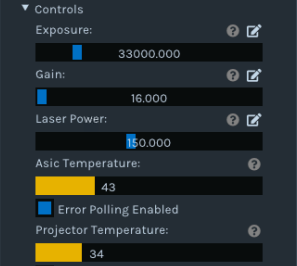
Another aspect of performance that you can check is the camera's temperature. What are the values of the D455's ASIC and Projector temperatures in the RealSense Viewer during streaming (these are under the Controls category of the Stereo Module options).
Also, does the outer casing of the camera feel hot to the touch after only a few minutes of streaming. If it is then this could indicate that there is a glitch on the USB port or a bad USB cable.

-
Hello again MartyG.Here is the current state:
rebuilt adding -DBUILD_WITH_OPENMP=TRUE and remade librealsense.
launching the script ros2 launch realsense2_camera rs_launch.py enable_pointcloud:=true depth_width:=640 depth_height:=480 depth_fps:=15.0 color_width:=640 color_height:=480 color_fps:=15.0 with rviz2 does not produce a rendering:

I see a global status error- Do I need to implement a static tf publisher to support the incoming messages?
Thanks again for your support!
Below are some stats from htop and the rsviewer. Device is not hot to the touch after operation for many minutes.

-
If librealsense has been updated after the RealSense ROS wrapper has been built then the ROS wrapper needs to be built again. Did you perform a wrapper rebuild after installing the OpenMP-enabled librealsense build, please?
Which ROS2 wrapper version are you using, please? If you are using the new 4.x beta wrapper, such as 4.0.3, are you able to generate a pointcloud in RViz2 if you use the launch instruction below?
ros2 launch realsense2_camera rs_launch.py depth_module.profile:=1280x720x30 pointcloud.enable:=true
Whilst an ASIC temperature of 43 is high, it is at an acceptable maximum range. If the temperature rose higher than 43 then problems might start to manifest. I would consider a good temperature to be high 20's to low / mid 30's.
-
Hello again,
I re-cloned and re-built the ros2 wrapper from
git clone https://github.com/IntelRealSense/realsense-ros.git -b ros2-betaas per the instructions again.
Unfortunately this does not generate a pointcloud in rviz2.
Running the demo_pointcloud script still works however. Is there a way to adjust the camera light sensitivity? The colors in the pointcloud actually show very well in dim lighting and are not white washed as before.
Thank you,
James
-
The demo_pointcloud.launch file was created for the earlier ros2 branch (up to ROS2 wrapper version 3.2.3) and is not included in the new ros2_beta branch for the 4.x wrappers.
I would suspect that the white balance setting is affecting your results. There is no documentation available though regarding configuring white balance in ROS2. You could try disabling auto white-balance by adding the ROS1 term enable_white_balance:=false to your roslaunch instruction to see whether it disables auto white-balance in ROS2 too.
-
Thank you. SInce the only launch file that gets a pointcloud to work is the demo_pointcloud.launch, I have been playing with that. I added {'name': 'enable_white_balance', 'default': 'false', 'description': 'wb'} to the local_parameters list and it worked in getting the output to not wash out. I am trying to compare this launch file with the rs_launch.py that you suggest. Not sure what I may find.
I even tried launching rviz from my linux pc to ease the load on the raspberry pi. (The camera performs perfectly in rs-viewer on the pc)
Would these messages point to anything in regards to rviz not streaming?
[realsense2_camera_node-1] [INFO] [1648154462.728241179] [RealSenseCameraNode]: publishing unordered pointcloud.
[realsense2_camera_node-1] [WARN] [1648154463.229247313] [RealSenseCameraNode]: No stream match for pointcloud chosen texture Process - Colorwhen launching the demo_pointcloud.launch these messages can be seen but are not present with rs_launch:
[realsense2_camera_node-1] [INFO] [1648154997.490516069] [RealSenseCameraNode]: Add Filter: pointcloud
[realsense2_camera_node-1] [INFO] [1648154997.492481690] [RealSenseCameraNode]: num_filters: 1Any ideas?
Thank you
James
-
The RealSense ROS wrapper's pointcloud is of an unordered format by default. This can be changed to an ordered pointcloud by setting pointcloud.ordered_pc to true in the ROS2 4.x wrapper.
The difference between an unordered and ordered point cloud is discussed at the link below.
https://github.com/IntelRealSense/realsense-ros/issues/1563
The message No stream match for pointcloud chosen texture Process - Color may appear each time that a frame drop occurs and a texture is therefore unavailable. The point cloud is not published in the frame that the message occurs. The occurrence of the frame drop could be an indication that the computer's processor is struggling.
Please sign in to leave a comment.
Comments
13 comments