Depth of field of RGB module of D435
What is the range of distances from camera to objects at which the objects appear relatively sharp?
According to this comment in Github: https://github.com/IntelRealSense/librealsense/issues/7631#issuecomment-714504852, the closest distance is 7cm.
Then, what is the farthest?
This wikipedia article https://en.wikipedia.org/wiki/Depth_of_field contains formulas, but they require knowledge of the focusing distance.
-
RealSense camera models have official minimum and maximum depth sensing distances, the values of which will vary depending upon the particular camera model. When a camera is moved closer to an object / surface than the specified minimum distance then the depth image can begin to progressively break up as the camera moves closer to the object / surface. The minimum distance of the D435 / D435i models is 0.1 meters / 10 cm.
As the distance of an observed object / surface from the camera increases, depth measuring error increases progressively, a phenomenon known as RMS error. On the D435 / D435i models, this error factor becomes noticable at 3 meters distance and beyond from the camera.
The D455 model has 2x the accuracy over distance of the D435 / D435i, meaning that at 6 meters distance it has the same error that the D435 / D435i has at 3 meters. The D415 model has around 2x the accuracy over distance of the D435 / D435i models.
Point 5 of the section of Intel's camera tuning guide linked to below discusses RMS error and provides a graphic illustrating the difference in RMS error over distance between the D415 and D435.
A camera manufacturer will know the values of all of the aspects of their camera but may not be able to freely disclose certain information about a particular component publicly.
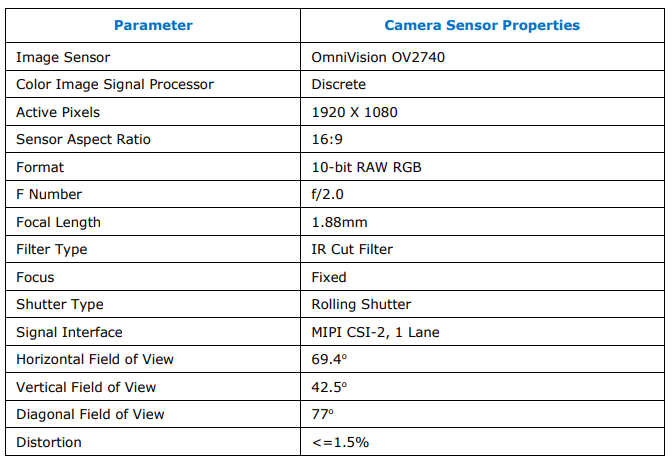
I do not have information available regarding RGB focusing distance on RealSense cameras over long range, and the cameras have fixed focal lengths as mentioned in the case that you linked to in your original message above. It is possible though to adjust software settings to reduce RGB blurring in the RealSense SDK, such as maximizing the RGB sharpness setting. This is described at the link below.
https://github.com/IntelRealSense/librealsense/issues/7187#issuecomment-690248295
It may also be worth looking at the built-in Measure option in the 3D point cloud mode of the RealSense Viewer program that enables the real-world distance between two or more points on the point cloud image to be measured.
https://github.com/IntelRealSense/librealsense/issues/10133#issuecomment-1007310195
Please sign in to leave a comment.
Comments
2 comments