Realsense viewer- Ability to preset settings
I have multiple D435i and D435's, and each time I load them in the intel realsense viewer I have to optimize the settings for the stereo and rgb cameras. I tried to save the custom configuration to a file and download it to the hardware, but the changes are never saved. Could someone tell me how to save a preset to always be on the camera. For instance, simply ensuring that upon start up the histogram equalization is always enabled without me having to turn it on.
Thank you ahead of time.
-
Hi Mderuijter Not all settings that are defined in the RealSense Viewer are exported to a custom json, which may be why certain options such as Histogram Equalization do not update if you load the exported json file back into the RealSense Viewer, giving the impression that the import did not work when actually that particular option was not included in the json.
In the link below, a RealSense team member explains to a RealSense user who also wanted to set Histogram Equalization with a json preset file that this option is not a hardware feature and is instead applied through the colorizer.
https://github.com/IntelRealSense/librealsense/issues/1674#issuecomment-387361411
Custom preset files cannot be stored in the camera hardware and are instead loaded into an application. I researched your question carefully but cannot see a way to enable Histogram Equalization automatically in the Viewer on program start-up. You could do so if you were writing your own application in a langauge such as C++ or Python.
-
Although resolution and frame rate can be defined in a json with 'stream-height', 'stream-width' and 'stream-fps' parameters, in practice the camera pipeline will override the settings when streaming starts. The usual approach to defining a custom resolution and FPS configuration for a program is to set the desired values as cfg (config) statements in the program's scripting.
I do recall a case where a RealSense Python user demonstrated loading the cfg values for resolution and FPS into their custom stream configuration from a json though.
config.enable_stream(rs.stream.depth, int(jsonObj['stream-width']), int(jsonObj['stream-height']), rs.format.z16, int(jsonObj['stream-fps']))

config.enable_stream(rs.stream.color, int(jsonObj['stream-width']), int(jsonObj['stream-height']), rs.format.bgr8, int(jsonObj['stream-fps']))

cfg = pipeline.start(config)
Another Python example of this method is at the link below:
https://github.com/IntelRealSense/librealsense/issues/6075
This method of loading json resolution and FPS values into the pipeline config to apply those values can likely be converted to C++ scripting, since the official C++ documentation for enable_stream in the link below describes the 'int' value system used in the Python code.
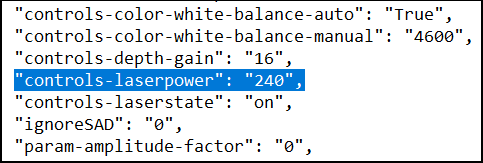
Laser Power can be stored in a json exported from the Viewer via the 'controls-laserpower' parameter. I confirmed with testing that when the exported json is applied in the Viewer, the Laser Power setting changes to the value stored in the json.
Please sign in to leave a comment.
Comments
3 comments