Trying to get both IR streams
Hi,
I'm trying to get both IR streams. It's something I've done before, but for some reason it doesn't work anymore (I've updated the FW, changed the SDK...). I observed that even in the RS Viewer, I can't enable both IR streams anymore.
I tried chaing framerate, resolution, data format... nothing seems to work and it throws an error when calling p.start(cfg).
Any idea? Thanks!
pipeline p;
rs2::config cfg;
cfg.enable_stream(RS2_STREAM_COLOR, 640, 480, RS2_FORMAT_BGR8, 30);
cfg.enable_stream(RS2_STREAM_DEPTH, 1280, 720, RS2_FORMAT_Z16, 30);
cfg.enable_stream(RS2_STREAM_INFRARED, 0, 1280, 720, RS2_FORMAT_BGR8, 30);
cfg.enable_stream(RS2_STREAM_INFRARED, 2, 1280, 720, RS2_FORMAT_BGR8, 30);
p.start(cfg);
-
Hi Ralucadianapetre First, please try changing the '2' index number to '1' for the Infrared 2 line.
Also, on your infrared streams you are streaming color from the infrared sensor instead of infrared, which is Y8 instead of BGR8.
If it is your intention to stream color from the infrared sensor, you can only do so with the left infrared sensor and not both left and right simultaneously. So if you set Infrared and Infrared 2 in the Viewer to both stream color then it will not work.
Also, a D415 or D455 camera model is required to access color from the left infrared sensor as the D435 and D435i models do not support this feature.
-
Hi MartyG,
Thank you for replying so quickly.
Concerning the stream index: I've tried with 0 and 1, 1 and 2 (this is what I had before and worked fine), same problem. Actually, even with one stream, it only works when I set the index -1 or 0.
Concerning the data format: I used to set it to RS2_FORMAT_Y8. However, since updating the FW that doesn't work anymore. I updated again to the latest version (5.13.0.50), but still same problem: when trying to start the pipeline, it throws the following error:
"RealSense error calling rs2_pipeline_start_with_config(pipe:04046410, config:040463C0):
Config couldn't configure all streams"I get the same with RS2_FORMAT_Y16.
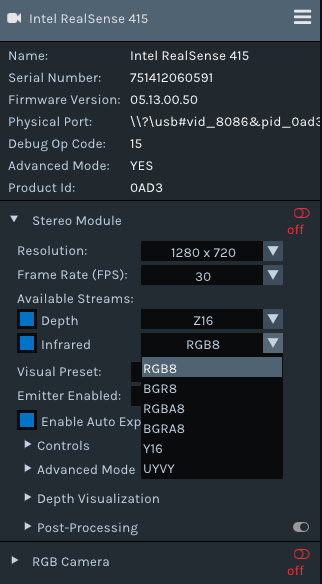
Even in the viewer, I don't have Y8 anymore (see image below). Y16 works, but it looks like the decoding is worng (vertical bands and bad contrast).
-
It looks as though you may have a problem that is specific to the particular computer that you are using and not with the camera hardware. I have a Windows laptop PC that has similar issues with 400 Series cameras that work correctly on another Windows laptop. With a D415, a symptom in the Viewer may be that the Infrared 2 option is missing even though the camera is plugged into a USB 3 port, like in your image above. Another glitch highlighted in your above image is that the speed of the USB connection ('2.1' or '3.2') is not displayed beside the camera name.
When the Viewer is functioning correctly, I would also expect the enable-disable toggle icon beside 'Post-Processing' to be colored blue (On) by default instead of ghosted-out (unselectable) in grey.
The problem is not necessarily related to the 'build' version of Windows, since both the laptop that the SDK works correctly with and the one that doesn't have the same Windows build. I am not aware of a solution to this rarely occurring issue at the time of writing this.
-
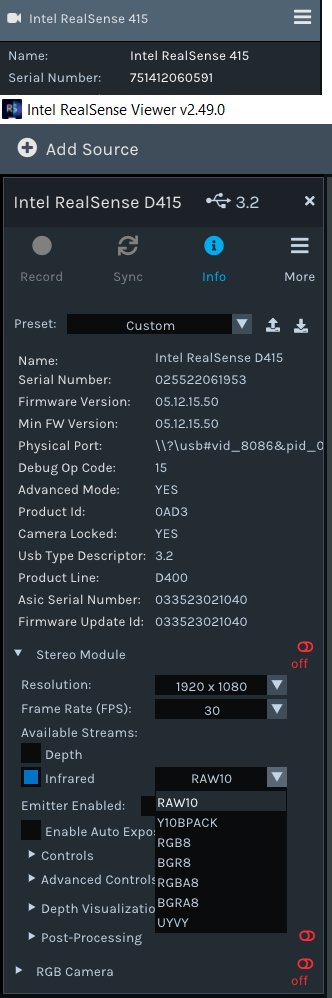
I think you are right about it depending on the laptop. I just tried the same sensor on a different laptop, and it works. Then I've tried a different sensor on a third laptop, and I have a similar problem.
I also tried a few different versions of the FW, but nothing changed...
Since there is no solution to this problem, do you know if it's possible to control the block matching window size?
-
Could you confirm what you mean by the 'block matching window size' please?
For example, if you wanted to create a custom version of the RealSense Viewer to configure the graphical elements of the menu then you could explore customizing the Imgui draw instructions, as described in the link below.
https://support.intelrealsense.com/hc/en-us/community/posts/360052500553/comments/360014925133
-
Hi Ralucadianapetre As mentioned earlier in this discussion, the following conditions apply.
1. If you have a USB 2 connection then only the left IR stream can be enabled.
2. If you have a D435 or D435i camera, you cannot stream RGB8 color from the left infrared sensor.
3. If you have a RealSense camera model that can stream RGB8 color from the left sensor, you cannot stream an infrared image in RGB8 format and instead have the choice of Y8 or Y16.
You can reduce the volume of data being transferred by reducing the resolution and / or the FPS speed.
-
My problem is that I cannot set the IR format to Y8. I don't want to get both left and right anymore. Just left IR but Y8. You said that this problem is related to the laptop I'm using and, at that time, you were not aware of a solution. Do you have one now? For the reminder, when I try setting the format to RS2_FORMAT_Y8 it thows this error:
"RealSense error calling rs2_pipeline_start_with_config(pipe:04046410, config:040463C0):
Config couldn't configure all streams"That option isn't avaiable on RS Viewer either.
-
If you cannot set the left infrared to Y8 then this could suggest the possibility of a driver error. If you are using Windows then please try uninstalling and re-installing the RGB and Depth drivers from the Windows Device Manager interface using the instructions at the link below.
https://support.intelrealsense.com/hc/en-us/community/posts/4419989666323/comments/4431239847443
Please sign in to leave a comment.
Comments
14 comments