Use in field biology
Good-day,
I am a field biologist trying to find a unit that would allow me to do two things:
1) Create 3D scans of mushrooms.
2) Census flying insects against the sky. I would like to use LiDAR (or similar technology) to get periodic, countable snapshots of insects flying above an upward-facing camera (i.e., with the sky as background). I would not expect to be able to identify the insects nor detect objects more than perhaps 4-5m away. However, ideally I would want to be able to automatically count the insects in front of the camera when the image was taken.
Would the L515 or some other unit work for such purposes?
Thank you,
Conrad.
-
Hi Conrad RealSense camera technology should be able to meet your requirements. The L515 lidar depth model would not be suitable for your project though as it is suited to indoor use under controlled lighting conditions due to its sensitivity to infrared light sources such as sunlight. A RealSense 400 Series stereo depth model would be the appropriate solution, as these cameras operate excellently outdoors in strong light.
A 400 Series camera should be able to distinguish insects so long as the insect takes up 9 pixels or greater on the image. This is covered in the link below which discusses the tracking of bees.
-
Thank you for your quick and precise response.
Just to double-check the 'easy' question - these cameras can also be used to make scans for 3D models of objects, correct?
Relating to the harder question - the insect surveying, I'm not interested in tracking objects but in periodically counting the 'overhead noise'. As background, recent concern over insect declines has lead to increased interest in monitoring insects, but many of the current techniques involve trapping them, techniques that involve high mortality and person-hours. Initially, we would probably do both trapping and remote sensing to proof the approach.
I have some follow-up questions:
1) Would you recommend the 455 model?
2) Would the 400 series work day & night or day only?
3) Is there off-the-shelf software that would allow me to count the insects (essentially, the overhead specks) automatically? (I've done only minimum programming.)
Thank you for taking my rather odd query seriously,
Conrad.
-
It's not an odd query at all. :)
Yes, I confirm that you can create 3D scans of objects and generate solid 3D models in formats such as .obj.
In regard to your other questions:
1. If your project will be making use of RGB video and the insects will be moving quickly then the D455 would be an appropriate choice. This is because both its RGB and depth sensors have fast 'global' shutters that can capture fast motion, such as a moving car on a road.
If RGB is not required then the D435 would be suitable. It has a fast global shutter on its depth sensor but a slower 'rolling' shutter on its RGB sensor that may be susceptible to blur when capturing fast motion.
It is worth noting that the D455 has 2x the depth measuring accuracy over distance of the D435, so has the same depth accuracy at 6 meters distance that the D435 has at 3 meters.
2. The 400 Series cameras can work during the night. If you will be capturing at 4-5 meters range then it would be recommended to place an external light source such as an IR illuminator lamp at the scene to provide additional illumination. The 400 Series cameras can make use of any visible light source in a scene when depth-analyzing that scene. You can find more information about this subject at the link below.
https://github.com/IntelRealSense/librealsense/issues/2000
3. I do not know of pre-made applications that are specifically made for insect counting. OpenCV is a good vision-computing programming platform for counting things in an image when creating your own application - google for opencv count number of insects for a large number of research leads.
-
Thanks again.
One last question before I purchase a unit for a test drive: I was, perhaps, wrongly, assuming that some sort of 3D technology be it LiDAR or a RealSense camera would allow me to associate a distance with each blip that was big enough to register in an image and that this would allow me to quickly ask, for example, how many objects were within 4m of the camera in a given shot? This might even allow me to shoot against backgrounds that would be more confusing than an empty sky, so long as those backdrops were farther from the camera than 4m. Am I correct in assuming that I should be able to do this or basically, in a censusing application like this, am I gaining little on a wide-focus standard camera?
-
In a situation where you are observing into the far distance, aligning depth to color will help the camera to distinguish pixels that are in the foreground from those that are in the background.
The SDK example program rs-align-advanced in the link below demonstrates how color pixels, once they have been mapped to depth coordinates, can be added or subtracted from an image in real-time with a distance filtering control
https://github.com/IntelRealSense/librealsense/tree/master/examples/align-advanced
In scenes where an object (such as an insect) may not be easily discernable from the depth data, you could alternatively use a deep neural network (DNN) that you have trained to recognize the shape of insects so that they can be highlighted on the RGB image. The link below has an example program provided by the RealSense SDK that identifies objects on the RGB image and uses depth data to display their distance in meters from the camera.
https://github.com/IntelRealSense/librealsense/tree/master/wrappers/openvino/dnn
If you prefer not to use RGB and only have a depth image then yes, each depth pixel on an image has a readable real-world distance in meters. The further that the observed coordinate is from the camera though, the more inaccurate the depth measurement will be. This phenomenon is called RMS Error. You can find more information about this in point 5. Understand theoretical Limit of the section of Intel's camera tuning paper linked to below.
-
Oops, one more question - the D455 does not currently seem to be available and I would like to work on the technical aspects now before our field season begins. Is there any reason to think that using the D435 (and so missing out on the quick RGB shutter speed) would be an issue in this application to insect surveys? I would not expect to use color to ID any of the flying objects and, judging by your earlier comments, my understanding is that the D435 should otherwise be as suitable, correct? Thanks. Happy New Year.
-
Most retailers are currently out of stock of RealSense cameras at the time of writing this, though the retailer Rutronik24 currently lists the D455 as in stock.
https://www.rutronik24.com/product/intel/82635dsd455mp/13946320.html
Rutronik are a long-term stockist of RealSense products and an Intel Authorized Distributor.
In regard to the D435's suitability, if the insects will not be moving faster than human walking speed then it should be able to capture RGB without motion blur. There are also ways to reduce blur with this model, such as using 60 FPS speed with auto-exposure enabled or using 6 FPS and setting a manual RGB exposure value of '70' if auto-exposure is disabled.
-
Good-morning Marty,
I did manage to purchase a d455 via ebay, and have begun fiddling with it.
I set up the RealSense Viewer on the three different computers. On two of them, it seems to be basically working correctly, but on the third (and what I thought was the most powerful computer), it initially seems to work but then the 3D view flickers and freezes. When I toggle to 2D, both streams seem to be there and functioning correctly.
I decided to start with the 3D mushroom scanning application, and, following your company's on-line suggestions, downloaded a Dot3D trial. I have not, however, been able to get this to work on any one of our three computers as it either freezes or crashes at the "waiting for camera to start streaming" stage. I have written the Dot3D people, but if you have other software you would suggest or if a solution to this issue immediately comes to mind, then please let me know.
I hope to move onto the insect censusing application but, for the moment, am just trying to accomplish these basic tasks.
-
Hi Conrad With the described problem in the 3D mode of the Viewer, disabling the post-processing filters may correct this. You can do this by going to the Post-Processing option under the Stereo Module section and left-clicking on the blue icon beside the Post-Processing category heading to turn it to red. This turns off all post-processing filters, displaying them as grey in the list of filters.
You could also try disabling the Viewer's GLSL settings in its settings interface. The link below has instructions for doing so.
https://github.com/IntelRealSense/librealsense/issues/8110#issuecomment-754705023
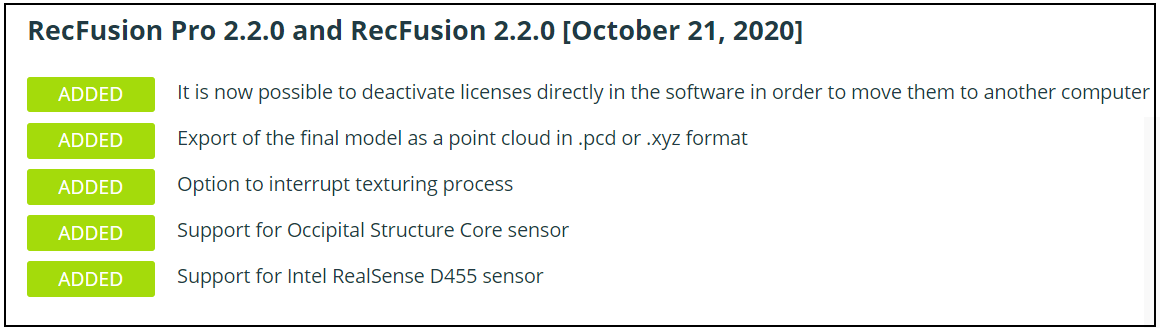
In regard to alternative D455-compatible commercial 3D scanning software, RecFusion added D455 support in October 2020.
RecFusion has an evaluation version that does not allow export to disk but should be able to provide confirmation of whether it would work on your computers.
https://www.recfusion.net/download-recfusion/
-
The default minimum depth sensing distance of the D455 model is 0.4 meters (40 cm). The RealSense SDK software has settings that can reduce the minimum distance and enable the camera to get closer to an object / surface, but there may not be an equivalent adjustable setting in RecFusion.
-
The RecFusion user guide is at the link below.
-
Thanks Marty,
Following your/their instructions, I was able to get the camera to focus on a relatively small volume in RecFusion. However, in attempting to scan the object, the scan starts out OK, but then quickly begins to flicker on and off and soon just stops.
Wondering whether this had to do with a hardware shortfall on the computer side or on the sensor side, I went back into the RealSense Viewer and tried to run some calibrations.
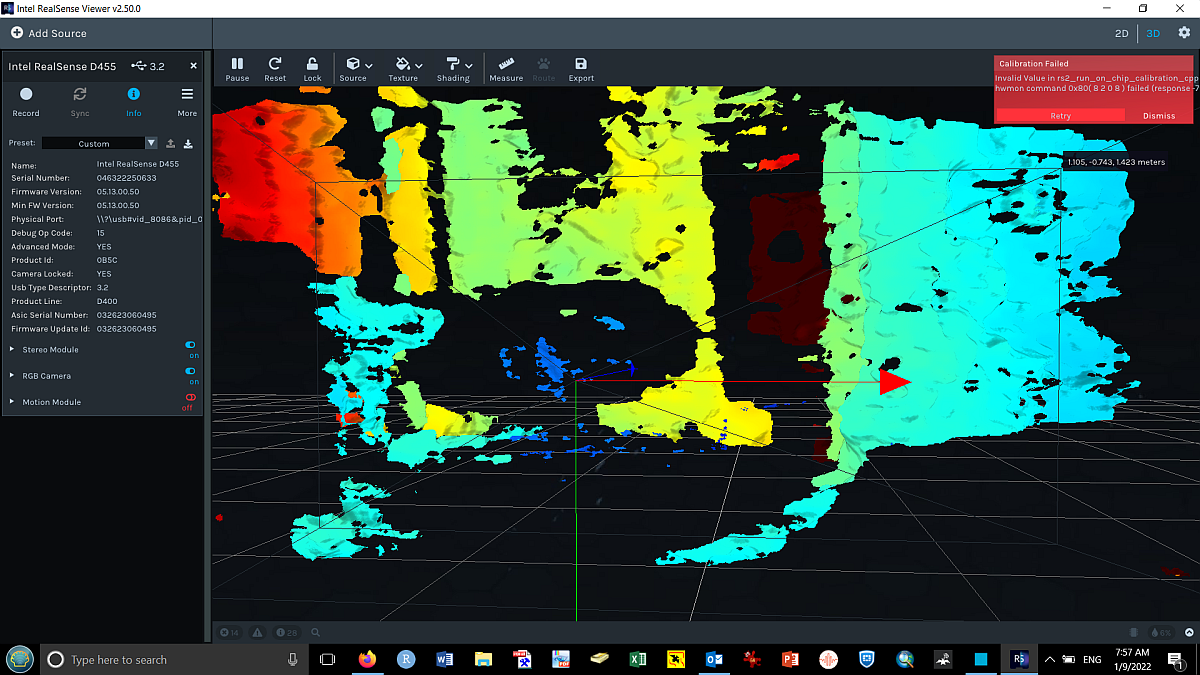
An attempt at on-chip calibration while pointing at a wall produced the following:
While an attempt to then do focal length calibration produced:
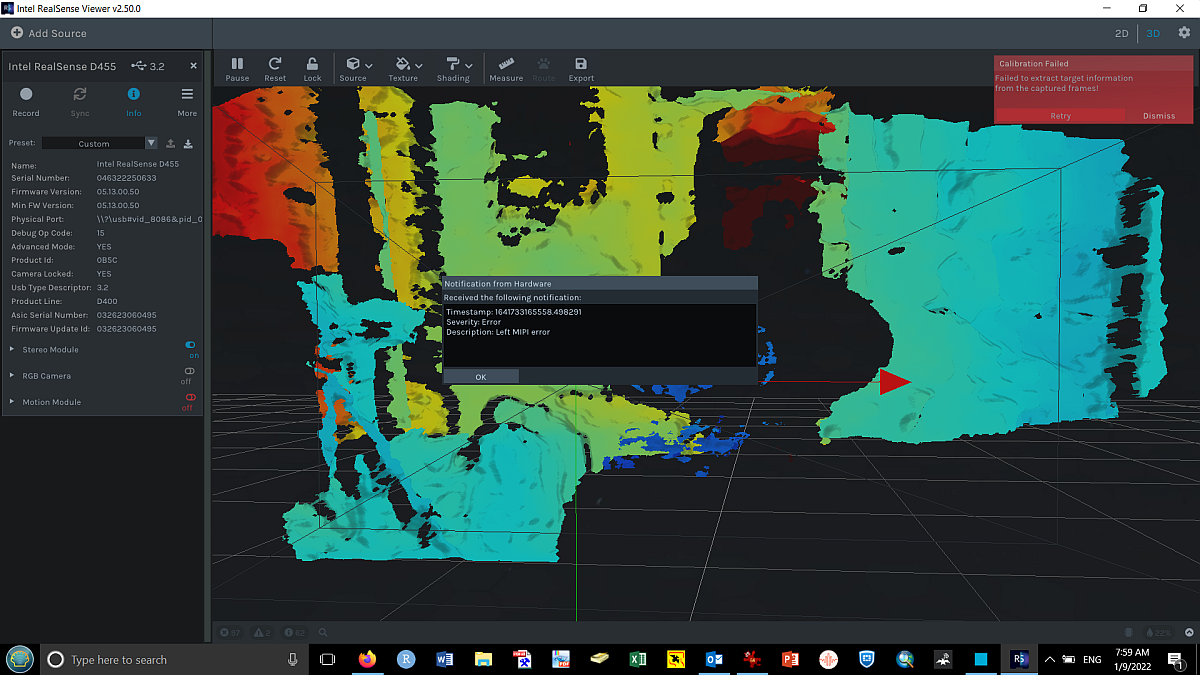
So, before I spend more time trying to work with this, my question is, 'do these errors suggest that something might be wrong with the camera unit I'm using?'
Thanks again for your time,
Conrad.
-
My experience is that when these kind of errors occur in the On-Chip calibration tool, it is caused by using the camera with a particular computer rather than a problem with the camera hardware itself. I have two Windows laptops where the same camera (including a D455 model) works fine on one computer but not the other. On the laptop with the problem, I also experience the same normal startup and then flicker-and-disappear phenomenon in the RealSense Viewer tool's 3D pointcloud mode on this computer (2D mode works fine). On the other laptop these issues do not occur.
In the Viewer, disabling all post-processing filters usually corrects the flicker-and-disappear problem.
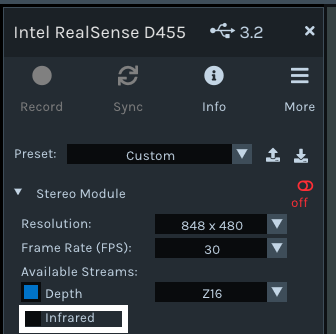
A symptom of whether a particular computer is going to be affected by the problem can be if the Infrared and Infrared 2 stream options are both missing from the Stereo Module section of the Viewer's options side-panel, or if you only have Infrared available but not Infrared 2.
-
I have been trying to work through this one step at the time. First, mushroom scanning, then will come insect censusing.
I did get RecFusion and Dot3d to more or less work, and perhaps what I'm realizing is that I should not expect too much from the resolution of the scan and that this unit is made more for whole-person or room-scale scans rather than the fine details of mushroom texture and color. My scan of a SLR camera produced something recognizable as a camera, but without any small detail. My goal, for educational purposes, was to be able to create images of mushrooms at about arms-length scale which could be rotated to show gills vs pores and a good overall impression of the mushroom. So my first question is, do you have examples of high-resolution scans of, say, apple-sized objects made with a RealSense unit? I would like to understand if I have reached the limits of the RealSense's resolution or whether I can hope for better if I spend more time fiddling with the software. Should go back to trying photogrammetry for mushroom models and move on to trying to work on the insect censusing. Your advice appreciated. Thanks. Conrad.
-
For the mushroom scanning application, the RealSense-compatible LIPScan 3D Desktop software may be worth trying. It has a free trial version and is designed specifically for close range detailed 3D model generation of objects small enough to be placed on a turntable.
https://www.lips-hci.com/lipscan-3d
https://www.youtube.com/watch?v=tCBsDUPVoAo
The software is optimized for the D415 camera model, but as it has a free trial there is nothing to lose in trying your D455 with it.
Another alternative may be to pair the D455 with a separate very high resolution RGB camera and use that camera as the RGB texture source instead of the D455's inbuilt RGB sensor whilst the D455 is used for the depth data.
-
Thanks Marty,
After conversation back and forth with LIPScan (they have now updated the 3D software to recognize the D455), the conclusion seemed to be that the D455 was not suitable for scanning small objects like a mushroom. They thought the D415 was probably the best unit for small scale scans, but, based on the scans they sent me, even that seemed unable to produce a reasonably detailed image of an object the size of mushroom. Having already tried photogrammetry with mushrooms, I would say that, for this application, photogrammetry produced something more recognizable (although it was still not really adequate). Have you seen examples of where a D455 was used for small-scale scans? I realize that this is not the unit's primary application, and so fully understand if such an application is not possible. As you know, I primarily purchased the unit to see if it could be used in insect censusing, and so will move on to exploring that application. Fingers crossed for better luck.
-
As you say, the D455 is suited for longer range sensing due to its 0.4 m minimum distance and I have not seen other examples of close-range scanning with it. I ran further tests with a D455 but was unable to improve the results from generating a point cloud of a small test object with a grainy texture (a little wooden squirrel).
-
Hi again. Intel have just launched a new RealSense camera model called the D405 that is designed for very close range scanning, so it may be suited to your plans for high detail, close range mushroom scanning. It has a range of 7 cm to 50 cm.
https://store.intelrealsense.com/buy-intel-realsense-depth-camera-d405.html
-
Thanks. I would be really hesitant to invest in this, unless I knew for sure it would work for that purpose. I had understood the D455 was going to be able to do this and was a little disappointed that that wasn't the case.
I am now pivoting back to my second goal of using the D455 for insect censusing. Clearly, I should get into Python programming to do this, and luckily I have a friend who can help with that language (but is not familiar with the realsense unit). My understanding is that first I need to install the pyrealsense2 and then, presumably, I should be able to use a python shell like IDLE to communicate with the camera. I am using Windows 10, do you know if anybody has created a starter's guide of sorts with step-by-step instructions for getting that communication with the camera started? It doesn't seem quite as straightforward as I had expected.
Thanks,
Conrad.
-
The link below leads to a past guide that I wrote about installing the RealSense pyrealsense2 wrapper on Windows 10 and Python 3.7 using the pip install pyrealsense2 instruction.
https://github.com/IntelRealSense/librealsense/issues/6402#issuecomment-629763906
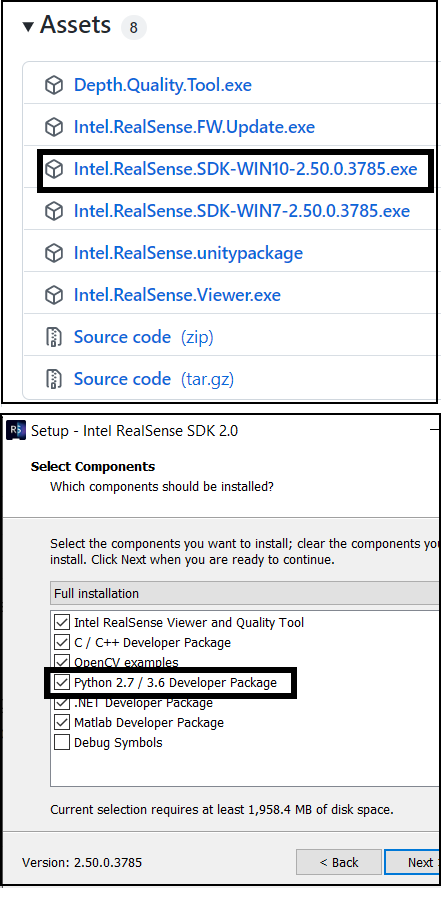
If you have installed the full RealSense SDK on Windows using the Intel.RealSense.SDK-WIN10 automated installer file on the SDK's Releases page then it already installs the Python wrapper as a default component for Python 2.7 and 3.6 though.
https://github.com/IntelRealSense/librealsense/releases
-
OK, so I found pip and see that it's working but "pip install pyrealsense2" gets me "ERROR: Could not find a version that satisfies the requirement pyrealsense2 (from versions: none)
ERROR: No matching distribution found for pyrealsense2"However, "pip install pyrealsense" did download several tar's, but each then said "ERROR: Command errored out with exit status 1:". I have also installed the Intel.RealSense.SDK-WIN10 python library. But should I be seeing these files somewhere? How can I test if it is adequately installed? Is there a list of simple .py scripts that I can just use to make sure the wrapper is installed?
Thanks.
-
The pyrealsense2 pip page has a simple test script.
https://pypi.org/project/pyrealsense2/
The SDK's Python wrapper has a page of example programs.
https://github.com/IntelRealSense/librealsense/tree/master/wrappers/python
This page also includes a simple test script.
-
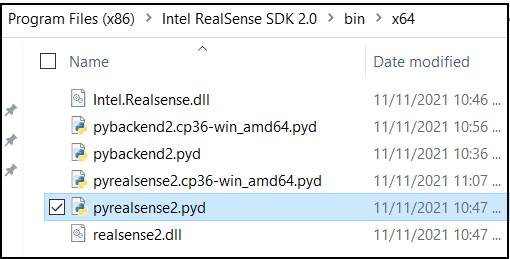
The official Python wrapper installation documentation for Windows at the link below states that you should copy pyrealsense2.pyd into the site-packages sub-folder of your Python directory.
https://github.com/IntelRealSense/librealsense/tree/master/wrappers/python#windows
If you have installed the full RealSense SDK with the automated installer file Intel.RealSense.SDK-WIN10 then you can find a pre-built pyrealsense2.pyd file to copy and paste into site-pacages at the computer location below:
C: > Program Files (x86) > Intel RealSense SDK 2.0 > bin > x64
-
Good-morning Marty,
So...
I tried to follow the instructions here:https://github.com/IntelRealSense/librealsense/tree/master/wrappers/python#windows
I copied the pyrealsense2.pyd file to the sites-packages folder of my Python install and, as suggested in Step 6 & just to see if that would help, moved that file plus the
realsense2.dllto the Scripts folder where I had saved the test code (i.e., the https://github.com/IntelRealSense/librealsense/tree/master/wrappers/python#streaming-using-rspipeline you suggest above).Trying to then run that testscript produced the following error:
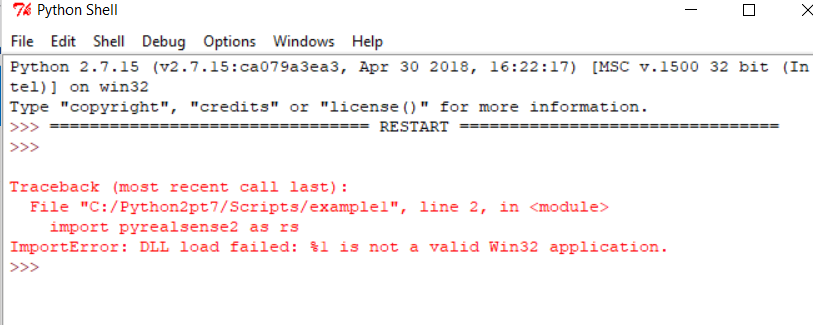
I tried the same thing on a second machine and got the same error. My first machine had multiple Python installs and I thought perhaps that was my problem. However, the second machine had just one Python install (from a previous application), yet I got the same error. Any thoughts?
Thanks.
-
In another case of this rare error at the link below, a RealSense team member suggests checking that your Python installation is the same bit format as the library.
https://github.com/IntelRealSense/librealsense/issues/1994#issuecomment-402612913
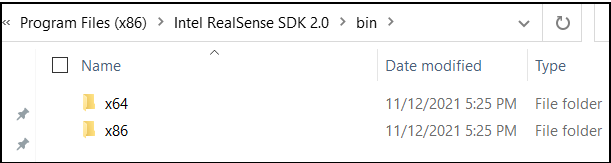
So if your Python version is 32 bit then my understanding is that you should use the 32-bit version of the RealSense files. In the Windows version of the RealSense SDK folder, the bin sub-directory provides files for x86 (32-bit) and x64 (64-bit).
Please sign in to leave a comment.
Comments
35 comments