Red Pulsing with D435 camera
Hello,
Currently I am doing a project where I have a dome with red and green LED's, a camera and a conveyor belt (as in the picture)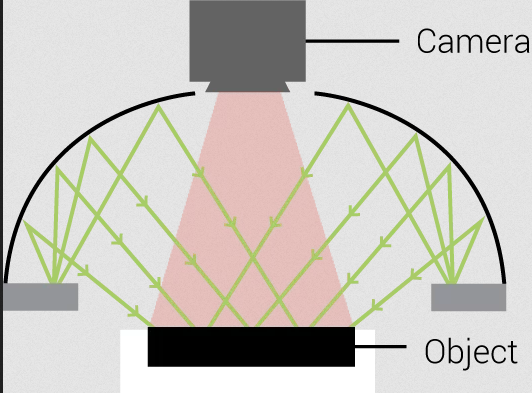 The task is to detect apples and pears when they pass the camera.
But the problem is that I experienced some weird red pulsing in the image, where it sometimes detects more red light than usual. This is problematic because the red pulsing color is nearly the same as the apple color, which messes with the software.
The pulsing isn't across the entire screen, but only to the sides of the screen. Also most of the time the pulsing stops after about 30 seconds, but sometimes it keeps happening. It occurs more when there is an apple in frame, when nothing red is in frame it doesn't occur as frequent or as much.
Does somebody know what can trigger this pulsing, or how the problem can be resolved?
I have seen that sunlight can trigger a redish tint on the image, but there is no sunlight in the dome.
If anybody knows the answer to this, that would be great!
Thanks!
-
Hi Lschreurs25 The projector component on the D435 model pulses in time with exposure, whilst on the D415 model the projector is always on. So I would first recommend confirming or eliminating the projector as the cause of your pulsing problem by setting the D435's projector to the Always On status.
The link below explains how to do so in the RealSense Viewer tool in order to test quickly whether it makes a positive difference.
https://github.com/IntelRealSense/librealsense/issues/9969#issuecomment-971423207
-
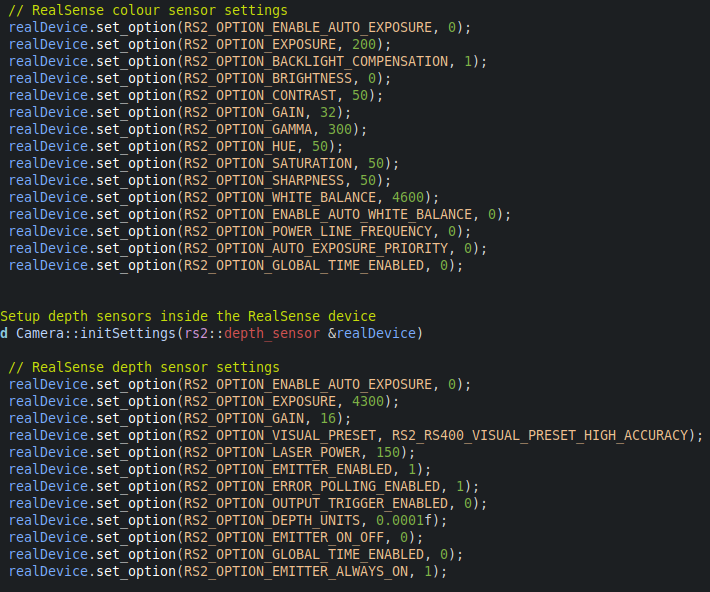
I note that your RGB exposure is set to 200 rather than 20 (the default RGB exposure value is 156). Or is the mention of 20 in your comment above a typo? :)
If you are using manual exposure, you should be careful of the values that you choose, as certain ranges of values can have unforeseen effects on the actual FPS. This is described in a discussion in the link below.
https://github.com/IntelRealSense/librealsense/issues/1957
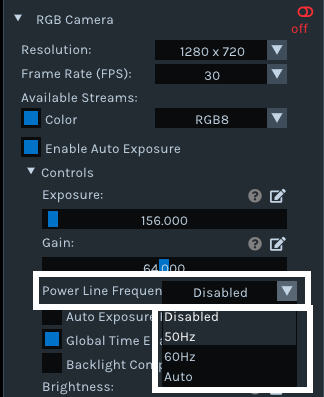
If you have fluorescent lights such as ceiling strip lights in the location that the camera is being used in, it may be disruptive to the image due to the gas inside these lights flickering at frequencies that are difficult to see with the human eye. Using an FPS that is close to the operating frequency of the particular set of lights can help to reduce disruption. For some light this may be 30 FPS and for others it may be 60 FPS. European regions that use 50Hz can cause problems with this method due to a matching 50 FPS camera frequency not being supported. In that situation, you can set an RGB option called Power Line Frequency to 50 Hz.
-
So for anybody who comes across this post with the same problem:
I found that the red pulsing happens with an exposure set between roughly 150 and 250. Any exposure above or below this does not create the red pulsing.
Ps. If I'm correct the exposure in C++ has a 0.1 multiplier, meaning a exposure setting of 100 is an exposure time of 10 milliseconds.
-
Thanks very much Lschreurs25 for sharing your experience with the RealSense community!
In Linux the exposure can be controlled with 0.1 msec granularity whilst on Windows the exposure values are rounded up according to a Microsoft logarithmic scale as described by a RealSense team member in the link below.
https://github.com/IntelRealSense/librealsense/issues/5493#issuecomment-567857540
Please sign in to leave a comment.
Comments
8 comments