The unit of point clouds measured from D455
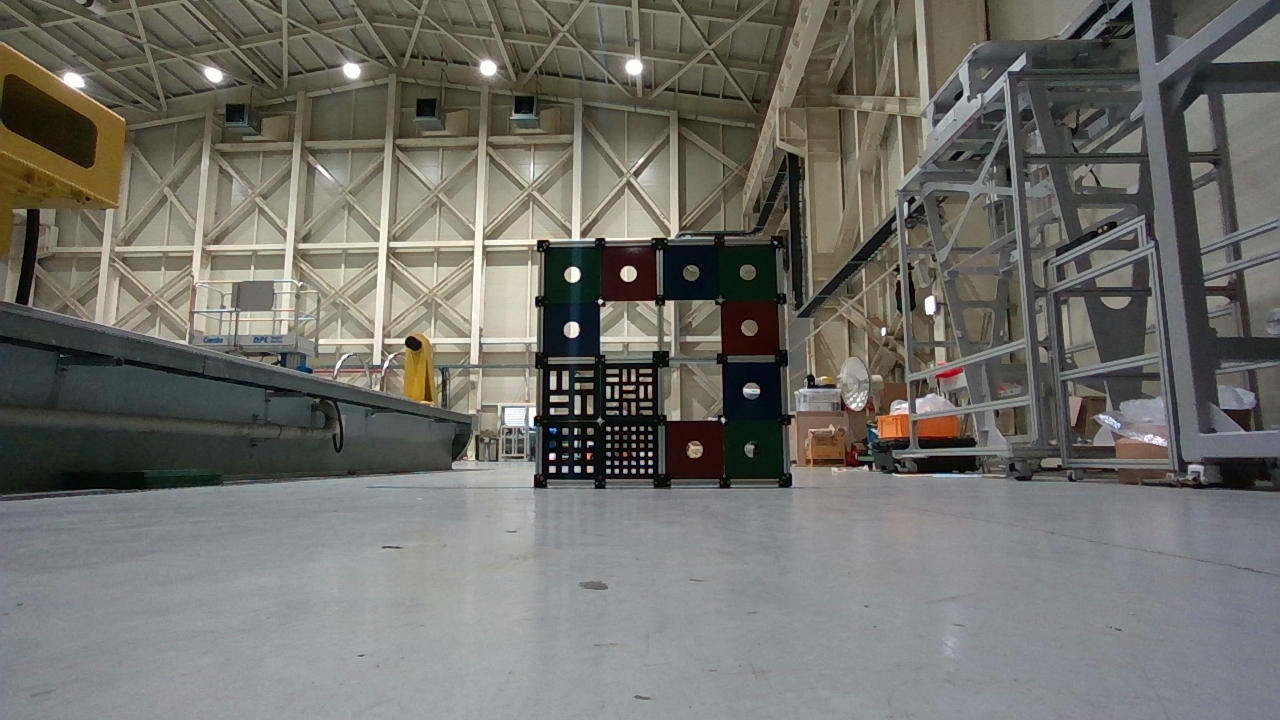
Using D455 depth camera, we measured point clouds from a phantom placed at 3 m from the camera.
But the depth measured by camera is almost 1.5 meters.
Why the measured depth by D455 is different with the real distance (3m)?
-
Hi Smeekim A measured distance of 1.5 m compared to 3 m real-world distance suggests that the camera may be mis-reading the depth due to some factor in the local environment, such as the location's lighting level or the color of the observed object / surface. Would it be possible to provide RGB and depth images of the observed scene in this discussion please, as that will be helpful in diagnosing your problem.
Also, is the object / surface that reads as 1.5 m positioned at the center of the camera view or off to the side of it?
-
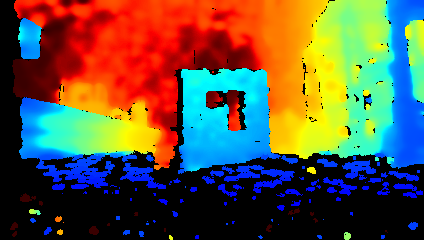
Thanks very much for the images. The far background and sides of the depth image look okay in terms of how the depth color-grading is shifting progressively from blue (near range) to red (far range).
The broken area of noise in the near-range area at the bottom of the depth image may be due to the reflectivity of the floor surface making it more difficult to read depth information from. Applying a post-processing Hole-Filling Filter may help to fill in some of that missing detail. At the area nearest to the camera, some of that noise may be due to the D455 having a default minimum depth sensing range of 0.4 m (40 cm), meaning that areas closer to the camera lenses than that distance may not be rendered on the image.
A physical filter product called a linear polarization filter can also be applied over the camera lenses on the outside of the camera to significantly negate the effect of glare from reflections. This is discussed in section 4.4 When to use polarizers and waveplates of Intel's white-paper document about optical filter products in the link below.
https://github.com/IntelRealSense/librealsense/issues/6713#issuecomment-651114720
In regard to the depth measurement discrepancy of the central object (1.5 m instead of 3 m), my main suspicions for the cause would be twofold. Firstly, there is the dark color of the material. Dark color shades such as dark grey and black are more difficult for the camera to analyze for depth detail than lighter colors. This is not due to RealSense specifically, but a general physics principle regarding how dark colors absorb light, making it more difficult for depth cameras to analyze such surfaces for depth detail.
If you cannot change the color of the material then placing an external light source near the object to illuminate its surface may improve depth analysis results by bringing out depth detail from the surface. You could alternatively consider adding an external LED pattern projector that can cast a dot pattern onto a surface at long range. A RealSense camera can then use these dots cast onto a surface as a 'texture source' to analyze for depth information. Intel's RealSense white paper document about projectors in the link below has more information about this.
https://dev.intelrealsense.com/docs/projectors
The other possible cause of measurement disruption that I mentioned is the patterns on the object's surfaces. If there is a repeating horizontal or vertical pattern - a repetitive pattern - then the camera's depth sensing algorithm may become confused. Examples of repetitive patterns are a row of fence posts or a row of similar looking tree tops (horizontal) and a stack of window blind slats (vertical). In the link below, a RealSense team member offers links to information resources that may help to reduce the negative effect of a repetitive pattern.
https://github.com/IntelRealSense/librealsense/issues/6713#issuecomment-651114720
Please sign in to leave a comment.
Comments
3 comments