No RealSense devices were found!
Hi,
I'm trying to use D415 with RTABMAP on ROS NOETIC(Ubuntu 20.04) on Raspberry Pi 4 but it doesn't seem to be detecting it. It displays an error message saying "Failed to meet update rate" and No Realsense devices found. I have installed Librealsense v2.48.0. Not entirely sure how this can be fixed. Please let me know what I'm doing wrong. After running rosversion roscpp, I get 1.15.13. The camera seems to be detected on realsense-viewer.
Thank you
-
Hi Varsha 11891 The first thing to bear in mind is that the D415 camera model does not have an IMU motion tracking component like the RealSense D435i and D455 models do. So whilst the rtabmap_ros documentation states that it can be used with D415, you will not be able to use IMU-related functions.
The rtabmap_ros documentation advises in its D415 notes to use the roslaunch realsense2_camera rs_camera.launch align_depth:=true roslaunch instruction of the RealSense SDK's RealSense ROS compatibility 'wrapper', which should be built separately from the RealSense SDK on your Pi.
http://wiki.ros.org/rtabmap_ros/Tutorials/HandHeldMapping#RGB_and_depth_sensors
The link below has instructions for building the RealSense ROS wrapper from source code on Ubuntu.
https://github.com/IntelRealSense/realsense-ros#step-2-install-intel-realsense-ros-from-sources
It is important to match a particular RealSense ROS wrapper version as closely as possible with the RealSense SDK version listed in that wrapper's release notes. For SDK version 2.48.0, wrapper version 2.3.1 should be built for ROS1 Noetic.
https://github.com/IntelRealSense/realsense-ros/releases/tag/2.3.1
-
Thanks for the reply Marty.
I followed the link you have mentioned http://wiki.ros.org/rtabmap_ros/Tutorials/HandHeldMapping#RGB_and_depth_sensors. I did have a few doubts from this one, should the commands
roslaunch realsense2_camera rs_camera.launch align_depth:=true
and
roslaunch rtabmap_ros rtabmap.launch \
    rtabmap_args:="--delete_db_on_start" \
    depth_topic:=/camera/aligned_depth_to_color/image_raw \
    rgb_topic:=/camera/color/image_raw \
    camera_info_topic:=/camera/color/camera_info \
    approx_sync:=false
be running simultaneously on two terminal windows or should they be executed one after the other? It's a little confusing.
I have built the realsense ros wrapper from source using the link https://github.com/IntelRealSense/realsense-ros#step-2-install-intel-realsense-ros-from-sources .
However I'm not able to install this wrapper version 2.3.1 from this link https://github.com/IntelRealSense/realsense-ros/releases/tag/2.3.1
Please tell me how I can install this wrapper.
-
I would think that the link that you used to build the wrapper may have installed the latest version of the wrapper - 2.3.2 - for SDK version 2.50.0.
https://github.com/IntelRealSense/realsense-ros#step-2-install-intel-realsense-ros-from-sources
You could try building librealsense 2.50.0 and then rebuilding ROS wrapper 2.3.2 again after that using the above link (since you have shown that this wrapper build method has worked once for you already).
If you would prefer to use the combination of 2.48.0 and wrapper 2.3.1 so that you do not have to rebuild librealsense: you may be able to go to the release page for 2.3.1 at the link below and then download its zip file, extract the 2.3.1 source code folder from it and build with that using the Method 2 instructions that you have already used instead of cloning the latest version.
https://github.com/IntelRealSense/realsense-ros/releases/tag/2.3.1
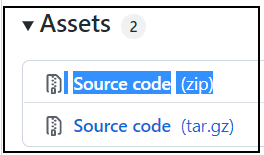
I have not used this zip-file method of building the wrapper myself, but I would speculate that the extracted folder would be placed in the catkin workspace folder catkin_ws\src (i.e inside the 'src' folder).
In regard to the launch method and order of the wrapper and rtabmap_ros, I believe that you would launch the wrapper first and rtabmap_ros second, and launch them in separate ROS terminal windows.
Please sign in to leave a comment.
Comments
3 comments