Check if device is already used
Hi,
I would like to know how check if device is explicitly already used by another application otherwise than going through the try catch?
I must use x4 D455, and each applications have once camera instance.
This application must check if camera is not used before launch depth rendering and his UDP server.
Like this:
rs2::context ctx;

auto devices = ctx.query_devices();
size_t device_count = devices.size();
if (!device_count)
{
 std::cout << "No device detected. Is it plugged in?\n";
 return EXIT_SUCCESS;
}

// Get the first connected device

for(int index = 0; index < devices.size(); index++)
{
 auto dev_1 = devices[index];

 // Check here
 if(dev_1.is<rs200::is_used>()) ?? is_free ??
 {
  std::cout << "We will using << " index << " d455 now! Starting UDP server" << std::endl;
  ...
 }
 else
 {
  std::cout << index << " already used... NEXT !" << std::endl;
 }
}
If someone can help me.
Thank a lot!
Best regards
-
Hi Faviersebastien01 Using a try-catch is the usual way to check the busy status of a stream. If you require an alternative, you could explore using the SDK's can_resolve instruction to see whether the requested pipeline profile can be provided.
A C++ example of the instruction's use in the SDK's code is highlighted in the link below.
https://github.com/IntelRealSense/librealsense/blob/master/src/rs.cpp#L2049
-
Hi MartyG!
Thank a lot for your reply and for your interesting lead
Using a try-catch is the usual way to check the busy status of a stream
Indeed, try {} catch () {} takes too long before returning an error, sometimes, the program crashes instead of catch and my project can't wait more 8 sec for check my 4 d455 cameras.
I've testing can_resolve(), but there a maybe a problem, i've launched Intel.RS.Viewer or another program for using/lock depth pipe, and when i execute my code, this function return always true.
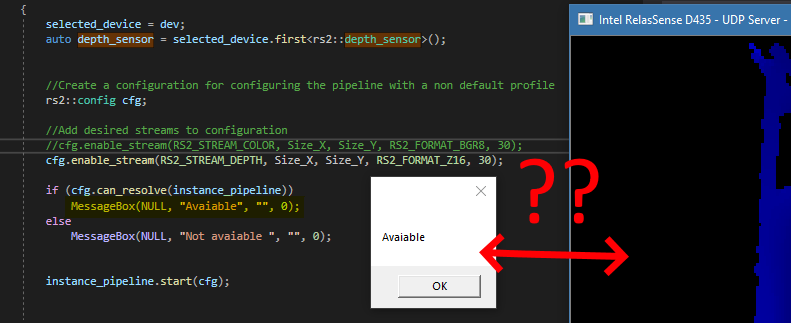
Do you have an idea ?
Thank a lot!
Regards---
NB
Parcial source code:rs2::pipeline instance_pipeline;
rs2::device selected_device;
selected_device = dev;
auto depth_sensor = selected_device.first<rs2::depth_sensor>();
//Create a configuration for configuring the pipeline with a non default profile
rs2::config cfg;
//Add desired streams to configuration
//cfg.enable_stream(RS2_STREAM_COLOR, Size_X, Size_Y, RS2_FORMAT_BGR8, 30);
cfg.enable_stream(RS2_STREAM_DEPTH, Size_X, Size_Y, RS2_FORMAT_Z16, 30);
if (cfg.can_resolve(instance_pipeline))
MessageBox(NULL, "Avaiable", "", 0);
else
MessageBox(NULL, "Not avaiable ", "", 0);
instance_pipeline.start(cfg); -
The link below highlights a more advanced use of can_resolve in the SDK code. If can_resolve is detected to be true then a pipe start instruction is issued. If the pipe start generates an error because it is already started then a catch handles the error, stops the pipeline and informs the user that the camera is not functional or busy.
Alternatively, if all of the D455 are attached to the same computer and you are using multicam ctx code then your original catch code may run faster if you adapt a C++ script in the link below for accessing all attached cameras simultaneously.
https://github.com/IntelRealSense/librealsense/issues/2219#issuecomment-412899468
This script checks the camera name to see whether it is a D415 model, so to make the script work you should change the name check to D455 or remove the checking mechanism.
Please sign in to leave a comment.
Comments
3 comments