D455: Depth map is only acquired in a central cross shape, missing in the corners
As you can see in the attached image, when I view the depth map in the RealSense Viewer, it is only acquired in a central, cross-shaped pattern. The depth data in the corners of the view is completely missing.
I have already tried running the On-Chip Calibration, but 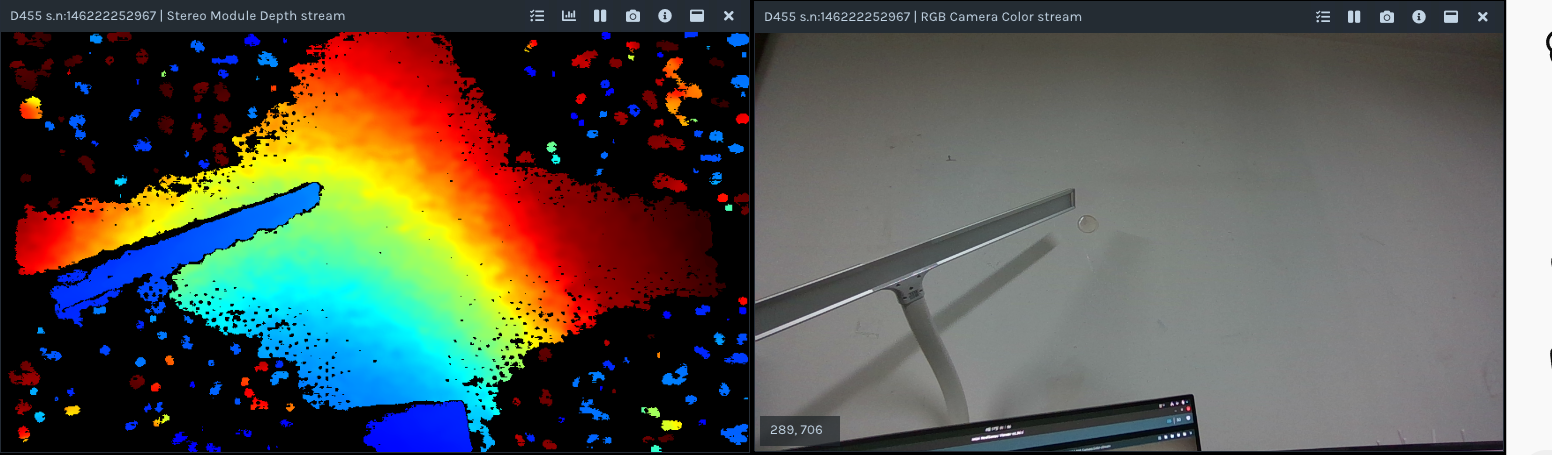 the issue persists. I have also confirmed that my SDK and firmware versions are matched.
What could be causing this issue?
-
Hi bomin kim The missing areas on the depth image appear to correspond to darker, less strongly illuminated areas on the RGB image. The camera may be having more difficulty with analyzing those areas for depth detail.
In the Stereo Module > Controls section of the RealSense Viewer's options side-panel, please try maximizing the Laser Power option's value to '360' to increase the strength of the laser projection from the camera's projector component. Does maximizing Laser Power reduce the size of the empty black areas on your depth image?
-
If changing Laser Power does not make a difference, please next go to the Stereo Module > Post-Processing section and expand open the list of post-processing filters. Find one called 'Threshold Filter' which is enabled by default with a blue icon next to it and left-click on the blue icon to turn it red (off) so that the camera can depth-sense to its full range.
If the depth remains missing, left-click on the red icon next to the Hole Filling filter to turn the icon blue (on) and cause the missing depth to be automatically filled in.
-
You could eliminate mis-calibration as a cause by enabling the depth stream and then using the instructions at the link below to reset the camera to its factory-new default calibration in the Viewer, if you have not tried this already.
https://github.com/IntelRealSense/librealsense/issues/10182#issuecomment-1019854487
Please sign in to leave a comment.
Comments
6 comments