D455 Partial Frames
Seeing partial frames periodically running multiple D455s, all plugged into USB3 PCIe cards. What could be causing this issue? Link to video clip below.
https://drive.google.com/file/d/1wqmuYhLwn4kaWKHnf1oH2hwRqZW59RX8/view?usp=drive_link
-
Hi Bschwartz I count 21 cameras on your image, all apparently attached to the same computer. Even if there is enough data bandwidth for the cameras, each attached camera will consume a portion of the computer's resources. So if there are 21 simultaneously active cameras on one computer then the computer's CPU might be being over-burdened, resulting in partial frames.
If that is the case then there might not be much that can be done except to reduce the resolution and / or FPS speed of the cameras or use a more powerful computer.
I observe in the video that the cameras affected with partial frames seem to be able to recover automatically to a normal state after a period of seconds. Noting the large overhead lamps in the scene, that provides an additional possibility as an alternative to a struggling computer: that the sensors on some of the cameras are becoming over-saturated with strong light and then auto-exposure corrects the image after a short period.
-
If the sensors were being affected by strong light then defining a Region of Interest (ROI) in the lower half of the image or applying an external Neural Density (ND) filter - such as the CLAREX NIR-75N - over the lenses on the outside of the camera may help to negate such disruption.
On some models of RealSense camera (D435f, D435if, D455f) this CLAREX filter is built into the camera.
-
Thanks MartyX Grover. It's not the lights, as we've observed this with lights off. We have all the cameras synced to each other, with one as master. Could it be sync being dropped then reestablished?
-
Also, are your slave cameras set to Inter Cam Sync Mode '2' (slave) or to Mode 4 (genlock slave). If you are using mode 2, you could try setting the slaves to 4 to see how it affects performance.
When using a RealSense camera as the Master with genlock mode though, if the Master is set to 30 FPS then all of the Slave cameras should be set to 90 FPS (3x the Master FPS).
-
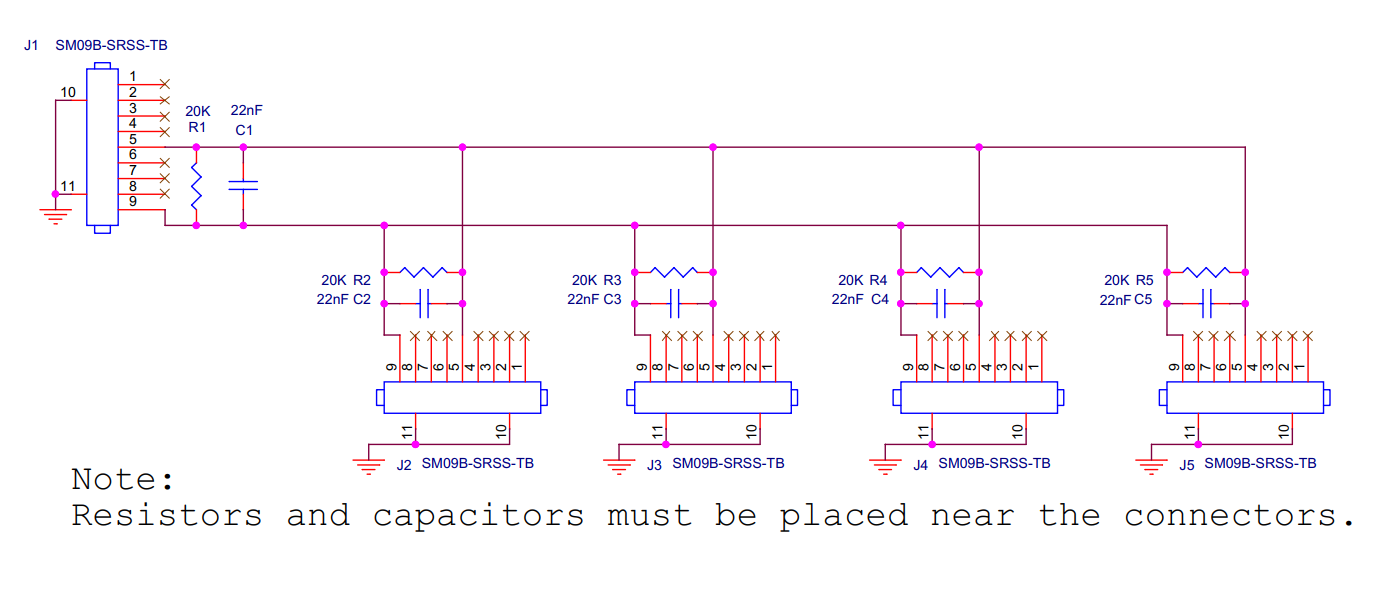
Thanks very much for the update. The multi-camera guide has electronics blueprints for adding anti-ESD components to the sync cable if you want to test whether static due to cable length is the cause of your partial frame problem when sync is enabled.
https://dev.intelrealsense.com/docs/multiple-depth-cameras-configuration#1-connecting-the-cameras
Please sign in to leave a comment.
Comments
7 comments