Dynamic calibrator 2.6.8 installer
Does anyone have the installer for dynamic calibration tool V2.6.8. My firmware requires the older version instead of V2.11.0 that the downloads have available:
https://downloadcenter.intel.com/download/29618/Intel-RealSense-D400-Series-Dynamic-Calibration-Tool
Hoping someone has the installer file. Support does not seem to work for submitting a ticket.
Thanks,
-
Hi Matthewlefort The user guide for the 2.11.0 version of the Dynamic Calibration tool states that the firmware requirements are 5.10.15.0 or higher for D435i and 5.10.6.0 or higher for other devices. These firmwares are very old, and so unless there is a compelling reason to keep your camera firmware version at this level, I would recommend updating the firmware in the RealSense Viewer program.
This is simple to perorm, and the RealSense Viewer can automatically install the firmware version that is appropriate for the librealsense SDK version that you are using without you having to provide a firmware file to perform the update with.
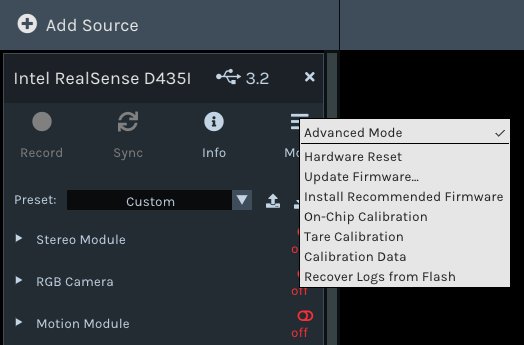
To perform this automated update, you can go to the More option near the top of the Viewer's options side-panel and select the Install Recommended Firmware option from the drop down menu.
-
Thanks MartyG. I would like to upgrade the firmware to the latest and use the new calibration tool, however at my company I am not a software engineer. From my understanding, our other internal software does not support the latest firmware of the Realsense and so we have to keep the firmware at 5.9.2 until further notice. Its because of this I have to use the 2.6.8 version. We have already found the 2.11.0 dyn calibration actually breaks the 5.9.2 camera firmware and have gone through the golden reset process to recover these cameras.
Hopefully soon we do support the latest firmware. I will continue to pressure our sofware engineers to fix that issue.
Thank you,
-
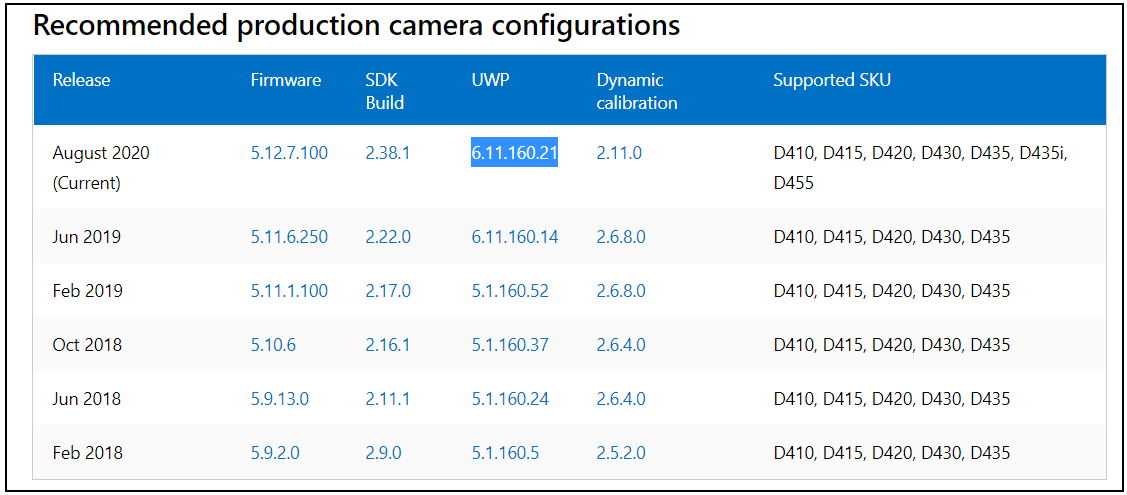
Thanks very much for the additional information. If you are using Windows, it may also be worth having your company's software engineers check whether version 6.11.160.21 of a RealSense driver called UWP (Universal Windows Platform) is installed. It has been reported by a small number of RealSense users to cause errors with the 2.11.0 Dynamic Calibration software, and also the C# and Unity wrappers, when installed. The earlier UWP driver version 6.1.160.14 does not have these issues.
The UWP driver provides RealSense compatibility with products that support UWP, such as the Microsoft Hololens headset. It is not required to be installed to use RealSense with Windows.
Please sign in to leave a comment.
Comments
3 comments