D435: Can I stream part of the IR or RGB pictures?
Hi, I'm new to the RealSense camera. We are investigating if we can use the D435 for some special tracking.
We would like to know if we can stream only part of the left/right IR image and/or RGB image to the computer. Like a AOI (Area of Interest) or ROI (Region of Interest) feature of a standard camera.
-
Hi Cor2 If you wanted to crop the height and width (XY) of an RGB or infrared image (not a depth image), OpenCV would be an option to investigate. Google for opencv crop image for more information.
If you wanted to exclude the background of the image and focus on the foreground then you could map RGB to depth in the RealSense SDK. This enables the background to be progressively hidden and made visible by changing the maximum observable depth that is rendered. The RealSense SDK has an example program called rs-align-advanced that demonstrates this.
https://github.com/IntelRealSense/librealsense/tree/master/examples/align-advanced
-
Thx for the quick answer!
The reason I would like to stream only part of the image is bandwidth limitation. We want to connect multiple D435 units to the same computer. And also because we would like maximum resolution and maximum framerate. But we are only interested in a small portion of the image each frame. So we could more the area of interest around.I think that your solutions are both after streaming the data to the computer.
-
The RealSense SDK's High Speed Capture mode may suit your needs. It can stream at 848x100 and 300 FPS. Because it only shows the center area of the camera field of view, it only has the processing demands of 90 FPS. This mode is compatible with cameras equipped with a fast Global Shutter, which includes the D435.
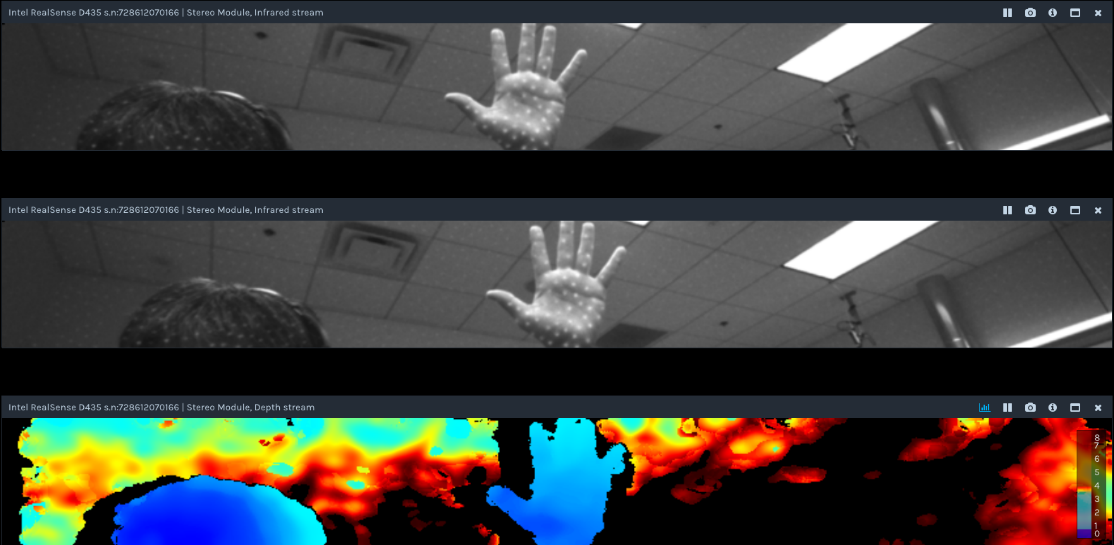
-
If you require a full-screen view with a high FPS, the ball tracking advice in the link below should also be helpful.
-
Hello Marty, thx for fast reaction again.
About this high speed capture mode: Can we program the offset of these 100 lines? We need to 'follow' the target by defining which part of the image to stream.But when reading the link of your second reaction I think this is not possible, which is really a pitty. Such a simple feature could make the sensors much more usefull.
-
As the high speed capture is governed by the camera firmware driver, there isn't a way as far as I know to use the RealSense SDK to move the area of the camera's field of view in 848x100 resolution.
Instead of moving the field of view, you could instead fix the camera on a mount that can move vertically up and down, which should achieve the same effect by changing the area of the real world that the center of the camera field of view is currently observing.
Alternatively, if you are using a USB hub and each hub can only provide a certain amount of bandwidth (e.g 5 Gbps), you could chain multiple hubs together on the same computer and spread the cameras across the multiple hubs. The USB standard supports up to 5 hubs on the same computer. There was a case about this recently in the link below:
Please sign in to leave a comment.
Comments
6 comments