Can someone help me on how to get rs-convert.exe?
I am not able to get rs-convert.exe. i dontloaded everything from github but I don't seem to find the exe file.
-
Hi Vyas K If you are using Windows and have installed the 793 mb RealSense SDK software from the Releases page, you can find an executable exe of rs-convert in the SDK's Tools folder. You can locate this easily by right-clicking on the RealSense Viewer program launch icon the SDK installer will have placed on the Windows desktop and selecting the Open file location menu option.
rs-convert should be launched from the Windows Command Prompt text interface instead of with a double left click in the folder. You can find the Command Prompt by typing command into the search box at the bottom of the Windows screen, next to the corner button where the computer is shut down.
-
The rs-convert command on its own will not perform a conversion. You need to specify in the launch command the type of conversion that you want to perform (e.g extract the bag to log format), the filename of the bag, etc. A list of conversion commands and an example command are at the rs-convert web-page:
https://github.com/IntelRealSense/librealsense/tree/master/tools/convert
Also, rs-convert exe should be launched in the Command Prompt from the SDK's Tools folder. An easy way to go to that folder in Command Prompt is:
1. Go to the Tools folder on the Windows desktop using the previously mentioned shortcut.
2. In the address bar at the top of the folder window, left-click on the end of the address text-box to convert it to the Windows-format address C://Program Files (x86)/Intel RealSense SDK 2.0/Tools
3. Copy the contents of the address box with CTRL-C and go to the Command Prompt window.
4. Type cd followed by a space and use CTRL-V to paste the address into the Command Prompt window and press return. The directory will change to the Tools folder.
5. Input the rs-convert conversion command.
-
I am not aware of a way to manipulate FPS with rs-convert. In regards to file naming though, whatever custom file name that you specify in the path that you provide in your rs-convert launch instruction should be used by rs-convert.
https://github.com/IntelRealSense/librealsense/issues/7033#issuecomment-669215540
-
Hi,
I recently bought a new Intel L515 LiDar camera. I am trying to convert the recorded BAG files to PNG, but I see there's no "rs-convert.exe" in SDK's Tools folder. On the GitHub page, all I could find are the CPP files but there isn't any exe file. May be I am doing it wrong. Please let me know. Thanks in advance.
-
Hi Waseemshariff126 If you are using Windows then rs-convert.exe should be in the Tools folder. This folder can be found by right-clicking on the RealSense Viewer launch shortcut icon that is placed on the Windows desktop and selecting the 'Open file location' menu option once the full RealSense SDK has been installed by the automated installer file in the 'Assets' file list on the SDK Releases page. The rs-convert.exe file should still be present in the folder even if you have an L515.
https://github.com/IntelRealSense/librealsense/releases
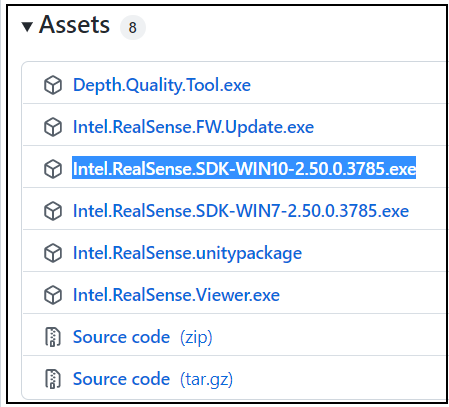
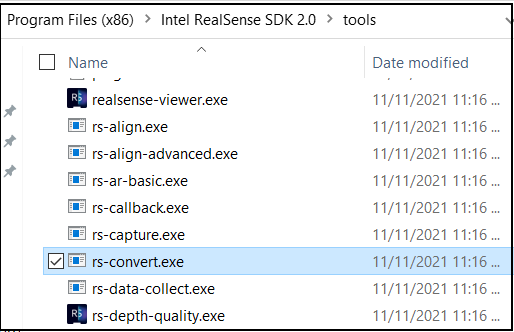
If you installed the RealSense SDK on Linux then the pre-built executable versions of the sample programs should be in the /usr/local/bin folder. If the SDK was built from source code with CMake in Linux then the examples are built by including the term DBUILD_EXAMPLES=true in the CMake build instruction.
An example of an L515 owner successfully using rs-convert with it on Windows is at the link below.
-
Hi,
I explored the working of L515. I set the resolution to 640x480 with 30 FPS for all cameras: Depth, Infrared, and RGB. But while converting the BAG files to PNGs, I observed that the number of processed frames are varying. Can you please help us with this?
The below example data was recorded for 10 minutes and a few seconds.
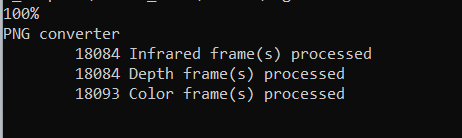
I was assuming that the RGB camera was taking a long time to stop recording, which may explain the additional frames. That, however, is not the case. Throughout the time frame, these frames are produced.
I also tried the Depth quality tools to modify settings, but it didn't help.
-
Hi Waseemshariff126 It would not be my expectation that depth / infrared and RGB color frame counts would match precisely, as the RGB image is produced by a separate sensor component in the camera, whilst depth / infrared comes from the same sensor. A RealSense team member in the link below explains how there can be a time offset between depth and RGB.
https://github.com/IntelRealSense/librealsense/issues/1548#issuecomment-389070550
The closeness of your depth / infrared and color frame counts is actually one of the best that I have seen.
The rs-convert tool auto-names files according to frame timestamp, so comparing timestamps would be the best way to find out which frames of different types correspond to each other at a given instant in time.
Further discussions about how depth and RGB sensors sync temporally (not to be confused with multiple-camera 'hardware sync') can be found here:
https://github.com/IntelRealSense/librealsense/issues/8726#issuecomment-812556071
-
Hello MartyG
I'm getting only one frame from .bag file and few frames data
Please help to get each frame and each reading during entire span.
I want the readings along with the frame number so that I can synchronize the frames.
I'm running following command on windows terminal
.\rs-convert.exe -i 20230728_180422.bag -p "C:/Users/SOHAM PADHYE/Downloads/png/" -v "C://Users/SOHAM PADHYE/Downloads/png/"
-
Since SDK version 2.35.0 the rs-convert tool names frame filenames by their timestamp, not the frame number. Older versions of rs-convert (2.34.0 and older) named the frames by their frame number.
The -v command for csv export is known to not work for some RealSense users. It appears to have performed the conversion but does not generate any files. The reason for this is not known and there is not a solution to fix rs-convert's csv export if it does not work for you, unfortunately.
PNG image file export with -p usually works though. Is it not generating PNGs for you either?
You can confirm whether the bag file has any problems by playing it back in the RealSense Viewer by drag and dropping the bag file into the center window of the Viewer.
-
Hello MartyG
Please help me to get the data at 10fps using realsense ros package.
I'm getting the the frames at 30 fps. Also tell how to change the frame size.
-
10 FPS is not supported for depth by RealSense cameras. The closest alternatives are 6 FPS (or 5 if using the D455 camera model) or 15 FPS. If the L515 model is being used then 30 is the only supported FPS for depth.
The only supported mode for 10 FPS that I could find was 1280x720 color on the D455 model.
If you need to set a custom FPS in ROS then you could explore the possibility of setting a rate.
https://roboticsbackend.com/ros-rate-roscpy-roscpp/
In the RealSense ROS wrapper you can change the resolution by editing the height and width values in the launch file or by defining the custom values in the launch instruction. For example, to launch with depth and color at 640x480 and 6 FPS:
ROS1
roslaunch realsense2_camera rs_camera.launch depth_width:=640 depth_height:=480 depth_fps:=6 color_width:=640 color_height:=480 color_fps:=6
ROS2
ros2 launch realsense2_camera rs_launch.py depth_module.profile:=640x480x6 rgb_camera.profile:=640x480x6
Please sign in to leave a comment.
Comments
15 comments