D415 - flat surface calibration issues
I cannot calibrate the depth sensor on D415. Its fixed permanently over a flat table, when i use the dynamic calibration tool it still shows a 10-20mm difference in height from one side to the other. Working distance is 770mm. Ive tried with LEDs and no lighting.
I have tried put the gold calibration back on and used on chip calibration, is there any other method to try?
We have verified level sensor as well as table beneath. One of next things we will try is using textured background provided by intel, and see if any difference there. We will be doing that this week.
But is there anything else that could be wrong here, is it possible this is hardware issue? Similar results regardless of the lighting used. Even accounting for the depth accuracy error rate, this deviation seems very high.
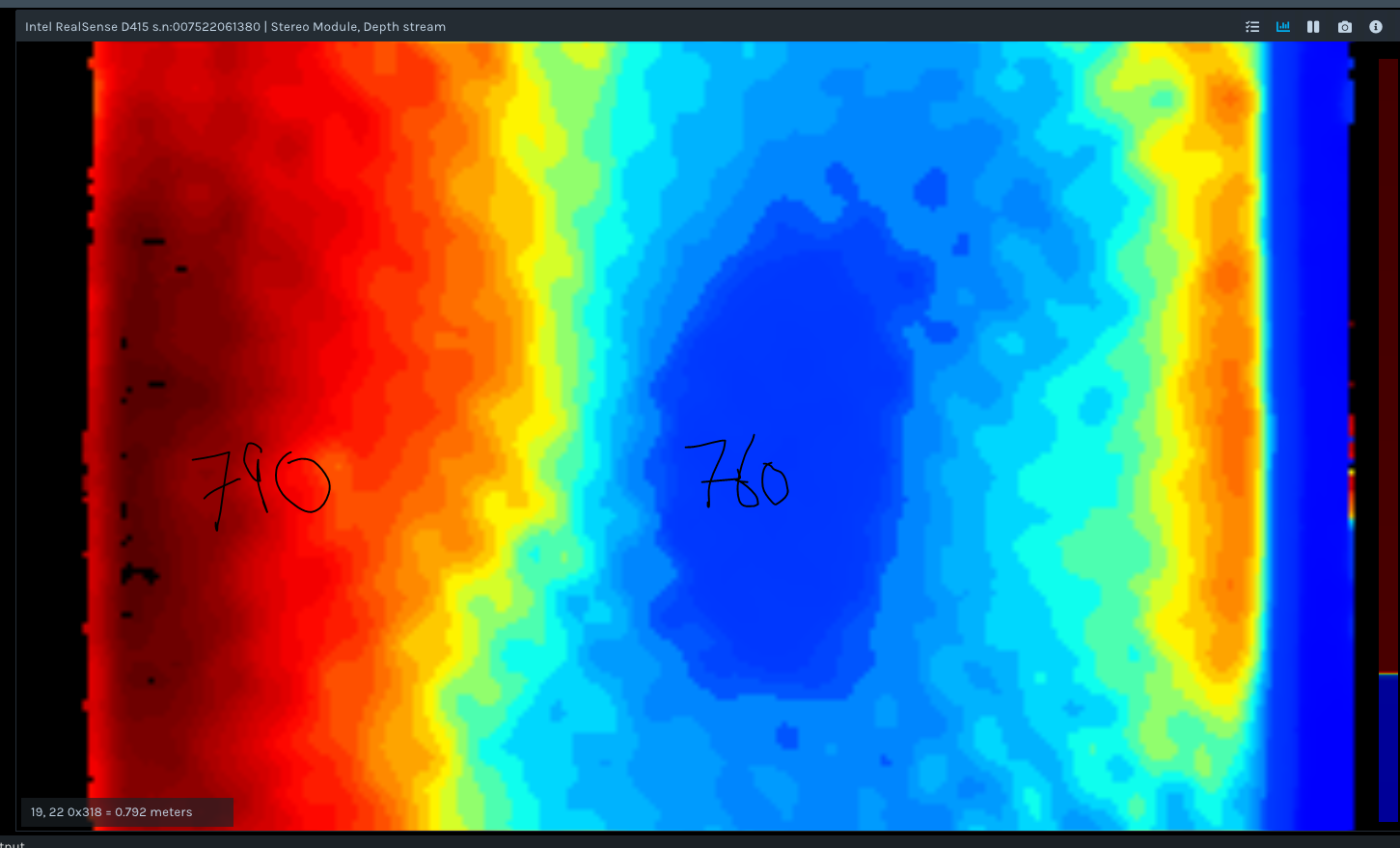
This is same as issue described in below post, though there does not seem to be any definitive answer to issue described here:
Any help appreciated.
-
Hi Barry Somers Having texture for the camera to analyse is important when sensing flat surfaces such as doors, walls, desks, etc. If the object has no texture or low texture then you can provide that texture by using the camera's projector. This projects a semi-random pattern of dots onto the scene that the camera can analyse for depth detail.
Alternatively, if you have a well lit scene then the camera can instead use ambient light in the scene to read depth detail. The 400 Series cameras actually work better in bright light, which can bring out the depth texture in objects.
If you are using a D415, the optimal depth sensing resolution for best accuracy is 1280x720
Intel's excellent camera tuning guide can provide useful guidance for improving image quality if you have not read it already.
https://dev.intelrealsense.com/docs/tuning-depth-cameras-for-best-performance
-
Hi Marty,
Yes we have been using that guide. Thats where we got the textured image from, and will be using next to test in lab this week.
The 'cameras projector'. Does this refer to the laser emitter? Or is that different? We have tried both with the laser on and off.
Thanks,
Barry
-
The D415, D435, D435i and D455 camera models have an infrared projector component in them that is separate from the left and right IR sensors. Yes, it is also known as the IR Emitter.
Is the table surface reflective? If light is projecting onto the table from a nearby light source such as a ceiling light, then reflections generated on the table surface may make those areas more difficult for the camera to read depth data from accurately. The same phenomenon occurs with reflective floors and floor tiles.
Section 4.4 of Intel's guide about physical camera filters that can be applied to camera lenses discusses the effect of reflective surfaces and how a linear polarizer filter can improve that situation.
-
Its not that reflective, but its the only thing we can think of at present to be causing this. That's why we thought maybe textured background will perform better. We will have access to the lab this week so will be testing with textured background and see how that performs.
We will also experiment more with the external lights in building external to the camera rig, and see how they are affecting the results. Thank you for suggestion.
Please sign in to leave a comment.
Comments
4 comments