Noise on my depth image due to processingBlock | D435 C#
Hello,
When creating my code I was inspired by the RS-DevProjectC# code seen on this link:
https://github.com/IntelRealSense/librealsense/issues/2809
Especially for filter creation!
But during my tests this few days, I realize that I have noises on my depth image when I move my object in front of the camera. Normally as I'm using a D435 camera with global shooting it shouldn't be there and when I go back to my old code that doesn't use filter and no processingBlock I don't have this noise there.
I tried to remove the filters one by one, to see if it came from them, but it doesn't change the noise in the image.
Exemple image with noise and without all the filters :
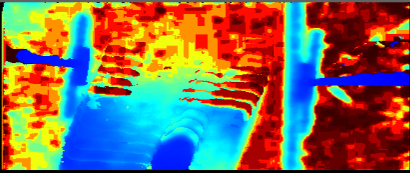
So I think the problem comes from this processing block, which requires you to make returns in the "setupProcessingBlock" functions for each frame. So I would like to know if it's possible to apply my filters but with a different method than this one, still in C# ... Because I lose all the interest of the Global Shooting of the camera if not. And my filters are essential for my application. The elements spotted by the camera are moving.
Thanks by advance
-
In a recent test that I did, I experienced an effect like this when using a Temporal Filter and setting its Alpha to a low value. The lower the value, the longer it took to update the image over time from the previous camera position to the next one. The effect is hard to reproduce on my desktop PC with a good graphics chip, but easier to reproduce on my lower specification laptop.
II you are not using post-processing filters when this happens, it is conceivable that it is related to slow processing on your computer, perhaps due to the code as you suggest.
-
I create a project with only the stream depth and color and the filter. Because when I dont appply any filter I still have noise on my image.
The repository is on this link : https://github.com/thomasChenus/testProcessingBlock
-
Okey. It's not possible for my application to turn off the IR projector, I need it too much! I think I need some help to apply filter, but not inside a processingBlock. I think the problem comes from the processingBlock. Because on the project link it's a really really light code and I still have the noise.
-
If the scene being observed has good lighting then the camera can use ambient light in the scene (including sunlight) to analyse surfaces for depth detail instead of using the projector's dot pattern for analysis. The 400 Series cameras actually work better in strong sunlight.
Another way to close up black holes other than using a filter such as Hole Filling may be to increase the Laser Power setting's value. The higher that Laser Power is set to, the less "sparse" the image becomes. Reducing laser power can cause holes to open up, whilst increasing it can close them. You can test the Laser Power under the "Controls" section of the viewer.
-
I understand. You pointed me in the right direction. The temporal filter did that to me. I thought that if I didn't give it a value, it's like if it wasn't there. But from the moment you set it it has to take a default value, so that's why I had that noise. But I can't totally suppress it either, or my image is very moving. I had to make a compromise, I'll test it now
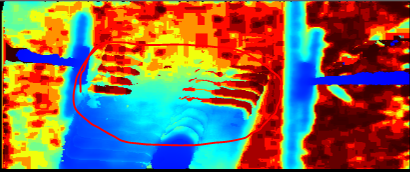
Please sign in to leave a comment.
Comments
8 comments