Using multi cameras makes scan quality better?
Hello, i am using D415 for short range ( within 500mm ) capturing.
I tried to use SR305, D435i, but i found D415 is the best on my project.
However, i am not really satisfied with scan quality. I tried to apply different pre-parameter setting and also read many articles regarding on how to get the best result and applied the setting they recommend but non of that makes extreme changes.
Big problem is missing part and with high density option, i've got many distortion results.
Last thing i want to try is using multi cameras. do you guys think it help to improve missing part scanning caused of high side wall, and make flat surface stable result?
-
Multiple cameras can improve depth quality, because in the areas where the field of view of the cameras overlap there are fewer blind-spots and there is redundancy in the data (because more than one camera is observing the same area). Cameras can be arranged horizontally for a wider view or in a vertical stack for a taller one.
The more cameras that are used, the fewer the blind-spots in the scan. Individual scans from multiple cameras can be stitched together into a single model.
If you would prefer to use a single camera though, you can move the camera around whilst recording and continually build up detail, until you are satisfied with the model that has been created and stop recording. In 2015, Intel demonstrated building up a point cloud scan of a room with a handheld smartphone equipped with a RealSense ZR300 stereo camera (the predecessor of the D435).
https://www.youtube.com/watch?v=Vpa8vKsapFk&feature=youtu.be&t=88
More recently, room scanning with the new RealSense L515 lidar depth camera was demonstrated at the CES 2020 show. A tablet and an L515 attached to the rear of the tablet was used with DotProduct Dot3D Pro scanning software.
https://www.youtube.com/watch?v=41Yu2H9_z3w
Dot3D Pro also works with the 400 Series cameras.
When scanning flat / low-texture surfaces such as doors, walls and tables with the 400 Series cameras, it is recommended that the camera's projector is enabled to project a semi-random dot pattern onto the room. This provides the camera with detail to analyse for depth.
Also bear in mind that the D415 and D435 have different optimal depth resolutions for helping to ensure best accuracy. On the D415 it is 1280x720 and on the D435 models it is 848x480.
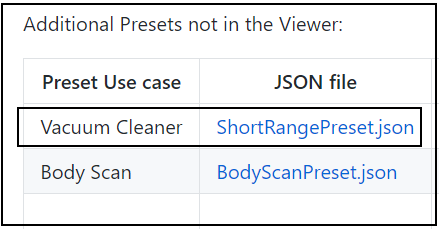
There is also a ShortRange custom preset that is not built into the RealSense Viewer but is available for download so that it can be imported into a project.
https://github.com/IntelRealSense/librealsense/wiki/D400-Series-Visual-Presets#preset-table
In the above link, scroll down to the section headed Additional presets not in the Viewer
Please sign in to leave a comment.
Comments
1 comment