Raspberry Pi ModuleNotFoundError: No module named 'pyrealsense2'
Hi,
I am having trouble importing pyrealsense2 on my raspberry pi. I got it successfully running on my windows laptop, but for some reason it's much harder on the raspberry pi. I have tried to pip (and pip3) install pyrealsense2, but I get the following error:
"ERROR: Could not find a version that satisfies the requirement pyrealsense2 (from versions: none)
ERROR: No matching distribution found for pyrealsense2"
I also tried building from source, but when I run make -j4 I run into issues with files missing like config.h (which I found) and libudev.h (which I did not find).
Has anyone had any luck running pyrealsense2 on raspbian?
-
Cnorton The official Raspberry Pi documentation suggests a couple of other Windows tools to write an image to SD card and instructions for doing the write for each tool.
https://www.raspberrypi.org/documentation/installation/installing-images/windows.md
In the guide where Intel provide a pre-made Pi 4 image that includes librealsense, they use balenaEtcher.
-
Cnorton You can clone the SD card contents onto a PC with Win32 Disk Imager.
https://www.howtogeek.com/341944/how-to-clone-your-raspberry-pi-sd-card-for-foolproof-backup/
The problem is how to put the card image online for Shane Huston to download. You may have to register with an online cloud storage service such as Google Drive to host such a large file, and upload the cloned image to it.
-
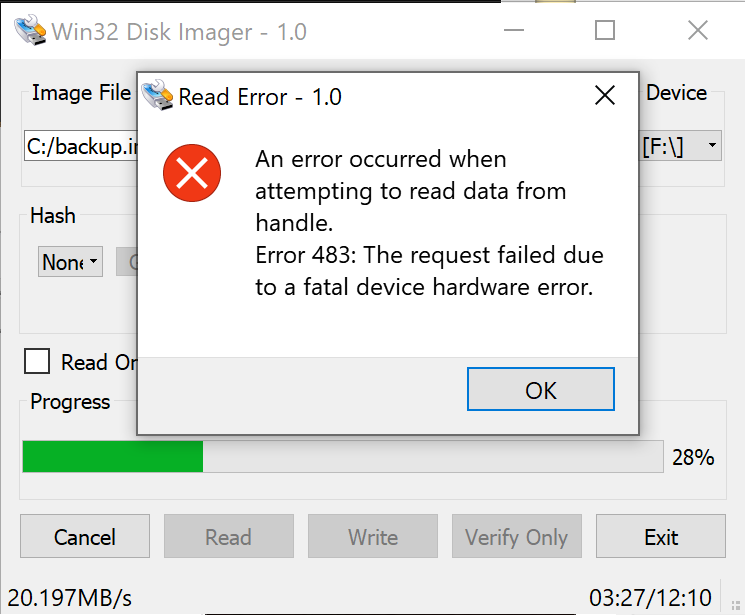
MartyX Grover I think he already mentioned he's trying to use Win32 Disk Imager but was having hardware errors.
Cnorton what kind of errors are you seeing? I was able to create an image from my microSD using Win32 Disk Imager. Here is a picture in case it's helpful to see the settings I used (basically default I think)
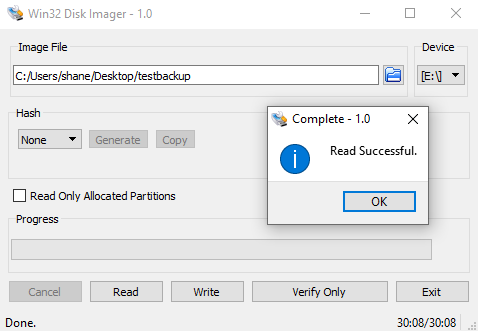
-
Strange. No sweat if you can't get the img read working. It looks like I may have made some progress. I am able to run some example realsense python scripts now, but only via terminal commands. Cnorton have you been able to run any from the desktop, i.e. in Thonny? Or are you only testing in terminal?
It seems that my Thonny/desktop seems to want to default to python3 while in terminal it defaults to python2 and works. If in Thonny or using python3 in terminal, I get the following error:
ImportError: /home/realsense/Desktop/pyrealsense2.so: undefined symbol: _Py_ZeroStruct
When running with "python" or "python2" in terminal, the example scripts I've tested run fine. I do need to have the librealsense2 and pyrealsense2 files next to them to work, so perhaps my PATH still isn't working correctly.
-
I'll keep trying to get the image file because its good to have as a backup.
I run everything in the terminal, although if the paths are the same they should work the same. Have not seen that error so I'm not sure what would fix that. The command which python3 tells you the path where python3 is located. I think the correct location is: /usr/bin/python3
Installation problems are the worst, so I'll let you know when I can make an image.
-
I tried copy all the '*.so' files into the folder same as script and it worked. So there are 6 '*.so' files. 3 for librealsense and 3 for pyrealsense2. And follow all the steps here of course https://github.com/acrobotic/Ai_Demos_RPi/wiki/Raspberry-Pi-4-and-Intel-RealSense-D435
Been stuck with this for 3 days straight. The first time I tried to install it, I got the error "pyrealsense2" has no attribute "pipeline". Didn't know how to fix it so I re-installed everything and got the problem No module named 'pyrealsense2' instead. But copy all the '*.so' files like I said above and it worked for me with python3.
Well... not really. I'm trying to run the camera on the Raspberry pi 3 with only USB 2.0 and got this error:
pipeline.start(config)
RuntimeError: Couldn't resolve requestsI guess it's some resolution and framerate not compatible with USB 2.0. Would appreciate if anyone knows how to fix it
-
Briandinh2307 Thanks so much for your advice!
Yes, the 400 Series cameras have much more limited resolution and FPS modes available on a USB2 connection due to the lower bandwidth on such a connection compared to USB3 (on which the camera's full capabilities can be accessed). I hope that the discussion in the link below about a RealSense user who had the same error will be helpful.
-
Thanks for the quick reply,
Just experienced with it. Seems like I can only output the depth stream with this configuration: config.enable_stream(stream.depth, 640, 480, rs.format.z16, 30)
The infrared and rgb sensors will not work with that configuration. I don't know about other configuration but this is enough to convince me to buy a raspberry pi 4. Hopefully it will arrive within this week.
-
Hi MartyX Grover,
I am trying to set up the pyrealsense2 library for the Raspberry Pi 4. I have a D435i. I was able to install the RealSense-viewer and make it work. However when it comes to a python code it cannot find pyrealsense2. I tried to looking for pyrealsense2.so files in /library/build but I couldn't find it. It seems like it is not there at all, however librealsense2.so files are there. What the problem might be in my case?
-
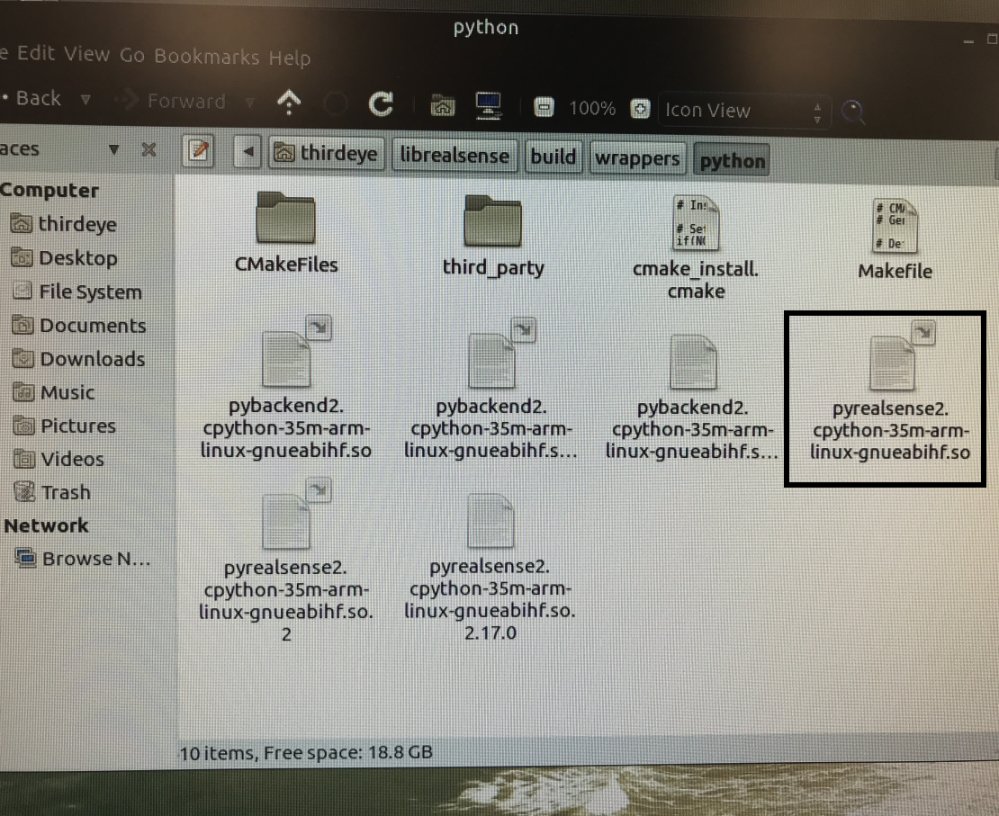
Hi Begaiym Kudainazarova When building the pyrealsense2 wrapper for Python 3, pyrealsense2.so will have a complex auto-generated filename that is partly based on the Python 3 version that you have installed on your computer. For example, if the computer is using Python 3.5 then the auto-generated filename may be something like pyrealsense2.cpython-35m-arm-linux-gnueabihf.so - with the '35m' part referring to the Python 3 version number.
The easiest way to identify the file that you need is to look for a filename that starts with 'pyrealsense2' and ends in '.so', such as pyrealsense2.cpython-35m-arm-linux-gnueabihf.so
-
Hi MartyX Grover, thanks a lot for your response. Yeah I know what you mean, since I have installed it previously on my Mac computer before and I saw those files in /librealsense/build/wrapper/python. But this time I cannot see any files with .so extension, only pyrealsense2....cmake. That's why I was very confused because I couldn't find any .so files with pyrealsense2 names.
-
Which protobuf version did you use, please? The Acrobotic guide for Pi 4 and Raspberry Pi OS (formerly Raspbian) uses protobuf version 3.10.0. Some RealSense users found though that they had a smoother build experience with more recent versions such as 3.14.0 as they had issues with 'autogen.sh' when using 3.10.0 or earlier.
If the pyrealsense2 wrapper is able to find the computer's Python installation using the defined PYTHONPATH then it should not be necessary to find the two .so files and place them in the same folder location as your Python project script.
Also, which Raspberry Pi OS version are you using - Buster or Bullseye?
-
I am using Raspberry pi Buster.
I defined a python path during the installation and since I am not using any environments and other versions of python I don't think there should be a problem with the PYTHONPATH. However I cannot find a pyrealsense2 library even in the dist-packages in python3 root, and I still cannot import it. Should I reinstall the whole thing again using protobuf 3.14.0? Because I tried uninstalling protobuf 3.10.0 and reinstalling it with the version you mentioned but it didn't;t solve the problem, so should I reinstall librealsense and as well?
Please sign in to leave a comment.
Comments
51 comments