Interactive Installations
Hi there I am a University Student developing an interactive installation. I would like to know more about how this is possible with the D400 series, specifically the D435. We will have a wall with a projector, and I'm wondering what would be the best placement of the depth sensor to capture people's hand motions.
We want to place the camera in a way in which where the person interacts with on the wall (x,y) is where the software can capture use depth value to project something at this same coordinate on the wall.
Thank you!
-
The 400 Series cameras have a very strong history of use in interactive displays and exhibitions. The links below highlight just a few of those projects.
https://www.intelrealsense.com/interactive-art/
https://www.intelrealsense.com/making-magic-art-and-technology-working-together/
https://www.intelrealsense.com/brixels-powered-by-intel-realsense-technologies/
The newest member of the 400 Series, the D455, was opened for pre-orders this week for shipping in the week of July 20 2020. It has improved range and accuracy over that of the D435 by a factor of two.
https://github.com/IntelRealSense/librealsense/issues/6610
The digital display company LUMOplay recently demonstrated the other new RealSense camera, the L515 lidar depth camera, paired with a projector for a wall-based interaction just like your described project.
-
Thank you for that information! Is there a way to calculate the dimensions of what the D435 or D455 can capture in terms of its FOV and where it is placed (height of ceiling, distance from wall).
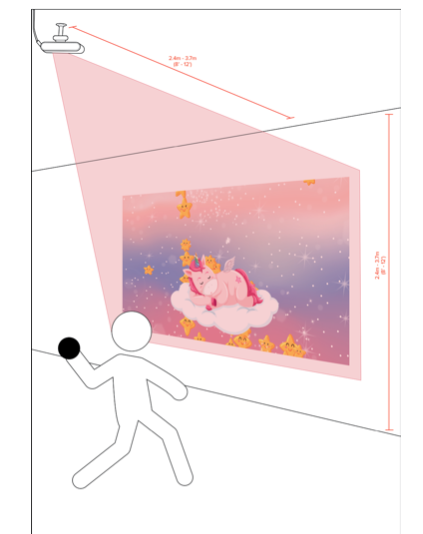
Also I have seen lumoPLAYs videos and installation recommendations. There is one where the camera is on the ceiling and slanted to look down at the users on the wall. I am wondering how this would work for depth values - do the hands of the users have to be visible, is it possible to accurately track hands? For example in the youtube link you sent above, if is possible to interact with the wall with only hand gestures except with an object (the ball)? - I have a photo attached for reference, thank you!
-
To create a hand detection and tracking system to your precise needs that can be controlled absolutely by you, it may be worth considering the advanced-level option of developing your own body and hand tracking system that uses "machine learning" algorithms. Intel published a deep seminar on YouTube exploring how to approach doing this with RealSense.
https://www.youtube.com/watch?v=VSHDyUXSNqY
I would think that if machine learning is used then a system may be able to predict the position of a hand when the view of it is blocked by the body or other obstacles. The original Microsoft Kinect depth camera in 2010 had this kind of skeletal position prediction for when a body part could not be seen.
The FOV angles of RealSense cameras is published in their data sheet documents. This may give insights about how to position a particular camera and what would be within the view in a particular location (and position in that location) that the camera is placed in.
-
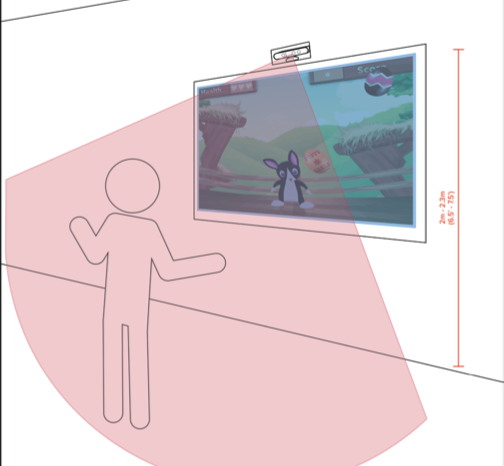
Thank you for your help, with the situation where the camera is facing the user (as with the photo attached), is there dimensions where the camera is placed (the height) and where the user should stand (from the wall) for the camera to capture the users hand gestures?
Also how large of the width is covered by the camera, if the wall was 6 metres wide, would two cameras be recommended?
Lastly is it easy to create a mapping system of where the matrix of the camera captures to the matrix of pixels on the wall? We want to make it seem that where the user is interacting with is where the spot on the wall is affected.
Thank you again, this is all really helpful!
-
The RealSense blog has previously covered a similar screen with a RealSense powered camera called Prowise
https://www.intelrealsense.com/active-learning-with-intel-realsense-technology/
Based on cases I have handled where a RealSense camera is wall mounted as a person tracking device and pointing diagonally down, I would say that a mount height of 2 to 2.5 meters (like on your diagram) and a maximum distance from the camera of 3 meters would be reasonable.
I recall that Microsoft Kinect needed players to be a minimum of 6 ft from the camera by the screen to be detected and tracked properly, with 8 ft being preferable. This would be reasonable for RealSense too to make sure that the full body is in the field of view of the camera with room to spare for the arms to be stretched out and the hands still be in the field of view.
You can expand the field of view by arranging multiple cameras so they overlap their FOV. You can arrange them either vertically or horizontally depending on whether you need a wide or tall view. The 400 Series cameras do not interfere with each other when multiples of them are used.
An example 180 degree FOV from four horizontally spaced D435 cameras was demonstrated in January 2018 by Intel.
https://www.intelrealsense.com/volumetric-capture-using-intel-realsense-d435-cameras/
Regarding the wall matrix: could you explain more how your system might work please?
It sounds as though you want to relate a point on the human (such as the hand) to the camera's position? If so, you could perhaps use a scripting method called rs2_deproject_pixel_to_point to convert a 2D pixel on an image to 3D real-world coordinates. You can read more about coordinate systems here:
https://github.com/IntelRealSense/librealsense/wiki/Projection-in-RealSense-SDK-2.0
Please sign in to leave a comment.
Comments
5 comments