IR pattern visible in RGB color image
Hi.
I thought the RealSense D435 had an IR filter on the color camera to filter out the IR pattern from the Laser projector.
After digging out my D435 which has been laying in its box for a while I was surprised to see how visible the IR pattern is in the color camera in darker scenes.
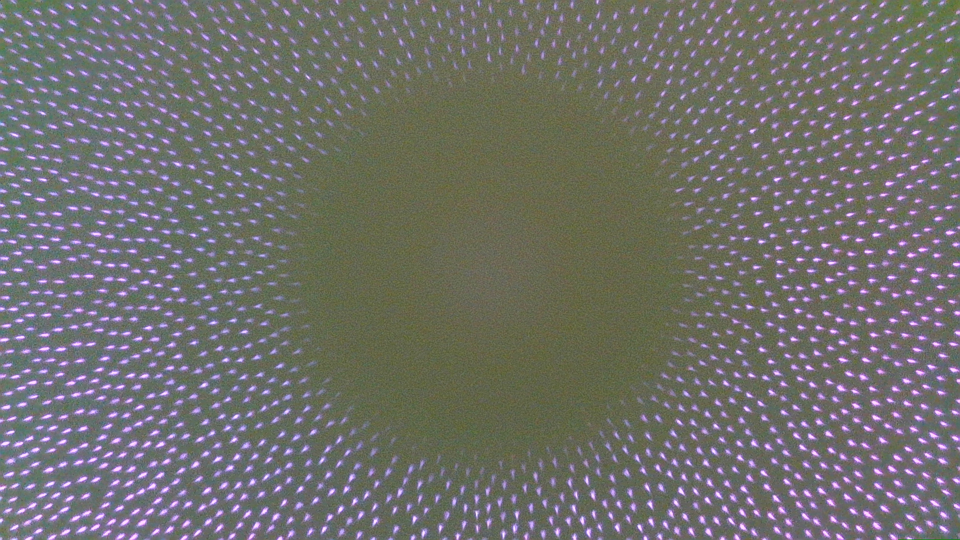
Furthermore there seems to be a blindspot in the center of the RGB image where the IR pattern is not visible?
Although when I look at the two Infrared images the projected pattern is at least fine, so the projector seems to be OK.
Is this visible pattern expected or is something wrong with my camera?
Best regards
Thomas Jespersen
-
The IR dot pattern should not be visible on the color image. Usually when it does happen it is because the Laser Power setting of the camera is high. Reducing the Laser Power setting's value can make the IR dot pattern disappear from the color image, since the visibility of the pattern is tied to the Laser Power value (higher value = greater visibility, lower value = lower visibility,
In the RealSense Viewer program, the Laser Power setting can be found in the 'Controls' section of the Viewer's options side-panel.
I would recommend a minimum Laser Power value of '1', as setting it to '0' turns off the projector and can make images darker.
-
MartyG, how should I interpret that reply? If that IR pattern is not supposed to be visible, why is that the case
Do the camera come with an IR filter or not?
And how about this odd ring of occlusion/blindspot (the black ring)?
-
Dorodnic the RealSense SDK Manager has said that the dots are most likely to appear on the color image when doing short-range sensing, due to laser emission being significant at that short distance. He also suggests reducing laser power to decrease dot visibility.
The D415 camera models can use a camera configuration file called a 'json' to remove the pattern, though I understand that this would not be usable to you as a D435 user. The pattern removal json has had a bug in recent times, so an alternative file has been provided.
https://github.com/IntelRealSense/librealsense/issues/6248#issuecomment-615902296
The 400 Series cameras do not have an IR-Cut filter, meaning that the IR imager components can see all visible light frequencies. Physical filters to change the properties of light entering the imager can be purchased. Intel have published a paper on the subject.
https://dev.intelrealsense.com/docs/optical-filters-for-intel-realsense-depth-cameras-d400
Given the apparent very strong areas of white light, I would speculate that the ring represents an area of light that is so intense that the camera cannot read any depth detail from that area and so it appears as black on the image (devoid of depth information).
Please sign in to leave a comment.
Comments
3 comments