Detecting thin objects with D415 camera
Hello,
I'm trying to locate 4mm thin objects with a D415 camera, but it seems that the camera is not able to distinguish well the part I'm trying to detect from the floor.
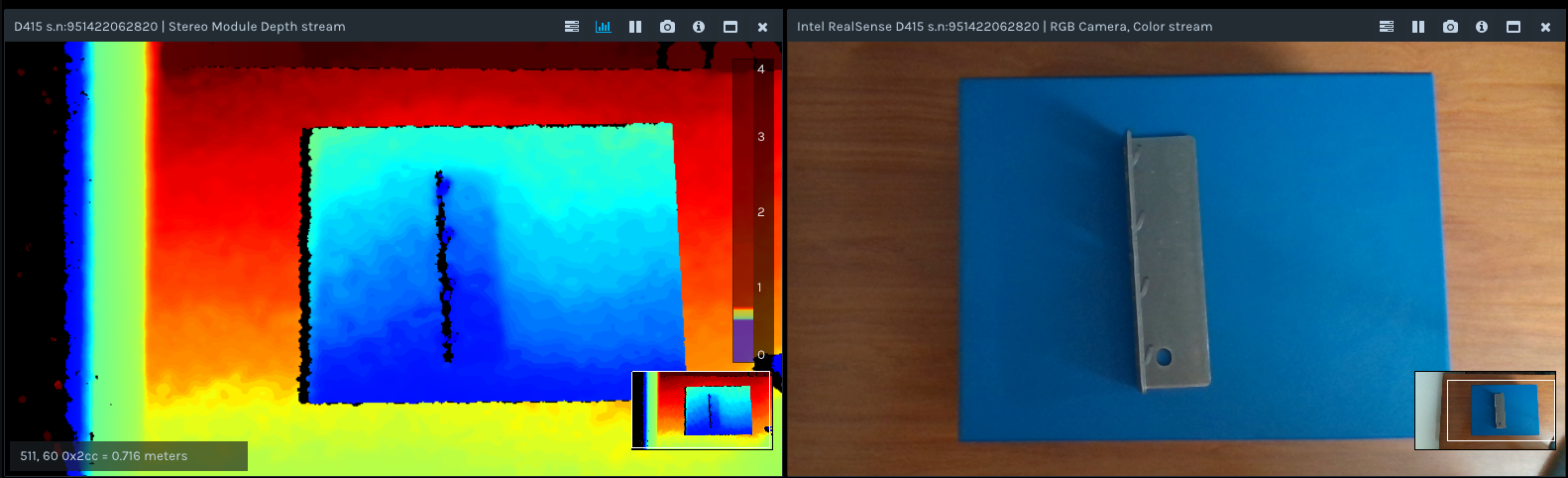
It guess that it's possible that some filter is making the part to be considered the floor, but I'm not able to improve the detection by changing the camera parameters.
I also did the test with a SR300 camera with similar results.
Any idea about how to improve this? Is this all the camera can get? Do I need to calibrate the camera?
Thanks in advance.
-
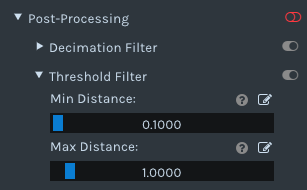
You could subtract the background, including the floor, from the image, by using a "depth clamp" to set a minimum and maximum distance that the camera can observe. Data outside of that range will be excluded from the image.
If you are using the RealSense Viewer program with your D415 then you can set a depth clamp by going to the "Post Processing" section of the options side-panel, expanding open the 'Threshold Filter' option and setting a maximum distance. By starting with a large value and gradually reducing it, you should find a point where the floor is removed but the distance from the base of the object upwards is preserved.
-
You can use a Deep Neural Network (DNN) to recognise a specific object from the color image and calculate a distance value for it. The RealSense SDK has several DNN example programs.
C++ and OpenCV
https://github.com/IntelRealSense/librealsense/tree/master/wrappers/opencv/dnn
C++ and OpenVINO
https://github.com/IntelRealSense/librealsense/tree/master/wrappers/openvino/dnn
OpenCV
https://github.com/twMr7/rscvdnn
Python
https://github.com/IntelRealSense/librealsense/blob/jupyter/notebooks/distance_to_object.ipynb
-
I found a tutorial for converting an OpenCV image into a numpy.ndarray and back again. I hope that it will provide some useful insights.
https://www.pluralsight.com/guides/importing-image-data-into-numpy-arrays
Please sign in to leave a comment.
Comments
5 comments