.STEP file
Hi, when I record with the D415 I have files in .FLY or .bag formats. How to have a .STEP file format like here
https://dev.intelrealsense.com/docs/cad-files ?
regards.
-
The .STEP files on the CAD (Computer Aided Design) page are not camera data recordings. They are 3D models of RealSense camera products with precisely correct measurements. STEP files can be used with Computer Aided Design software such as AutoCAD to work out how to integrate a RealSense camera into a project by seeing how a 3D model of the camera would fit into an on-computer simulation of a project without needing a real camera.
-
Thank you :)
can i do a smiliar point cloud with D415 please ?
https://www.youtube.com/watch?v=GgfYdVvaB7E
i need to capture an entire room.
Regards
-
If the point cloud was made with a D435 and not a D435i (the model with a tracking IMU component) then you should be able to replicate it with a D415. The author of the YouTube video posted a link to a guide to how they made the scan.
The main differences between the D415 and D435 are:
1. The D415 has a smaller field of view, so you might have to move the camera a bit more to get a scan of the whole room.
2. The D415 has around 2.5x better image quality than the D435.
3. The D415 has a slower moving camera shutter than the D435, which can make the image vulnerable to blur when capturing fast movement, but if you are moving the camera round at human walking pace then the D415 should be able to cope fine with that.
-
thanks for your explication.
But can't I do that just with this example?https://dev.intelrealsense.com/docs/rs-pointcloud
Regards
-
The rs-pointcloud example and programs similar to it will only create a point cloud of what is currently in the camera's view. 'SLAM' software such as RTAB-MAP can record point cloud data as the camera is moved around (e.g whilst attached to a robot or carried around by a person) and build up a map.
Once the user is satisfied with the amount of detail that they have recorded then they can turn off live recording and have a recorded map of the location like the one in the YouTube video.
If you wanted to create a 360 degree point cloud of a room without putting the camera on a robot or carrying it around with you then there are a couple of approaches that can be taken:
1. Use multiple RealSense cameras, arrange them in a 360 degree circle and capture a point cloud from each, then stitch the separate point clouds together into a single large cloud. This can be done with a process called Affine Transform, where you rotate and move the clouds in 3D space so they can then be appended together into a single cloud.
The more RealSense cameras that you use, the fewer 'blind spots' there will be in the data as the fields of views of the cameras overlap. I would recommend 8 cameras for a 360 degree view, though I have seen it done with only 6.
2. If you wish to just use a single camera, you could alternatively record the point clouds as multiple ply format files by taking a recording, rotating the camera and recording again, until you have a set of ply files that represent a 360 degree view of the room. Then stitch the contents of the ply files together into a single large point cloud.
The RealSense Viewer software has the ability to capture a point cloud and export it as a ply file using its "3D" mode.
-
To merge individual point clouds once they are captured, you could make use of free software called CloudCompare that is available for Windows and Linux.
https://www.cloudcompare.org/doc/wiki/index.php?title=Merge
An alternative method of point cloud stitching is to use the Point Cloud Library (PCL).
https://github.com/PointCloudLibrary/pcl
http://www.pointclouds.org/documentation/tutorials/normal_distributions_transform.php
-
You can capture the individual point clouds and save them as files. The RealSense SDK does not have the ability by default to stitch the clouds together though. That needs to be done with other point cloud processing software, such as CloudCompare or the PCL library.
If you are aiming for an integrated solution that can capture the point clouds with the RealSense SDK and then use the point cloud data to create a combined cloud, PCL may be the best way to do it. This is because the RealSense SDK has a PCL compatibility 'wrapper' that can be installed.
https://github.com/IntelRealSense/librealsense/tree/master/wrappers/pcl
-
thank you for your suggestion.
i tried that :
"2. If you wish to just use a single camera, you could alternatively record the point clouds as multiple ply format files by taking a recording, rotating the camera and recording again, until you have a set of ply files that represent a 360 degree view of the room. Then stitch the contents of the ply files together into a single large point cloud."
I made 2 captures on this image and we see that I am not on the same axis. ( 20° rotation)
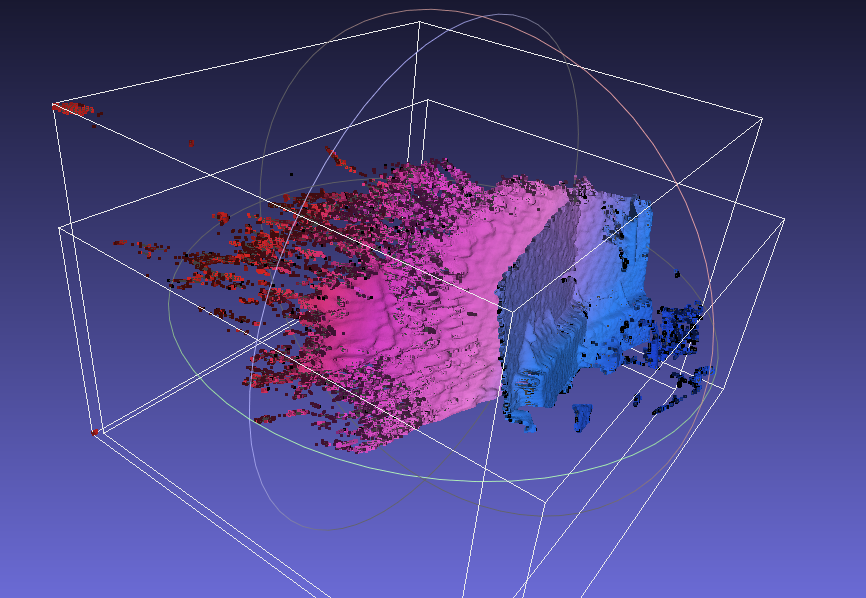
Why?
Regards
Please sign in to leave a comment.
Comments
12 comments