Configuration change between d415 and d435 camera | C#
Hi,
I just changed my camera, I switched from the d415 to the d435, to be able to enjoy the global shooting. I've been doing a post where I've been sharing my depth filter configuration code lately : " Json configuration, change the min/max distance depth to get an image with the right colors | D415 camera C# "
Today by changing camera, I changed my configurations as the FOV is different between the two cameras, but now I have problems with the color camera. I have a lot of noise on the color image and with the colorization of the depth I have this noise that comes on my depth image.
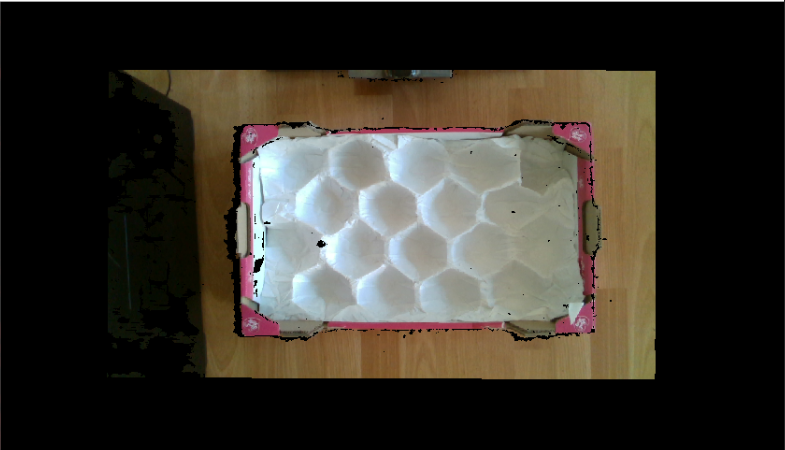
As you can see I have big black parts on my picture and I don't know why. Also you can see that the image is divided in my display, again I don't know why. I tried to change my filters but nothing works, I don't know what parameter to change on the color image to remove all this noise.
Thank you in advance if anyone can help me.
Thomas
-
The majority of RealSense related information gets posted on the RealSense 'Librealsense' GitHub forums. So if you start every search term with the word librealsense then it greatly improves the relevance of the search results. It can get annoying though to repeatedly have to type the word 'librealsense' for every search term, so putting it as the first word makes it much easier to delete everything but the first word when searching for something new.
Also, I highly recommend right-clicking on search result links and choosing the option to open in a new browser window. It makes it far easier to get back to the search page without losing your search terms.
The reason for a lack of search results for Librealsense use with Windows 7 though is simply because there is not much on the internet to find about it.
Also bear in mind that putting keywords in speech marks - " " - tells the search to look for that exact word or phrase instead of looking for similar but not exact words / terms. For example: librealsense "c#" "threshold filter"
In regard to an alternative to a threshold filter, there is the Disparity Shift option, though it does not have the same fine-control over both minimum and maximum distance that the threshold filter does.
Increasing its value reduces MaxZ (reducing the maximum observable distance) whilst also reducing the minimum observable distance MinZ (allowing the camera to see detail closer to its lens).
Conversely, if the Disparity Shift value is reduced then the maximum observable distance increases, but the minimum distance that the camera can see detail reduces. so you have to find a balance between MinZ and MaxZ that suits your application.
Unfortunately, I could not find how to set Disparity Shift with C# either. You may have to try changing it with a json, like you tried to do originally with the depth clamp.
-
Hello Marty,
I couldn't find anything to help me with the server, so I switched to a new server with windows10. I have no problem running my program now.
For the moment I'm doing the tests without light, and you told me about a bandpass filter some time ago. It's a physical filter? Or do you have the code to configure it? Because I'm still having trouble with black dots in my color image, which would affect the depth image.
-
I'm glad you found a solution, even if it required a change of server!
The D435 is the best choice of the 400 Series for dark scenes, as it has a wider IR imager that can let in more light than the D415's smaller IR imager.
If you are seeing black dots on the RGB color image and you have the IR Emitter enabled, this may indicate that they are leaking through from the IR, as they should not normally be on the RGB color image. A way to stop the dots from being visible on RGB is to reduce the value of the "Laser Power" setting, as the value of Laser Power is tied to the visibility of the IR dot pattern projection. Increasing Laser Power makes the dot pattern more visible, and reducing Laser Power makes the dots less visible.
A bandpass filter is a physical external filter for camera lenses. Intel have published a white-paper document on optical filters.
https://dev.intelrealsense.com/docs/optical-filters-for-intel-realsense-depth-cameras-d400
-
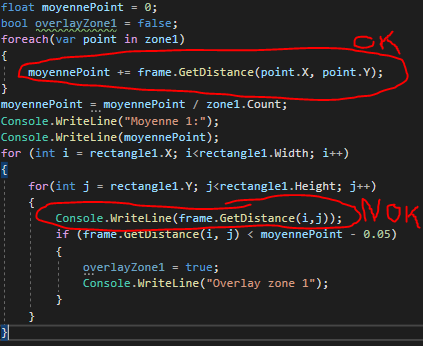
A depth value of zero does not always mean that an object is not there. It can also mean that the camera was unable to read any depth detail from an object at that coordinate for some reason.
This is why a large number of zero-value points can be an indicator of a broken image and so be used as a condition to perform an automated reset of the camera (e.g if more than 50% of the pixels in an image are detected to have a value of '0').
Please sign in to leave a comment.
Comments
66 comments