Configuration change between d415 and d435 camera | C#
Hi,
I just changed my camera, I switched from the d415 to the d435, to be able to enjoy the global shooting. I've been doing a post where I've been sharing my depth filter configuration code lately : " Json configuration, change the min/max distance depth to get an image with the right colors | D415 camera C# "
Today by changing camera, I changed my configurations as the FOV is different between the two cameras, but now I have problems with the color camera. I have a lot of noise on the color image and with the colorization of the depth I have this noise that comes on my depth image.
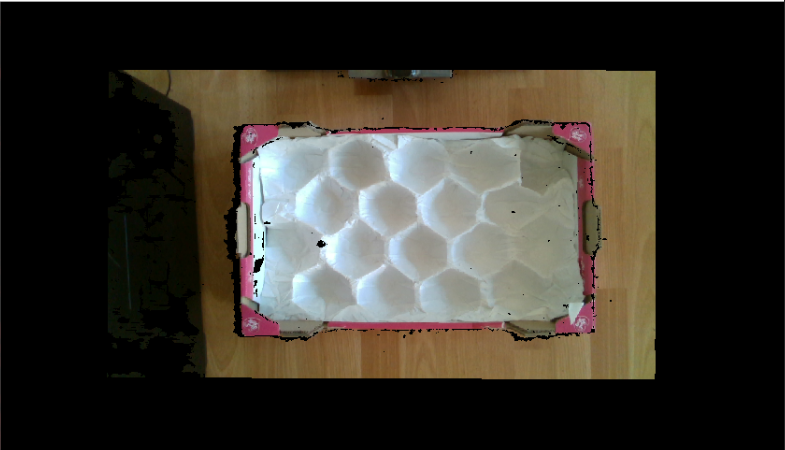
As you can see I have big black parts on my picture and I don't know why. Also you can see that the image is divided in my display, again I don't know why. I tried to change my filters but nothing works, I don't know what parameter to change on the color image to remove all this noise.
Thank you in advance if anyone can help me.
Thomas
-
I read through the case again from the start and was reminded that you are using C#. Most of the other small number of cases who have experienced this DLL exception with RealSensed.dll were also using C#, so your case is similar to theirs in that respect.
I guess that the version of your project that was running fine on your networked Windows 10 machine is also a C# project if you are using the same code.
It looks as though you were able to successfully run the RealSense Viewer on your Windows Server R2 2012 machine and see the camera image, and that the problem is when you try to use the camera with your own project. Is that correct please?
-
On this link : https://github.com/IntelRealSense/librealsense/blob/master/doc/installation_win7.md
At the end I show the message : The binaries supporting Win7 differ from ones supporting Win10. When building on Win7, CMake will automatically generate binaries for Win7. You can also build for Win7 from Win10 by adding
-DFORCE_WINUSB_UVC=trueto CMake flags. Signed drivers are still required when building from source (can be extracted from the Win7 installer and freely redistributed)Maybe that's where the problem is. But I've never used CMake to run my program before.
-
My understanding of the instructions is that CMake can be used to build the SDK for Win7 from source instead of using the pre-built version installed with the Windows 7 Installer program.
Building from source is usually a good option when you are running the SDK on an "exotic" setup whose hardware or software deviates from the average Windows 7 setup that the SDK would have been tested with. The fact that the RealSense Viewer works fine though would seem to suggest that the pre-built version installed with the Windows 7 Installer is stable enough on your Windows Server R2 2012 setup.
It suggests to me that the problem is in the way that the DLL libraries are linked in the self-made project. I could not find any references about developing your own projects in the Win7 RealSense SDK though, unfortunately.
-
Okay, I think the problem did come from there. I copied the realsense2.dll file from the path "C:\Program Files (x86)\Intel RealSense SDK 2.0 (Win7)\bin\x64", which is the base path where the SDK goes. But now I have a new problem, which I've never seen before :
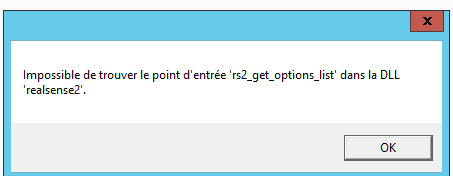
The message is : " impossible to find the input point 'rs2-get-options-list' into the DLL 'realsense2' "
-
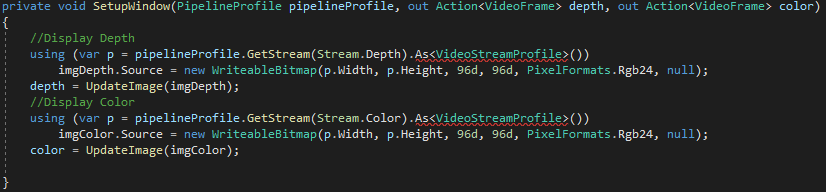
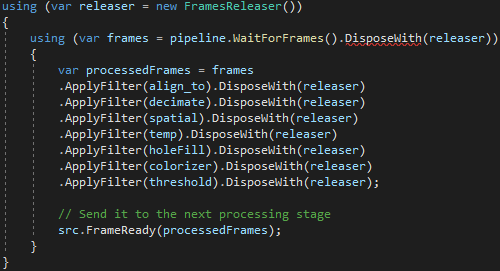
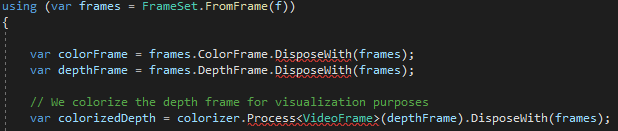
Yes. But here I just put Intel.Realsense.dll (it's good syntax, not Intel.RealSense.dll or Intel.RealSensed.dll) which was in the same directory as realsense2.dll I don't know if this should fix my problems, but I have a feeling it's an older version. Because of this I have a lot of basic functions that are not recognized anymore !

-
Yes, he doesn't know those instructions anymore! Like it doesn't exist in Intel.Realsense.dll. But I checked and I used IntelRealSensed.dll before and it worked. So I came back as before with this IntelRealSensed.dll dll, but I don't understand the error : " impossible to find the input point 'rs2-get-options-list' into the DLL 'realsense2' "
I think if this problem can be resolved my program will worked
-
The goal is to make the camera communicate with the program of a robot running on the server, today I don't have a computer for the robot but only these servers.
I'd like to succeed without having to add a computer. I think it's possible considering how much we've done today, compared to last week when I didn't even have video feedback on the viewer ^^'
-
I considered very carefully about how to proceed with this case. I think it would be helpful to bring in a RealSense support manager for advice. @... could you help Thomas to work out how to get his self-created project to work with the Windows 7 version of the RealSense SDK please? Thanks!
-
Hello Marty,
I went back to the Intel.Realsense.dll, like I told you 8 messages ago. I think it's the one that should be executed in my program as I'm on a win7 SDK.
As you can see in the screen shots (8 messages ago) I had a lot of things that are not recognized, like this one is older. I managed to set the errors for most of the functions, which were often syntax errors. But I still have two unrecognized functions and I can't find the correct syntax or equivalent.

I think for "colorizer.Process<VideoFrame>" it's a syntaxe error like others one, but for "ThresholdFilter" I need to found the equivalent. May be you can help me for this Marty ?
-
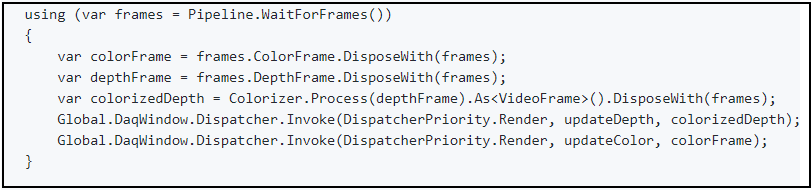
I hope that the script in the link below that uses <videoframe> will be useful to you for the <videoframe> error.
https://github.com/IntelRealSense/librealsense/issues/3446#issuecomment-471894096
Another approach is here:
https://github.com/IntelRealSense/librealsense/issues/5017
-
I thought you had already written a C# threshold filter routine in another case.
https://support.intelrealsense.com/hc/en-us/community/posts/360039445773/comments/360010898533
-
Have you altered the ThresholdFilter code since you wrote that previous routine, please? I note that you call the ThresholdFilter the ThreasholdFilter here, so just wanted to check whether you had renamed the commands in your code.
I did further extensive research but wasn't able to find anything that indicated that Windows 7 should affect post-processing commands.
-
OK ... I try an other DLL because the first I used is in x86 version and not x64. I change to the good one, I think every think is similar inside because my modifications still work and Threshold still not reconnize. But I have new fonction did'nt reconnize.

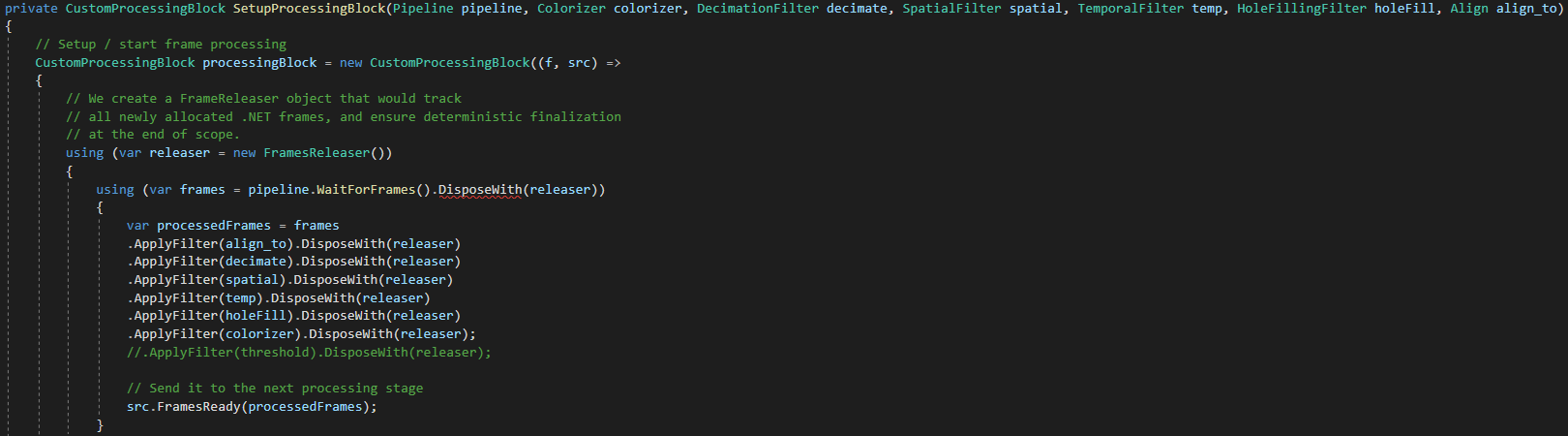
Like you can see I delete for now the ThresholdFilter, I want to be sure I can use the program with the serveur and after come back to this problem, because it's still essential for my project.
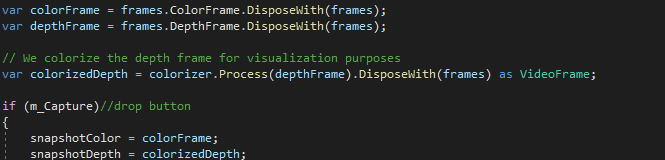
Do you have any idea what I could use to replace those functions? And what is the tool you use for your searches ? Because I can't find much info on google, especially for use under windows 7
Please sign in to leave a comment.
Comments
66 comments