Strange FPS when enable both color and depth streams
Hello, my camera is D435 and I use python wrapper.
I want to stream both color and depth in 60fps,
I close auto exposure and set the exposure value to 78.(I think it means exposure time=7.8ms)
I record the timestamp of every frame and calculate the time difference between two consecutive frames.
Because the frame rate is 60fps, the time difference should be about 16.6ms.
If I only enable color stream or depth stream, it can reach 60 fps and the time difference is always 16 to 18 ms.
fps: 60, period: 30seconds, total: 1800frames
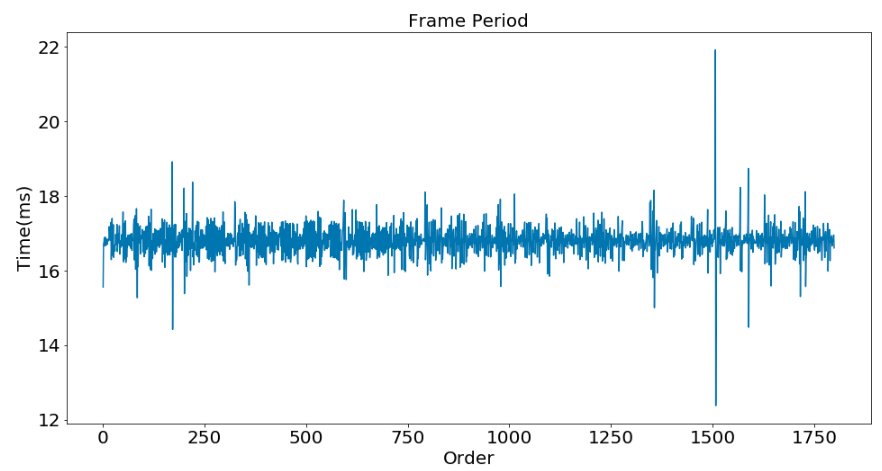
↑ Only color stream
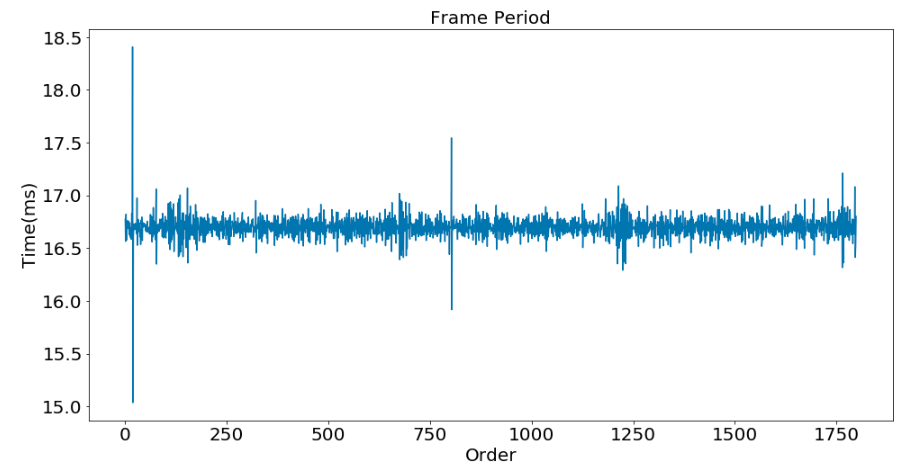
↑ Only depth stream
However, when I stream both depth and color, I find that fps will be over 60fps, and there are so many 0-second time differences.
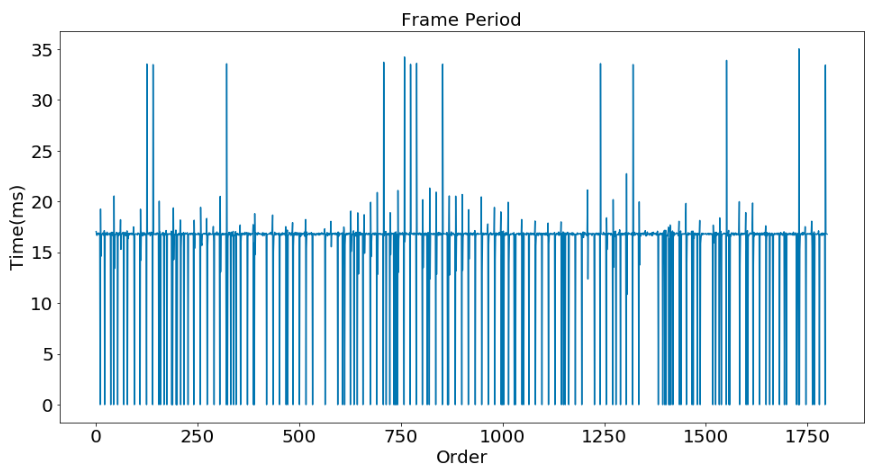
↑ Stream both color and depth
My code is below:
import pyrealsense2 as rs
import numpy as np
import datetime as dt
import time
import os
import cv2

if __name__ == '__main__':

	f = open('time60.txt','w')

	pipeline = rs.pipeline()

	config = rs.config()
	config.enable_stream(rs.stream.color, 640, 480, rs.format.bgr8, 30)
	config.enable_stream(rs.stream.depth, 640, 480, rs.format.z16, 30)

	#align = rs.align(rs.stream.color)

	#post-processing filter
	depth_to_disparity =  rs.disparity_transform(True)
	disparity_to_depth = rs.disparity_transform(False)
	dec_filter = rs.decimation_filter()
	temp_filter = rs.temporal_filter()
	spat_filter = rs.spatial_filter()

	profile = pipeline.start(config)
	frame_count = 0
	sensors = profile.get_device().query_sensors()


	for sensor in sensors:
		if sensor.supports(rs.option.auto_exposure_priority):
			#print('Start setting AE priority.')
			aep = sensor.get_option(rs.option.auto_exposure_priority)
			print(str(sensor),' supports AEP.')
			print('Original AEP = %d' %aep)
			aep = sensor.set_option(rs.option.auto_exposure_priority, 0)
			aep = sensor.get_option(rs.option.auto_exposure_priority)
			print('New AEP = %d' %aep)
			ep = sensor.set_option(rs.option.exposure, 78)


	try:
		print('Start Recording %s' %(str(dt.datetime.now())))
		date_start = time.time()
		while True:
			frames = pipeline.wait_for_frames()
			#frames = align.process(frames)
			color_frame = frames.get_color_frame()
			depth_frame = frames.get_depth_frame()
			if not depth_frame or not color_frame:
				print('No frame')


			#depth frame post-processing

			depth_frame = depth_to_disparity.process(depth_frame)
			depth_frame = dec_filter.process(depth_frame)
			depth_frame = temp_filter.process(depth_frame)
			depth_frame = spat_filter.process(depth_frame)
			depth_frame = disparity_to_depth.process(depth_frame)
			depth_frame = depth_frame.as_depth_frame()

			color_image = color_frame.get_data()
			depth_image = depth_frame.get_data()

			color_image = np.asanyarray(color_image)
			depth_image = np.asanyarray(depth_image)


			f.write(str(frames.get_timestamp())+'\n')
			frame_count += 1


			total_elapsed = time.time()-date_start

			print('Frame num: %d, fps: %.2f' %(frame_count, frame_count/total_elapsed))

			if frame_count >= 1800:
				print(time.time()-date_start)
				break

	finally:

		pipeline.stop()


		f.close()
		print('end')
Besides, when I apply "align" function, the fps will drop to about 50 fps, but I think it can be solved later.
Thank you in advance for your help
-
If the align process is being done before post-processing in your script, Intel recommend that the align is applied after post-processing. Doing so reduces aliasing.
There is also a relationship between FPS speed and the exposure value.
https://github.com/IntelRealSense/librealsense/issues/1957#issuecomment-400715579
-
Thanks for your reply, but my fps is set to 60, so the required minimum exposure time is 1000ms/60fps = 16.6ms
And I've already set the exposure value to 78(=7.8ms).
I think the exposure value is quite enough for 60fps.
The main problem confusing me is that the time difference is unstable when I enable color and depth stream at the same time, just as the 3rd picture shows.
-
When streaming both depth and color at the same time, stability can be increased by introducing latency, by setting the "frame queue capacity" to a value of '2'.
-
The 3rd image is a manifestation of Realsense cameras feature called "internal sync".
In general Depth and RGB sensors operate each with its own clock. In many use-cases though it is envisaged that the frame pairs will be temporally coherent to allow for inter-frame inference, such as point cloud and frames alignment (registration),especially when capturing dynamic scenes.
When D400 RGBand Depth sensors are set to the same FPS and the actual exposure does not exceed the frame period, then RGB sensor internally acts as Master and at the beginning of each frame it sends HW pulse to the Depth (Slave) sensor to start Depth generation as well. This results in Depth and RGB frames being captured simultaneously (timestamp offset < 1msec) as exhibited in the plot
-
Hello MartyG,
I've read the article you posted, but I don't know how to check/change frame_queue capacity in python.
It seems that frame_queue object does the same thing as pipeline object?
Is there any example code I can take for reference?
Hello Evgeni Raikhel,
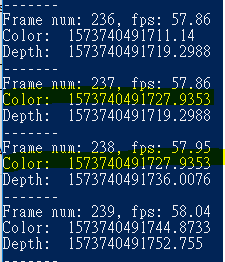
The time difference of the 3rd image is not between depth and color frames.
I enable color and depth stream at the same time, but only record color frame's timestamp.
As the image below shows, you can see the 237th and 238th color frames have the same timestamps.
-
I hope the discussion in the link below on frame queue size, which includes a link to sample code referencing frame queue size and some advice from Dorodnic the RealSense SDK Manager, will be of help to you in answering your questions on this subject.
-
Hello Satsuna, I'm sorry for misinterpreting the data as it wasn't clear that it represents only the RGB stream.
The call for
frames = pipeline.wait_for_frames()
produces synchronized bundles of frames named "rs2::framesets". And the repeating timestamps for RGB frames are due to of Host-side syncer deciding to reuse the same RGB frame in two (or more) consecutive framesets based on the timestamp differences.
-
Sorry for my late reply,
I used
sensor.get_option(rs.option.frames_queue_size)
to check the frames_queue_size and it returned 16.
Therefore, I used
sensor.set_option(rs.option.frames_queue_size, 2)
to set the frames_queue_size to 2.
but there are still many 0-second time differences.
I'm not sure if the two terms frame queue capacity (on 11/6) and frame queue size (on 11/14) you mentioned are the same.
-
Queue size and queue capacity are the same thing. The 'capacity' parameter describes the queue size, as confirmed in the SDK's frame buffering documentation.
Please sign in to leave a comment.
Comments
9 comments