D435 problems with small objects
The camera is located about 0,8 meters from the ground with direction towards the ground.
On the ground there are some objects ranging from 20 mm to 90 mm heights.
I am trying to separate the pieces from the ground using a threshold filter. The problem is that some of the pieces wont show or become small blinking objects.
In the example below, one is not showing. Tweaking the thresholds do not work. Other positions shows the same problem. Any Idea how to fix it ?
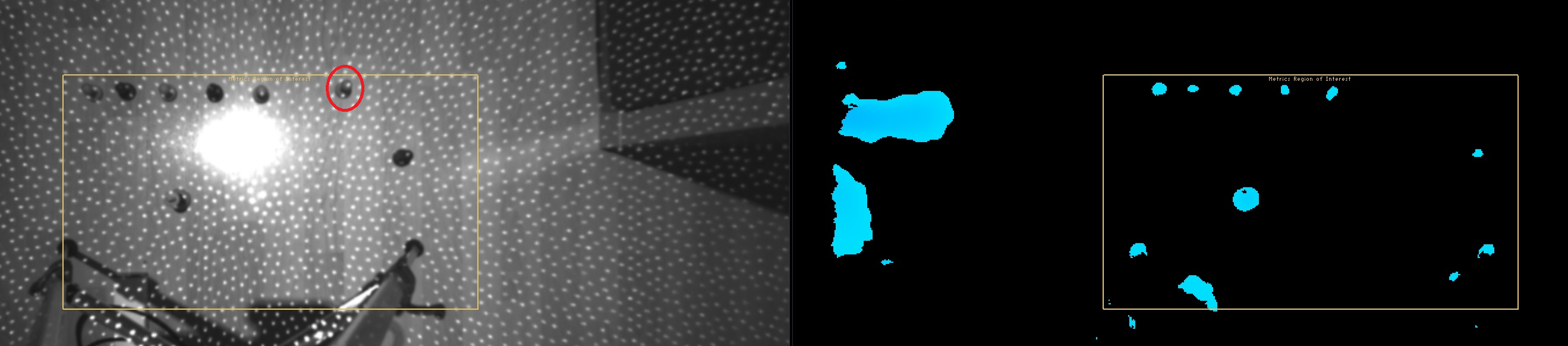
-
Hi and thank you for answering.
No, i am not getting a better result with tweaking the manual exposure. Only thing that work is to adjust the max-dist, but then i get a lot of noise. I wonder if this is because of the height(30 mm) and the small area at the top ? The top is a sphere with 10 mm diameter with the center 25 mm from the floor.
Another test shows that results got better with the camera 70 cm from the floor.
Tommy
-
Your problem shares characteristics with another recent case where a RealSense user was placing boxes of different thicknesses on a flat surface (vertically against a wall in tests, though the final project will be horizontally on a table). They too experienced the problem of locking onto the thinnest of the boxes and separating it from the background, and problems with extending the maximum range.
https://support.intelrealsense.com/hc/en-us/community/posts/360033574174-415-depth-sense-granularity
That case is still open and unresolved so far. The most recent comment I made on it was to pass on some advice I gave a different user for noise reduction.
https://github.com/IntelRealSense/librealsense/issues/4703#issuecomment-523823310
You may also experience additional noise on the image if the room is using a fluorescent ceiling light (like the strip lights in offices) rather than a bulb-based light, as they can flicker at frequencies that are hard to see with the human eye. If the light is of the fluorescent type, operating the camera FPS at a speed closer to the frequency of the particular light can help. For some people it is 30 FPS and others it is 60 FPS.
Please sign in to leave a comment.
Comments
5 comments