External hardware sync
We are planning synchronizing a D435 to a global time sync by using the external hardware sync from a Jetson TX2. As I understood, this would require a 1.8v signal kept high for 100us. So a couple of questions:
Is it tolerant to a 3.3v signal?
If not, is there any pin we can get 1.8v from? The connector only seems to have 3.3v.
The white paper also has the following paragraph:
"However, it is important to make sure to use a high resolution signal generator. The frequency of the signal generator needs to exactly match the sensor frame rate. For example, if the sensor is set up as 30 fps, the real frame rate may be 30.015 fps. You may need to use an oscilloscope to measure the real frame and configure the signal generator to the same frequency."
I don't understand how this makes sense since surely when you set up another camera in master mode in the multi-camera sync setup, it isn't measuring the "real frame rate". Shouldn't it be possible to simply share what length of pulse a camera in master mode creates and then we can recreate that with our external pulse?
-
If the 3.3 v is from the pin on your TX2 and you are going to connect it to the RealSense camera via a cable, I wonder if you could splice resistors into the cable to reduce the voltage to 1.8 v before it reaches the camera.
http://www.learningaboutelectronics.com/Articles/How-to-reduce-voltage-with-resistors.php
In regard to the workings of the trigger signal of a master camera ... the 'slave' cameras are always streaming independently like they normally do, but they are also listening for a sync trigger. If a sync signal is not detected within a certain time period on a frame then the slave gives up listening on that frame and triggers itself independently without sync. If a sync trigger is detected then the slave camera aligns its timing to the master.
-
Thanks for the quick answer. I could definitely splice it but if I had 1.8V available on one of the pins then I would have used a step down board so was just wondering if one of the other pins had it.
I understood as much about the functioning of the trigger but I don't understand the statement about the real frame rate. Is this based on the sensor or on the drift of the clocks? If it was an issue with drift then surely using another camera as master wouldn't solve this issue. If on the other hand it is something inherent in the sensor type which both cameras are using then it could make sense but then it must be a fixed value such as that 30 FPS = exactly 30.033 FPS. Then it would be nicer to just have the value instead of the proposed solution that I have to set up a scope to measure the exact frequency.
-
The general frame rate settings (15, 30, 60, 90, etc) are likely rounded up to the nearest whole value for ease of understanding (and not having hundreds of different settings on the options). If you look at the 'info' details of a live-running stream in the RealSense Viewer then you see fluctuating value ranges for FPS such as between 29.7 and 30.2 instead of a constant 30.
There are a range of factors that can affect the FPS at a given moment, including the exposure values and how efficiently the USB system / USB cable is performing.
Checking through the data sheet document for the 400 Series cameras, external sync pin 8 (Power) is listed as being 3.3v..
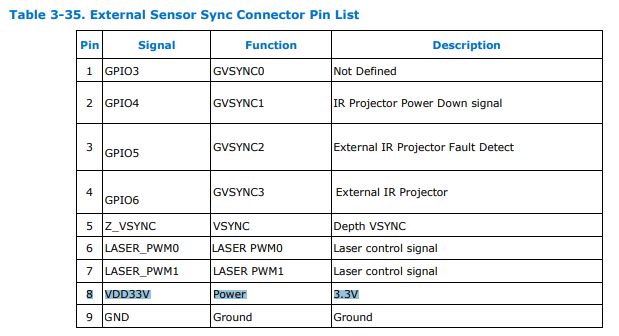
The camera's boards also have some 3.3V power pins, though I am not sure what use they would be for you.
You can check the details out yourself by opening the data sheet and doing a 'find' operation for the search term '3.3v' with no spaces in it.
-
Ok, so if I understand it correctly. We would need to perform the following steps:
- Set up a camera as master with the exact setup we want to use, including exposure time, fps etc.
- Connect the trigger output to a scope and detect the exact frequency and strobe length being generated.
- Set up our TX2 to create the exact same signal.
- Set up the camera in slave mode with the same settings and connect this generated trigger, then we should be able to get a synchronized output.
Can we be sure that once this is working, it would remain stable or do you expect that environmental factors such as temperature or light conditions could end up changing the period/frequency requirement of this trigger?
-
I should clarify that I have never built a synced setup at all, especially not a more complex one that uses an external trigger. So I apologize for any confusion that arises from my advice, as I am drawing on the extent of the knowledge that I do have about the theory of synching.
So you would need some device to act as a source to read the current FPS from. That could perhaps be one of the Slave cameras. Because if it were set to Master, then it would likely be transmitting a sync trigger instead of letting your Jetson be the source of the trigger.
It's a good idea to get the environmental conditions as stable as is practical (though in the average real-world room that is not light and temperature controlled, you will probably never achieve ideal conditions).
I would not expect the timestamps to remain constantly fixed once sync is active. As the multiple camera paper says, a counter-intuitive thing that one should understand about the sync process is that they will remain constant if the cameras are NOT synced. If sync is successfully occurring then it can be expected that the timestamps of the cameras will very, very slowly drift apart over the course of tens of minutes.
If you are planning on using long sync cables (longer than 3 ft, I think) then you should also consider building electrostatic discharge protection components into the cable. If an ESD discharge occurs and the sync cables do not have protection, the camera's counters will reset. this is less of a problem with the D435 than it is on D415 (with D415, an ESD discharge can also freeze the RGB) but it is something to bear in mind if you are going to use long sync cables. The white paper describes how to construct the ESD circuit.
-
As you correctly understood, we don't actually need a Camera set up as master. I was simply planning on replicating the pulse from one as the multiple camera guide (https://dev.intelrealsense.com/docs/multiple-depth-cameras-configuration) has this strange line in it under external hardware sync "For this reason, it may be better to just use one additional camera as master sync signal generator." This somehow makes it sound like the issues mentioned above this line (Measuring the real frame rate) are somehow considered by a master camera when setting up the trigger.
I understand that the timestamps will drift as it's not the actual clock frequencies which are being adjusted but simply the trigger point so the differences in clock frequency would cause a drift in the timestamps. I simply just have a hard time understanding what this "real frame rate" is that I have to match and how often I have to check it and adjust accordingly. I would expect a system where if I simply make a 100 microsecond pulse every 33.33 ms then I would get 30 fps. That way I can ensure that multiple TX2s have the exact same time reference and use that to create the triggers for the cameras. If the "real FPS" is dynamically changing and randomly different from camera to camera then synchronization is effectively not possible.
The Jetson and realsense will be placed right next to the other so I only expect the wire to be a few centimeters and I am therefore not putting in any protection to begin with.
-
I recalled that advice was given by a member of the RealSense support team about how to enforce a constant FPS. This may suit your requirements. Please visit the link below and read the comments from the linked-to point downwards.
https://github.com/IntelRealSense/librealsense/issues/2255#issuecomment-426186948
Please sign in to leave a comment.
Comments
7 comments