D435 Sunlight saturation problem
Hi, We are having a problem with our Realsense D435 cameras that is related to sunlight saturation and we're wondering if anyone had any ideas. (We updated our cameras to the latest firmware while trying to figure this issue out)
We first encountered the issue yesterday when we were testing our cameras outside. We noticed that in some cases the depth information would become extremely sparse and only restarting our application would restore it.
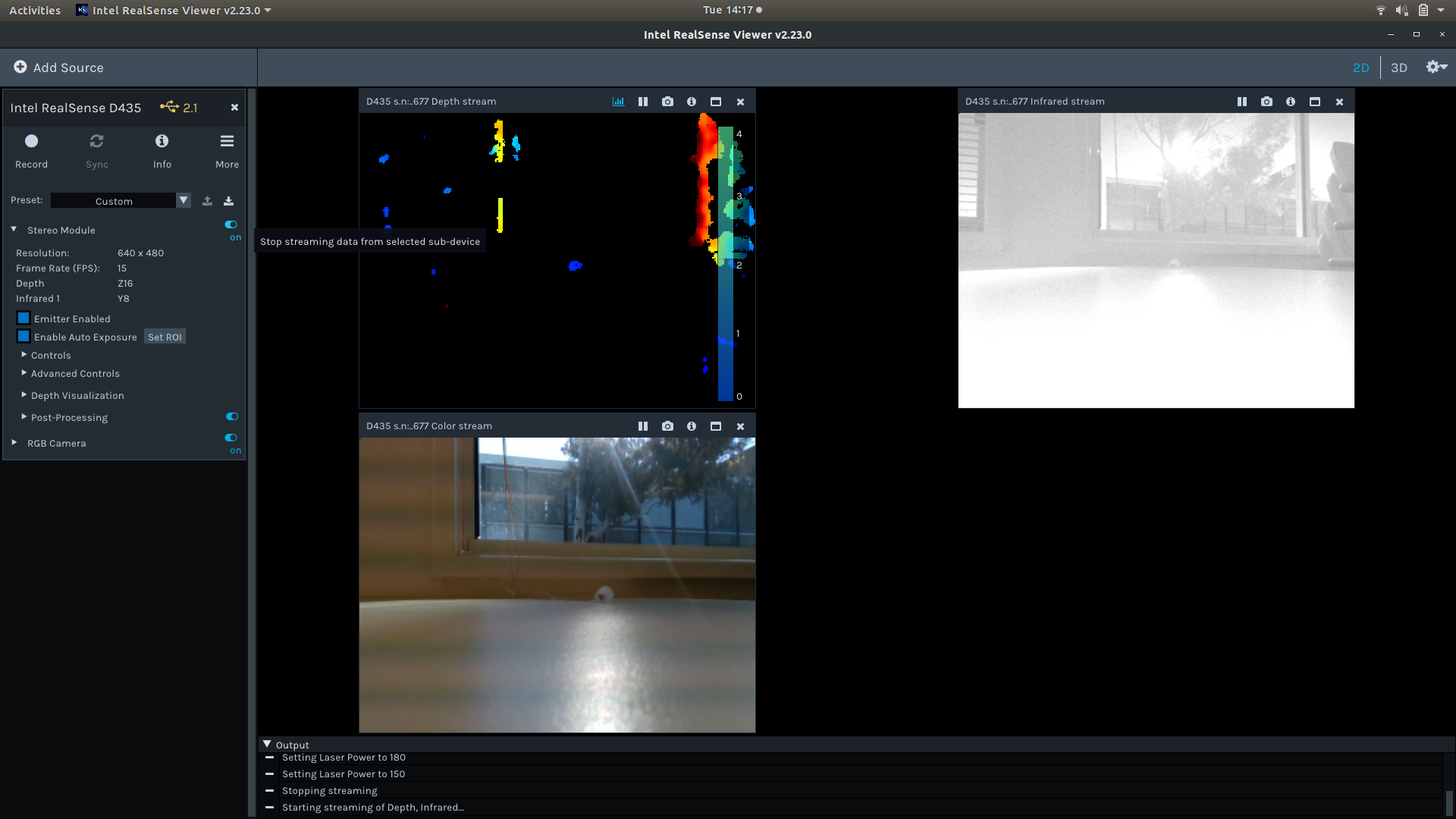
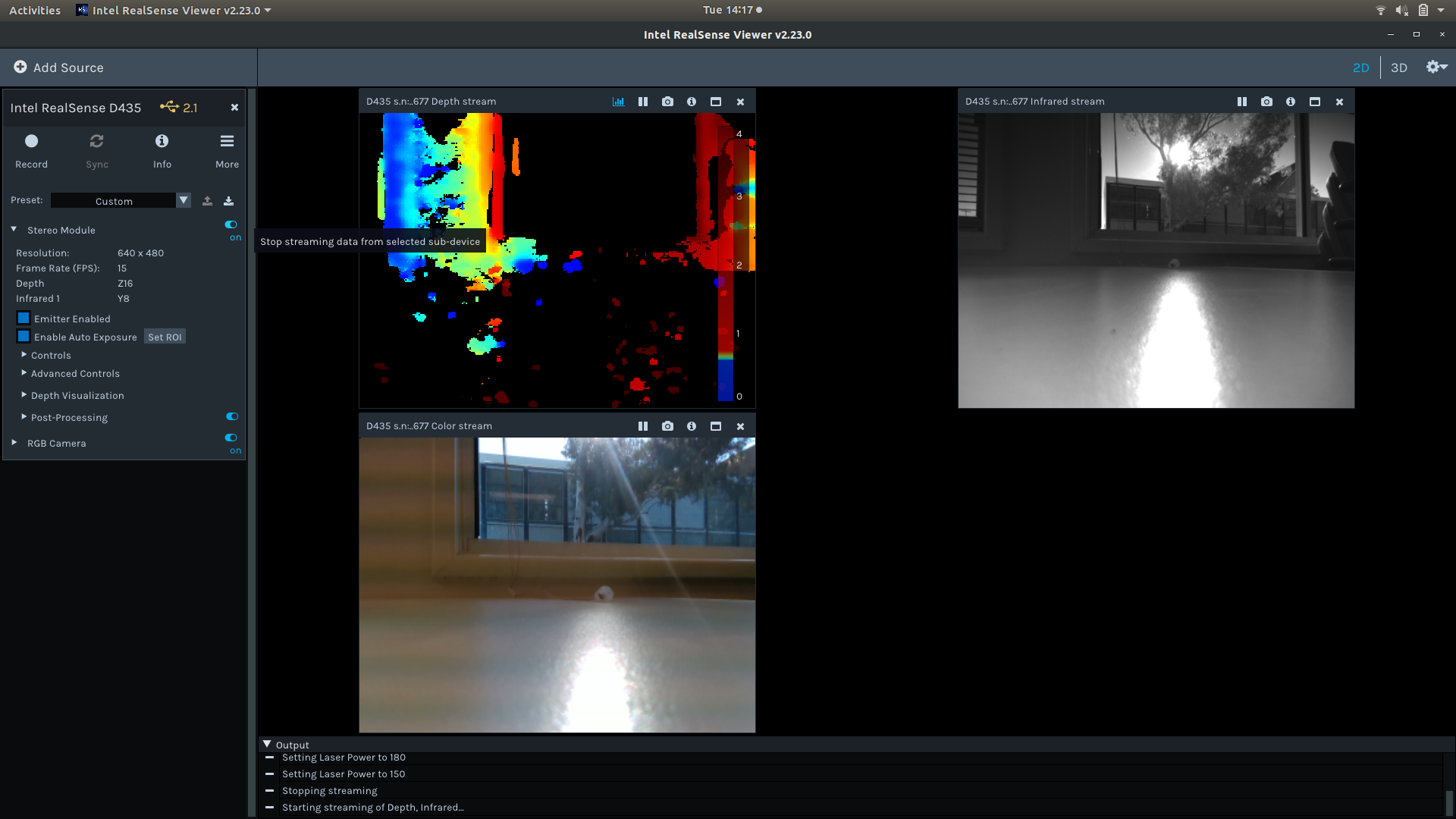
After further investigation today, we seem to have found that in cases where the IR cameras become fully saturated they will switch to a minimum exposure, maximum gain mode and will become stuck in that mode. Fully obscuring the camera (all lenses) will in some cases restore normal functionality, but otherwise resetting the camera (restarting the application) will fix the issue.
We have tested and found this issue to be present in multiple software applications and multiple cameras, including the Intel Realsense viewer and so we are leaning towards it being a quirk of the firmware or hardware.
Any ideas on what we can do to stop the cameras from getting stuck in this saturated mode?
I've attached images below of the same scene with the camera behaving normally and then becoming stuck with low exposure and high gain after the images becomes too bright.
-
Normally, the 'Vision Processor D4' hardware component inside the D415 and D435 takes care of lighting adjustments when using the camera outdoors with auto-exposure mode enabled. Unlike most depth cameras, the 400 Series cameras actually work better in bright sunlight, as they are able to use the light to add 'texture' to objects in a scene to better read depth detail from them.
The older SR300 model (which lacks a Vision Processor D4) has more trouble with processing very dark or very bright conditions, as a light-assistance component in it called the IR Emitter can cause the IR imager to become saturated unless the IR Emitter component is disabled.
I can recall a small number of past cases in which other users have had problems with the D435 in strong sunlight. In the link below, the Chief Technical Officer (CTO) of the RealSense Group at Intel offers advice about it, and RealSense users contribute their own own advice in the comments below his message.
https://github.com/IntelRealSense/librealsense/issues/2875#issuecomment-446788177
-
Hi MartyG,
Thanks for your speedy and informative reply. I've had a look at the link you provided and I don't think it really addresses the issue we are seeing. We have found no issues with the data we get in sunlit scenarios when the camera is working fine. The issue we are seeing is related to a failure in the auto-exposure function of the camera.
When the camera is pointed at a very bright scene we have found the auto-exposure becomes stuck on a minimum exposure maximum gain setting and does not automatically adjust any longer, even when pointed at a darker scene. Restarting the camera fixes the issue.
We have reproduced this behavior across three cameras and multiple software applications, including the Intel Realsense Viewer.
As we aim to use the camera in a mix of environments filtering the incoming light is not a solution for us (and given a bright enough scene it seems like this issue would still occur regardless).
-
I felt sure that I had seen a report of the camera freezing when saturated and managed to track it down. A RealSense support representative said in May 2019 that the freeze seemed to be a bug that would be fixed.
https://github.com/IntelRealSense/librealsense/issues/4022
A more recent update 5 days ago said that an auto-exposure bug fix has been put in an upcoming firmware driver (version 5.11.12.0).
-
This remains unsolved.
i.e. 3 years later, not fixed. Endemic on all D435 and D435i cameras. Expose them to a bright scenario, and they lock to the lowest exposure level and remain stuck. It appears to be an unsolvable problem. Why can't it be fixed?
Tested across 1000+ cameras at this point, over about 80,000 hours of operation. All manner of firmware newest to oldest.
Why can't the lower level firmware / settings be exposed so that exposure can be controlled? Or why can't this problem be fixed at least? -
Hi Charlie This issue regarding exposure drop to minimum is very rarely reported in the present day after fixes such as adding support for fractional exposure to the auto-exposure algorithm were implemented as far back as 2018.
https://github.com/IntelRealSense/librealsense/issues/2875#issuecomment-446788177
When it does occur, Intel suggest measures such as setting an auto-exposure Region of Interest (ROI) in the lower half of the image or overlaying a physical optical filter product such as a Linear Polarization Filter over the camera lenses.
https://dev.intelrealsense.com/docs/optical-filters-for-intel-realsense-depth-cameras-d400
Please sign in to leave a comment.
Comments
6 comments